From the computers in your office to the Wi-Fi router at home, most digital connections you rely on daily operate within a Local Area Network (LAN). Whether you’re printing a document from youwar laptop, accessing shared files in a company server, or streaming a movie on your smart TV, you’re already part of a LAN—often without realizing it.
Local Area Networks (LANs) form the backbone of modern connectivity in confined spaces. They’re designed to connect devices within a limited geographic area—typically a single building or campus—offering high-speed communication, resource sharing, and centralized management. Despite the rise of cloud computing and wide-area infrastructures, LANs remain essential to how homes, schools, and businesses function on a day-to-day basis.
Understanding how a LAN works—its architecture, components, and different types—reveals not just the mechanics behind everyday internet access, but also the strategic value it brings to efficient, secure, and cost-effective networking.
What Is a Local Area Network (LAN)?
A Local Area Network (LAN) is a group of computers and other networked devices that are connected within a limited physical area, such as a home, office, school, or campus. Unlike broader network types such as WAN (Wide Area Network) or MAN (Metropolitan Area Network), a LAN is designed for short-range connectivity—typically within a single building or a cluster of nearby structures.
At its core, a Local Area Network allows devices like computers, printers, servers, and smart devices to communicate with each other, share files, access applications, and use shared resources such as internet connections or storage. Most LANs today use either Ethernet cables or Wi-Fi (wireless local area networking), though both technologies can also coexist in hybrid environments.
A Brief History of LANs
The concept of Local Area Network began in the 1970s when businesses and academic institutions sought ways to connect their growing number of standalone computers. One of the earliest commercial LANs was developed by Xerox PARC in 1973, which later influenced the development of Ethernet—a networking standard still dominant today.
By the 1980s, LANs became mainstream in business environments, especially with the rise of personal computers. The increasing demand for data sharing, centralized storage, and communication tools pushed LANs to evolve in both speed and complexity. Today, LANs continue to be a fundamental element of both wired and wireless network architectures.
Key Characteristics of LAN

Local Area Networks are defined not just by their geographic limits, but also by a set of technical characteristics that make them fast, efficient, and reliable for small-scale environments. These traits have kept LANs relevant even as global networking technologies continue to advance.
1. Limited Geographic Scope
A LAN typically covers a small physical area—ranging from a single room to an entire building or a tightly connected campus. This limited scope reduces latency and allows for faster data exchange compared to broader networks like WANs, which span cities or countries.
2. High Data Transfer Speeds
LANs are built for speed. Wired Ethernet LANs often deliver speeds of 100 Mbps to 10 Gbps, while wireless LANs using modern standards like Wi-Fi 6 can achieve multi-gigabit performance under optimal conditions. This makes LANs ideal for activities that require real-time data access, such as video conferencing, file sharing, or multiplayer gaming.
3. Localized Infrastructure
A Local Area Network is usually owned, managed, and maintained by a single organization or individual. All the infrastructure—including switches, routers, access points, and cables—is under local control. This allows for easier troubleshooting, more customization, and tighter security.
4. Resource Sharing
One of the key advantages of Local Area Networks is the ability to share resources efficiently. Devices on the same LAN can access shared printers, servers, storage drives, and internet connections without needing external connectivity.
5. Low Operational Cost
Because LANs use relatively inexpensive equipment and require no leased lines or external service providers (unlike WANs), the cost of setup and maintenance is significantly lower. This makes LANs especially appealing for homes, small businesses, and educational institutions.
Types of Local Area Networks
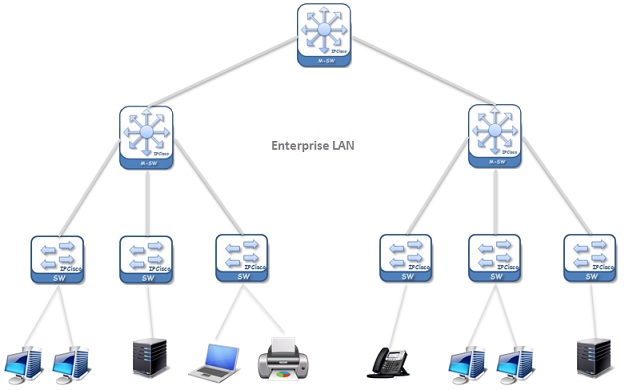
Although the concept of a LAN generally implies devices connected within a limited area, there are different types of Local Area Network configurations depending on how the network is built, managed, and accessed. Understanding these types helps identify which setup best suits a particular environment—whether it’s a home, school, or enterprise.
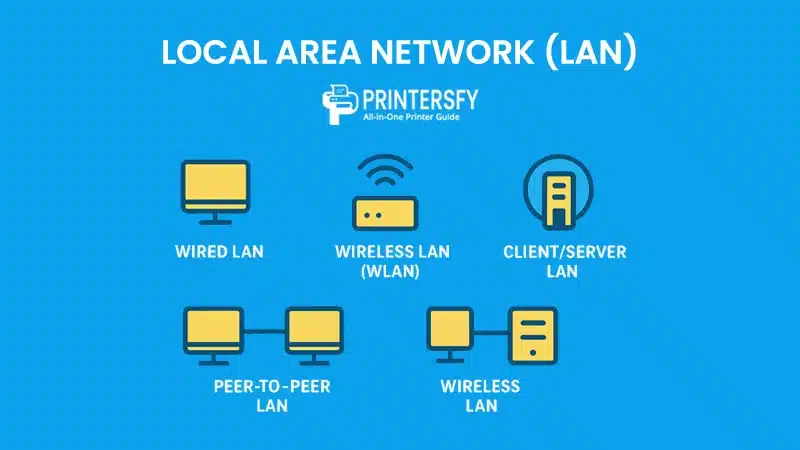
1. Wired LAN
A wired LAN uses physical cables—usually Ethernet—to connect all devices to a central switch or router. These networks are known for their high speed, low latency, and greater stability compared to wireless alternatives.
Advantages:
- Faster and more stable connections
- Lower interference
- Enhanced security (physical access required)
Use Cases:
- Corporate offices
- Data centers
- School computer labs
2. Wireless LAN (WLAN)
A Wireless LAN connects devices using radio waves, typically through Wi-Fi technology. While slightly more vulnerable to interference and slower than wired Local Area Networks, WLANs provide the benefit of mobility and flexibility.
Advantages:
- No need for physical cabling
- Easy to scale and relocate
- Suitable for mobile devices
Use Cases:
- Homes
- Coffee shops
- Hotels and public spaces
3. Peer-to-Peer LAN
In a peer-to-peer LAN, each device (node) acts as both a client and a server. There is no central authority or dedicated server. This setup is simple, cost-effective, and ideal for small networks with fewer than 10 devices.
Advantages:
- Low setup and maintenance cost
- Easy to configure
- No need for a central server
Limitations:
- Less secure
- Limited scalability
- Difficult to manage beyond a few users
4. Client/Server LAN
A client/server LAN features one or more dedicated servers that manage resources and security for multiple client devices. This architecture allows for centralized control, scalability, and better performance.
Advantages:
- Centralized management
- Better data integrity and access control
- Suitable for larger and more complex networks
Use Cases:
- Medium to large businesses
- Universities
- Government offices
Comparison Table: Types of Local Area Networks
| Type | Connection Method | Key Features | Common Use Cases | Pros | Cons |
|---|---|---|---|---|---|
| Wired LAN | Ethernet (cabled) | Stable, fast, and secure | Offices, data centers, labs | High speed, low latency, strong security | Requires cabling, limited mobility |
| Wireless LAN | Wi-Fi (radio waves) | Wireless connectivity, easy setup | Homes, cafes, mobile workspaces | Flexible, scalable, no cables needed | Vulnerable to interference, less secure |
| Peer-to-Peer LAN | Wired or wireless | No central server, simple direct sharing | Small home networks | Inexpensive, easy to set up | Hard to manage, limited scalability |
| Client/Server LAN | Wired or wireless | Centralized servers manage clients | Enterprises, universities | Scalable, centralized control, secure | Higher cost, requires server management |
Core Components of a LAN
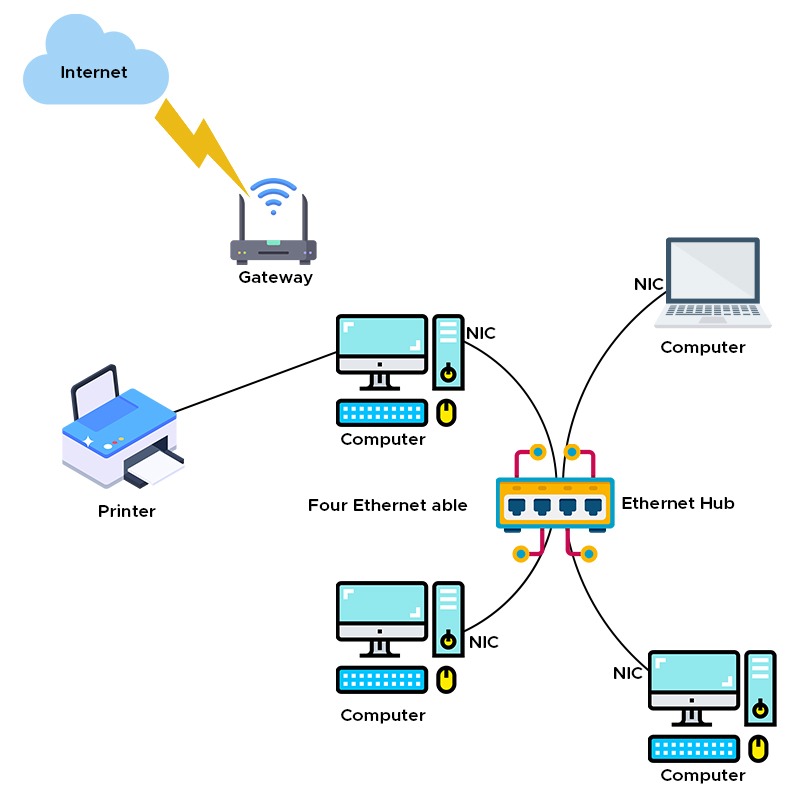
To function effectively, a Local Area Network depends on several hardware and software components that work together to establish connections, manage data flow, and ensure security. Understanding these elements helps in designing, troubleshooting, and optimizing any LAN environment.
1. Network Interface Card (NIC)
Every device connected to a LAN needs a Network Interface Card—a hardware component that enables communication over the network. NICs can be wired (Ethernet) or wireless (Wi-Fi), and each has a unique MAC address that identifies the device on the Local Area Network.
2. Switch
A switch is a central device that connects multiple wired devices in a LAN. It receives data packets from one device and forwards them only to the intended recipient, ensuring efficient and secure data transfer.
3. Router
While not always required for internal Local Area Network communication, a router connects the LAN to external networks like the internet. It assigns IP addresses, manages traffic, and provides features like NAT (Network Address Translation) and firewall protection.
4. Access Point (AP)
In wireless LANs, access points enable Wi-Fi-enabled devices to connect to the network. They function like wireless hubs, often connected to the main router or switch to extend wireless coverage.
5. Cables (for Wired LANs)
LANs using Ethernet require Cat5e, Cat6, or higher-grade cables for data transmission. These cables physically link devices to switches, routers, or modems and play a key role in maintaining signal integrity and speed.
6. Servers and Clients
In a client/server LAN, servers store and manage resources like files, applications, and databases, while clients are user-operated devices (PCs, laptops, tablets) that access those resources.
7. Network Operating System (NOS)
A Network Operating System like Windows Server, Linux, or macOS Server manages the network infrastructure—handling authentication, permissions, data management, and more in client/server environments.
Summary Table: Core Components of a Local Area Network
| Component | Function | Used In |
|---|---|---|
| Network Interface Card (NIC) | Allows devices to connect to the LAN via wired or wireless methods | All LAN devices |
| Switch | Connects multiple wired devices and directs data efficiently | Wired LANs |
| Router | Connects LAN to external networks (e.g., internet) and assigns IPs | Wired/Wireless LANs |
| Access Point (AP) | Provides wireless connectivity for mobile/Wi-Fi devices | Wireless LANs |
| Ethernet Cables | Transfers data in wired networks with high speed and stability | Wired LANs |
| Server | Hosts and manages network resources like files and applications | Client/Server LANs |
| Client Device | Accesses resources provided by the server or peers | All LAN types |
| Network OS (NOS) | Manages and controls network operations and user permissions | Especially Client/Server LANs |
How a Local Area Network Works

A Local Area Network (LAN) enables a group of devices—such as computers, printers, servers, and mobile phones—to communicate with each other within a limited geographic area like an office, school, or home. This communication happens through a combination of hardware components, protocols, and software that coordinate the sending and receiving of data.
Step-by-Step Process of LAN Communication
1. Device Initialization
When a device (like a computer or smartphone) powers on and connects to the Local Area Network, it uses its Network Interface Card (NIC) to establish a link, either through Ethernet or Wi-Fi. The device receives an IP address, typically from a router via DHCP (Dynamic Host Configuration Protocol), which identifies it on the network.
2. Data Request Initiation
Let’s say a user wants to open a file stored on a local server. The client device sends a request over the Local Area Network. If the LAN uses a switch, the switch uses the MAC address to direct the request to the correct destination—minimizing unnecessary traffic.
3. Data Routing and Switching
- In wired LANs, switches handle traffic by forwarding packets directly to the intended recipient.
- In wireless LANs, the access point receives the request and forwards it accordingly.
If external internet access is needed (for example, fetching cloud data), the router directs the request out of the Local Area Network and brings the response back in.
4. Response and Acknowledgment
The server or target device processes the request and sends data back through the same route. Protocols like TCP/IP ensure that data is transmitted reliably, in the correct order, and without corruption.
5. Ongoing Communication
As long as devices remain connected to the LAN, they can continue sending and receiving data. Communication is seamless, and users often aren’t aware of the underlying complexity.
Protocols and Standards in LAN Communication
LANs rely on standardized communication protocols to ensure interoperability between devices:
- Ethernet (IEEE 802.3): The dominant wired LAN protocol that defines cabling and signaling.
- Wi-Fi (IEEE 802.11): The most widely used wireless LAN protocol.
- TCP/IP: Provides the framework for reliable data transmission and addressing.
- DHCP: Automatically assigns IP addresses.
- DNS: Resolves domain names into IP addresses (for LANs that integrate with broader networks).
Process Flow Table: How a Local Area Network Works
| Stage | Description | Key Components Involved |
|---|---|---|
| 1. Device Initialization | Device connects to the LAN and obtains an IP address via DHCP | NIC, Router, DHCP |
| 2. Request Initiation | Device sends a data request (e.g., file access, print job) | Client Device, Switch, Access Point |
| 3. Data Routing | Switch or Access Point forwards the request to the appropriate device | Switch, Access Point, Server |
| 4. Response Delivery | Target device (e.g., server) responds and sends data back to the requester | Server, Client Device, Network Media |
| 5. Continuous Communication | Devices maintain connection and continue exchanging data | All LAN Components |
Types of LAN Architectures

The architecture of a Local Area Network defines how its components are organized and how data is transmitted within the network. Understanding different Local Area Network architectures helps in designing networks based on factors like scalability, performance, and manageability. The two primary architectural models are peer-to-peer (P2P) and client/server.
1. Peer-to-Peer (P2P) LAN
In a peer-to-peer LAN, all devices—called “peers”—have equal status. Each device can function as both a client and a server, meaning they can share resources like files or printers without a central authority.
Characteristics:
- No dedicated server
- Simple and inexpensive to set up
- Best suited for small networks (under 10 devices)
- Limited scalability and security
Use Case Example: A small office or home network where users want to share files and printers without needing centralized management.
2. Client/Server LAN
A client/server LAN includes at least one dedicated server that provides resources and services to other devices known as clients. Clients request access to shared files, databases, applications, and more, while the server handles data storage, access control, and processing.
Characteristics:
- Centralized control and administration
- Higher security and reliability
- Scalable for large organizations
- Requires more investment in hardware and management
Use Case Example: Corporate environments, schools, or data centers where centralized management and security are critical.
Comparison Table: Peer-to-Peer vs Client/Server LAN Architecture
| Feature | Peer-to-Peer (P2P) LAN | Client/Server LAN |
|---|---|---|
| Control Model | Decentralized – all devices are equal | Centralized – server controls resources |
| Setup Complexity | Easy and low-cost | Requires technical expertise and infrastructure |
| Security | Basic – user-managed | Advanced – centralized policies and permissions |
| Scalability | Limited – best for small networks | High – suitable for large networks |
| Performance | Can degrade as devices increase | Optimized through server-based resource management |
| Cost | Low (minimal hardware/software) | Higher (requires servers and IT staff) |
| Typical Use Case | Home networks, very small offices | Enterprises, schools, data centers |
Benefits of Using a Local Area Network
Implementing a Local Area Network (LAN) offers several significant advantages for homes, businesses, educational institutions, and other organizations. These benefits range from improved efficiency and cost savings to enhanced security and centralized resource sharing.
1. Resource Sharing
One of the main advantages of a Local Area Network is the ability to share resources such as printers, files, applications, and internet connections among multiple devices. This eliminates redundancy and reduces the cost of purchasing individual hardware for each user.
Example:
In an office setting, a single printer can serve all employees through the Local Area Network, rather than requiring each desk to have a separate device.
2. Centralized Data Management
LANs make it possible to store files and data on a centralized server, allowing users to access and manage information more efficiently. This centralization simplifies data backup, updates, and access control.
3. Enhanced Communication
LANs support internal communication tools such as instant messaging, VoIP, and email servers, which facilitate faster and more secure communication between users within the network.
4. Improved Security and Access Control
In a properly configured LAN—especially in a client/server model—administrators can implement robust security policies such as user authentication, access control lists (ACLs), and encryption. Unauthorized access can be limited more effectively than with standalone systems.
5. High-Speed Connectivity
Since LANs typically operate over high-speed Ethernet or wireless standards, data transmission within the network is much faster compared to using internet-based connections between remote systems.
6. Cost Efficiency Over Time
Although there’s an upfront cost in setting up a LAN (particularly for client/server models), the long-term savings on hardware, software licensing, and productivity improvements can outweigh the initial investment.
Use Cases and Real-World Applications of LANs
Local Area Networks are widely implemented across various sectors, powering everything from small offices to global corporations. Below are some of the most common and impactful use cases for LANs in real-world scenarios.
1. Business Offices
In both small and large enterprises, LANs enable employees to share files, collaborate on documents, access centralized databases, and use networked printers and applications. Network administrators can manage permissions, deploy software updates, and monitor performance from a central console.
Example: A mid-sized company uses a Local Area Network to connect 100+ employees across multiple departments, providing access to CRM software, shared drives, and cloud services through the central server.
2. Educational Institutions
Schools, colleges, and universities use LANs to connect student labs, administrative departments, faculty offices, and library systems. Teachers can distribute materials, and students can access learning platforms and shared resources securely.
Example: A university campus LAN connects dozens of buildings, allowing seamless access to learning management systems (LMS), research databases, and printing stations.
3. Healthcare Facilities
Hospitals and clinics rely on LANs to ensure secure, real-time access to electronic medical records (EMRs), diagnostic systems, and internal communications. This improves both operational efficiency and patient care.
Example: A hospital uses a Local Area Network to allow doctors, nurses, and staff to access patient records, lab results, and pharmacy systems from any workstation within the facility.
4. Manufacturing and Industrial Environments
Factories use LANs to connect automation systems, monitoring tools, inventory databases, and employee terminals. LANs enable real-time data exchange between machines (Industrial IoT), improving precision and reducing downtime.
Example: A manufacturing plant uses a LAN to connect programmable logic controllers (PLCs), quality control stations, and production line dashboards.
5. Home Networks
Modern households use LANs to link devices like laptops, smartphones, printers, smart TVs, and Internet of Things (IoT) gadgets. With LANs, users can share files, stream media, and control smart appliances from anywhere within the house.
Example: A smart home setup uses a wireless LAN to connect thermostats, lights, security cameras, and voice assistants, all controlled through a mobile app.
LAN Technologies and Transmission Media
Local Area Networks (LANs) can be implemented using various technologies and physical media, each influencing the network’s speed, scalability, and reliability. Choosing the right combination depends on factors like performance requirements, budget, environment, and number of devices.
1. Ethernet (Wired LAN)
Ethernet is the most common Local Area Network technology, especially in wired environments. It uses protocols defined by the IEEE 802.3 standard and supports high data transfer rates—typically 1 Gbps, 10 Gbps, or even higher.
- Media Used: Twisted pair cables (Cat5e, Cat6, Cat6a, Cat7) or fiber optic cables
- Topology: Usually star or extended star, with switches at the center
- Strengths: Stable, secure, low latency, ideal for business use
Example: An office LAN using Cat6 cabling and gigabit switches for reliable file transfers and VoIP communication.
2. Wi-Fi (Wireless LAN)
Wi-Fi is a wireless LAN technology based on the IEEE 802.11 family of standards. It provides mobility and convenience, allowing devices to connect without physical cables.
- Media Used: Radio frequency (RF) via access points
- Strengths: Easy deployment, flexible access, ideal for mobile devices
- Limitations: Susceptible to interference, lower speeds than wired connections
Example: A university campus uses Wi-Fi access points to provide internet and intranet access to students and faculty across multiple buildings.
3. Fiber Optic LAN
For environments requiring ultra-fast and long-distance data transmission, fiber optic Local Area Networks are used. These networks rely on light-based data transfer through fiber cables.
- Strengths: Extremely high speed, electromagnetic immunity, long distance support
- Use Cases: Data centers, research facilities, high-performance computing environments
Example: A data center backbone uses a fiber optic Local Area Network to interconnect server racks and storage arrays for real-time data processing.
4. Powerline Networking (LAN over Electrical Wiring)
In some buildings, LAN signals can be transmitted over existing electrical wiring using powerline adapters.
- Strengths: No need for new cabling, useful in homes or retrofits
- Limitations: Slower and less stable compared to Ethernet or Wi-Fi
Example: A home office uses powerline networking to extend LAN connectivity to a distant room without drilling or running Ethernet cables.
LAN Topologies and Their Role in Network Design
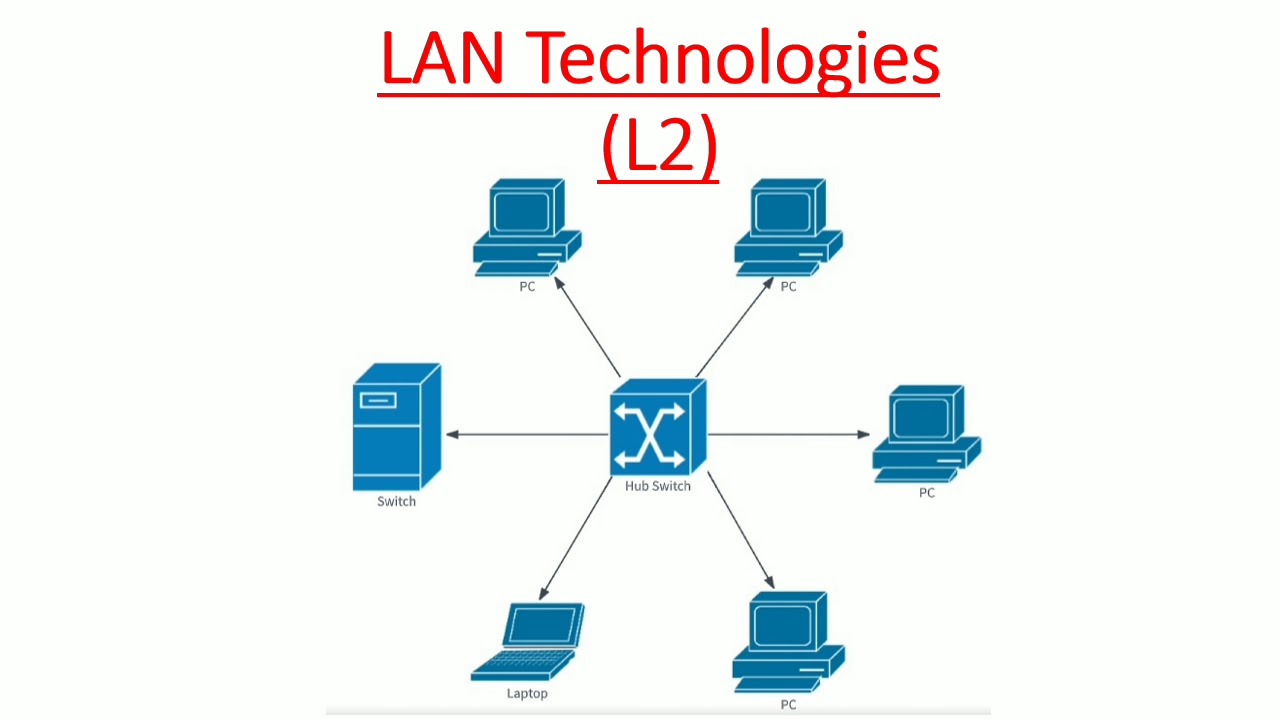
The topology of a Local Area Network refers to how devices (nodes) are arranged and connected to each other. Network topology plays a critical role in determining the network’s performance, fault tolerance, and scalability. Each topology has unique characteristics that make it more suitable for specific scenarios.
1. Star Topology
In a star topology, all devices are connected to a central device such as a switch or hub. It is the most widely used topology in modern Local Area Networks.
- Advantages:
- Easy to install and manage
- Fault isolation is simple
- Performance is not affected by other devices’ traffic
- Disadvantages:
- If the central device fails, the whole network is affected
Use Case: Corporate offices and home networks often use star topology for centralized control and easier troubleshooting.
2. Bus Topology
In bus topology, all devices share a single communication line (a backbone cable). Data travels in both directions along the bus, and each device checks if the data is addressed to it.
- Advantages:
- Easy and inexpensive to implement for small networks
- Requires less cable length
- Disadvantages:
- Difficult to troubleshoot
- If the backbone cable fails, the entire network goes down
- Limited scalability
Use Case: Was common in early Local Area Networks but largely replaced by star topology in modern networks.
3. Ring Topology
Each device in a ring topology connects to exactly two other devices, forming a circular data path. Data travels in one direction (or sometimes both, in dual ring networks).
- Advantages:
- Predictable data transmission pattern
- Can perform well under heavy traffic with token-passing protocol
- Disadvantages:
- A failure in one device can disrupt the entire network
- More complex to configure than star topology
Use Case: Used in certain industrial and metro-area networks (like FDDI or SONET-based rings).
4. Mesh Topology (Partial or Full)
In a mesh topology, devices are interconnected—each node connects to some or all other nodes. Full mesh provides complete redundancy.
- Advantages:
- High fault tolerance
- Excellent performance due to multiple transmission paths
- Disadvantages:
- Expensive and complex to set up
- Requires a lot of cabling and configuration
Use Case: Data centers, military networks, and mission-critical systems where reliability is paramount.
5. Hybrid Topology
A hybrid topology combines elements of two or more topologies, such as star-bus or star-ring.
- Advantages:
- Flexible and scalable
- Can be tailored to specific network needs
- Disadvantages:
- Design and management can be complex
Use Case: Large enterprise networks often adopt hybrid topologies for scalability and fault tolerance.
Security Considerations in LAN Environments
While Local Area Networks are often considered safer than wide-area or public networks, they are not immune to threats. Internal vulnerabilities, misconfigurations, or unsecured endpoints can make even a private LAN a target for cyberattacks. Securing a Local Area Network requires both technical safeguards and best practices tailored to the specific needs of the network.
1. Physical Security
Controlling physical access to network hardware is the first layer of defense.
- Best Practices:
- Lock server rooms and network closets
- Restrict access to switches, routers, and access points
- Use surveillance systems in sensitive areas
Why It Matters: Physical tampering can allow attackers to plug in rogue devices, intercept traffic, or install malware directly.
2. Access Control
Controlling who can access what resources within the network prevents unauthorized usage and data leaks.
- Solutions:
- Implement strong authentication (e.g., username/password, biometrics)
- Use Role-Based Access Control (RBAC) or group policies
- Set permissions for file sharing and application access
Why It Matters: Without proper access control, sensitive data can be exposed to the wrong users or compromised.
3. Network Segmentation
Dividing a LAN into smaller subnets or VLANs helps contain security breaches and optimize performance.
- Benefits:
- Limits lateral movement of malware
- Isolates sensitive departments (e.g., HR, finance)
- Reduces broadcast traffic and improves speed
Example: A university segments its LAN into student, faculty, and admin VLANs to limit access and improve control.
4. Endpoint Security
Devices connected to the LAN—like computers, printers, or IoT devices—must be secured individually.
- Recommendations:
- Keep OS and software updated
- Use antivirus and anti-malware tools
- Disable unused ports and services
- Use firewalls on end-user devices
Why It Matters: Even a single infected laptop can become an entry point for a network-wide attack.
5. Encryption and Secure Protocols
Even within a LAN, encrypting sensitive data and using secure communication protocols is essential.
- Implementations:
- Use HTTPS, SSH, and VPNs for sensitive traffic
- Encrypt file transfers and storage
- Secure internal communication between servers
Why It Matters: Data traveling in plain text—even within a private network—can be intercepted by malicious insiders or compromised devices.
6. Monitoring and Logging
Constant monitoring of LAN traffic and maintaining logs can help detect unusual behavior early.
- Tools:
- Network Intrusion Detection Systems (NIDS)
- SIEM platforms (Security Information and Event Management)
- Router and switch logs for auditing
Why It Matters: Timely alerts and historical logs are key to stopping breaches and conducting forensic analysis.
Advantages and Limitations of LANs

Local Area Networks offer numerous benefits, particularly in environments that demand high-speed, reliable, and secure communication among devices. However, like any technology, LANs also come with certain constraints that must be considered during planning, implementation, and maintenance.
Advantages of LAN
1. High Data Transfer Speed
Local Area Networks typically offer much faster data transfer rates compared to WANs or internet connections, often ranging from 100 Mbps to 10 Gbps.
Why It Matters: Fast speeds ensure smooth file transfers, real-time communication, and efficient use of shared resources like printers and servers.
2. Resource Sharing
Devices and applications can be shared across the network, including printers, scanners, internet connections, and file servers.
Why It Matters: Reduces hardware costs and enhances productivity by enabling centralized resource access.
3. Centralized Data and Management
LANs support centralized storage, backups, software deployment, and user management through servers or network management systems.
Why It Matters: Eases IT administration, improves data integrity, and simplifies security enforcement.
4. Enhanced Security Control
Compared to internet-based systems, LANs provide greater control over access permissions, internal firewalls, and device authentication.
Why It Matters: Helps protect sensitive data and prevent unauthorized usage or breaches.
5. Reliability and Uptime
Modern LANs are highly reliable, with minimal latency and downtime due to redundancy, error detection protocols, and robust equipment.
Why It Matters: Ensures continuous operations for business-critical services and communication.
Limitations of LAN
1. Limited Geographic Scope
LANs are designed for small areas, such as a single building or campus. They are not suitable for long-distance networking without being integrated into a WAN.
Implication: Expanding a LAN over multiple physical sites requires additional infrastructure and design.
2. Initial Setup Cost
Although LANs save money in the long run, the initial investment in cabling, networking equipment, and configuration can be significant.
Implication: Small organizations or homes may hesitate to deploy high-end LAN infrastructure due to budget constraints.
3. Maintenance and Troubleshooting
LANs require ongoing monitoring, maintenance, and updates to ensure performance and security.
Implication: Without dedicated IT support, issues such as device failures, IP conflicts, or unauthorized access can escalate quickly.
4. Security Risks from Within
Because LANs often assume trust among internal users, they may be more vulnerable to insider threats or misconfigured access controls.
Implication: Requires strong policies, access control, and employee training to reduce risk.
5. Performance Bottlenecks
In poorly designed LANs or those with too many devices, performance may degrade due to congestion or hardware limitations.
Implication: Proper planning of switches, bandwidth, and segmentation is crucial for scalability.
Comparison of LAN with PAN, MAN, and WAN

While Local Area Networks (LANs) are the most common type of network used in homes, offices, and schools, they are part of a broader classification of computer networks. These classifications are based on geographical scope, transmission speed, and intended use cases. Here’s how LANs compare with other major types of networks: PAN, MAN, and WAN.
Summary Table: Comparison of Network Types
| Network Type | Full Name | Coverage Area | Typical Use Case | Speed | Ownership |
|---|---|---|---|---|---|
| PAN | Personal Area Network | A few meters | Connecting personal devices like smartphones, smartwatches, or laptops via Bluetooth or USB | Low to moderate | Individual |
| LAN | Local Area Network | Up to a few kilometers | Offices, homes, schools, and small businesses | High | Private (organization or individual) |
| MAN | Metropolitan Area Network | City or metropolitan | Connecting LANs across city campuses or buildings | Moderate to high | ISP, government, or large organizations |
| WAN | Wide Area Network | Global | Internet, multinational company networks | Variable (usually lower than LAN) | Public/private (ISPs, corporations) |
Key Differences Explained
1. Geographic Range
- PAN covers only a few meters and is limited to personal devices.
- LAN spans a building or campus.
- MAN connects buildings across a city or large urban area.
- WAN connects devices and LANs over wide distances—even continents.
2. Use Case
- PANs are used for device-to-device communication (e.g., syncing a smartwatch).
- LANs enable internal communication in localized environments like offices.
- MANs bridge multiple LANs across a city—ideal for universities or banks.
- WANs are essential for multinational organizations and accessing cloud services or the internet.
3. Speed and Latency
- LANs usually offer the best performance in terms of bandwidth and low latency.
- WANs are often slower and more complex due to routing over public infrastructure.
4. Ownership and Management
- LANs and PANs are typically privately managed.
- MANs and WANs are often managed by ISPs or telecom providers.
5. Cost
- PANs and LANs are relatively inexpensive to set up.
- MANs and especially WANs can be costly due to infrastructure, hardware, and service agreements.
Conclusion
Local Area Networks (LANs) remain one of the most critical elements of modern digital infrastructure. From small homes to large enterprises and everything in between, LANs provide the essential backbone that connects users, devices, applications, and services in a fast, secure, and reliable manner.
Understanding how a LAN operates—from its architecture and core components to the technologies it uses and the real-world applications it enables—helps organizations make smarter IT decisions. While LANs have their limitations, their advantages in speed, control, and cost-effectiveness make them indispensable in today’s interconnected environments.
Whether you’re designing a network for a startup, managing IT in a school, or simply trying to optimize your home setup, a well-planned LAN is a powerful tool that enables seamless communication and productivity.
FAQ About Local Area Network (LAN)
What is the main difference between LAN and WAN?
A LAN (Local Area Network) covers a limited area like a home or office, while a WAN (Wide Area Network) spans broader geographic areas such as cities or countries, typically connecting multiple LANs.
Can wireless technologies be used in a LAN?
Yes, LANs can be wireless (Wi-Fi) or wired (Ethernet). Wireless LANs (WLANs) use radio signals to connect devices without physical cables.
What devices are commonly used in a LAN setup?
Local Area Networks typically include switches, routers, access points, servers, desktop computers, laptops, printers, and other networked peripherals.
How is data transmitted within a LAN?
Data in a Local Area Network is transmitted in the form of packets using communication protocols like Ethernet. These packets are directed to the correct devices using MAC addresses and IP addressing.
Is it possible to connect multiple LANs together?
Yes. Multiple LANs can be interconnected using routers to form larger networks, such as a campus network or a Wide Area Network (WAN).