Long before modern office printers became common, industries depended on heavy-duty machines designed to produce text at extreme speed. In many of these environments, the line printer played a central role because it could keep up with nonstop data output and convert system information into physical documents without slowing down. Its long presence in large-scale printing workflows shows how essential fast, consistent text production has always been for organizations with demanding operational workloads.
During the early mainframe era, businesses required a reliable way to move large volumes of digital records onto paper for auditing, reporting, and archival needs. Rather than printing characters one at a time, these machines were built to generate a full row in a single mechanical action. This approach made them far faster than most technologies of their time and well-suited for producing transaction logs, batch summaries, and continuous multi-page reports.
Although today’s printers offer refined features and improved graphic quality, this class of industrial hardware remains relevant in settings where durability and raw throughput matter more than visual detail. Its efficient mechanical design still supports industries that depend on steady, text-heavy output every day. With that context in mind, the next step is understanding what the device is and why its core operating concept sets it apart from other printing systems.
What Is a Line Printer? (Definition & Core Concept)
A line printer is an impact-based device designed to produce a complete row of text at once, making it fundamentally different from printers that render characters individually. It was built for high-volume, text-only output in environments that required predictable and continuous production.
This type of printer became a central component in legacy computing because it prioritized throughput over graphical detail. Instead of using pins to form letters, it relies on pre-formed characters arranged on a drum, moving chain, or metal band. When the correct symbol aligns with a print column, a hammer strikes the ribbon and transfers the character onto paper. The entire motion happens in a synchronized pattern that supports extremely fast printing speeds.
Compared with laser printers—which deliver sharper detail through a more complex imaging process—this mechanical design focuses on durability and efficiency. It integrates cleanly with older infrastructures, handles long continuous workloads, and remains cost-effective for bulk text output. These strengths explain why it is still used in certain industrial and data-center environments.
Core Components of a Line Printer and Their Functions
Although drum, chain, and line-matrix models differ mechanically, the internal structure of the machine follows the same functional blueprint. Below are the primary components and their roles in producing high-speed text output.
Component Description Primary Function Print Mechanism (Drum, Chain, Line-Matrix) Engine containing character sets or impact pins. Forms characters across the full row in a single cycle. Drum Cylinder Rotating cylinder with embossed characters. Aligns characters for impact printing at high speed. Chain/Band Assembly Horizontal chain or metal band with repeated character sets. Positions characters for synchronized hammer strikes. Line-Matrix Pin Bar (“Comb”) Horizontal bar with impact pins. Forms dot-pattern characters or simple graphics. Hammer Bank Row of hammers aligned with print columns. Strikes the ribbon to transfer characters onto paper. Inked Ribbon Assembly Ribbon between the print mechanism and paper. Provides ink during impact and maintains density. Paper Handling System Tractor feed, rollers, and tension guides. Moves continuous forms and keeps alignment precise. Control System & Electronics Sensors and controllers for timing and alignment. Synchronizes hammer firing and paper movement. Power Supply Unit (PSU) Industrial-grade power module. Provides stable current to mechanical and electronic parts. Structural Frame & Covers Reinforced outer housing. Protects internal printers parts and reduces vibration.
Print Mechanism (Drum, Chain, or Shuttle Matrix)
The print mechanism defines how characters are produced. Drum models rotate a cylinder with repeated embossed symbols. Chain or band models rely on a fast-moving horizontal loop of character sets. Line-matrix units use pins to create characters from dot patterns. Each mechanism influences noise level, speed, and print flexibility.
Hammer Bank
This component contains a long row of hammers, each aligned with a specific print column. When a character reaches the correct position, an electromagnet triggers a hammer strike. The timing must be precise to maintain uniform spacing and clarity across the entire row.
Inked Ribbon Assembly
The ribbon sits between the print mechanism and the paper. Heavy-duty ribbons withstand continuous impact and advance gradually to maintain consistent ink levels during extended print runs.
Paper Handling System
Industrial units usually process continuous fan-fold forms. Tractor feeds and rollers maintain tension and alignment, ensuring smooth movement during high-volume tasks without jams or misfeeds.
Control System & Electronics
Internal sensors and timing circuits synchronize character alignment, ribbon motion, hammer firing, and paper feeding. This coordination ensures consistent line-by-line output even at very high operating speeds.
Power Supply & Supporting Components
A durable power supply supports long operating cycles. Additional elements—such as diagnostic indicators, sensors, trays, and a reinforced body—help maintain stability and reliability in demanding production environments.
How a Line Printer Works

Understanding how this machine operates begins with its purpose: generating large amounts of text with minimal delay. Industrial settings often produce continuous logs, reports, and audit trails that must be printed without pauses. To accommodate this, engineers designed a mechanism capable of printing full rows through synchronized movement and rapid impact.
The workflow combines moving character sets with precise hammer activation. As characters rotate or pass across the print line, sensors detect alignment and trigger the corresponding hammer. This creates steady, predictable output and keeps the device reliable even during long print cycles.
Detailed Working Process
The printing cycle starts when the drum, chain, or pin bar begins moving. As each character approaches its designated position, timing circuits and sensors coordinate hammer activation. When alignment is perfect, the hammer strikes through the ribbon and leaves an impression on the paper. This sequence repeats rapidly across all columns, creating a full row almost instantly.
Printing Speed & Performance Characteristics
Industrial units commonly produce hundreds to thousands of lines per minute. The specific speed depends on the design and number of characters per line. Wider formats require more precise hammer control but allow large documents to be printed continuously using tractor-fed forms. This combination of speed and endurance makes the machine suitable for environments with nonstop text output.
Line Printer Works — Step-by-Step Workflow
| Step | Process Description | Key Mechanism Involved |
|---|---|---|
| 1. Character Set Rotation/Movement | The drum, chain, or pin bar moves continuously to position characters. | Drum cylinder, chain/band, line-matrix pin bar |
| 2. Position Detection & Synchronization | Sensors detect the correct moment for alignment. | Timing circuits, alignment sensors |
| 3. Hammer Activation | Electromagnets trigger individual hammer strikes. | Hammer bank |
| 4. Impact Printing | Ink transfers to paper through the ribbon. | Ribbon assembly, hammer mechanism |
| 5. Ribbon Advancement | The ribbon advances slightly after each cycle. | Ribbon feed system |
| 6. Continuous Paper Feeding | Tractor-feed systems move the paper steadily. | Paper handling system |
| 7. Line Completion & Repeat Cycle | The sequence repeats to print the next row. | Full mechanical cycle |
Functions and Applications of Line Printers
A line printer remains indispensable in environments that demand continuous, high-volume text output. Built for durability and predictable performance, these industrial units excel where repetitive printing tasks are part of daily operations and downtime is not an option.
Organizations commonly use these systems for large data batches, continuous logs, and mission-critical records. Their mechanical design and steady throughput make them a practical choice for workloads that modern office printers struggle to handle efficiently.
Use cases span multiple sectors. Logistics centers, inventory management platforms, utilities, and energy companies rely on these printers to generate lengthy multipart forms and long-running reports without frequent intervention. The devices are also well-integrated into data-center environments, producing system logs, queue reports, and job summaries around the clock.
Many legacy mainframe installations still retain these printers because they plug directly into established printing pipelines. By avoiding costly software rewrites or infrastructure changes, firms preserve reliable output while keeping operational risk low.
Business & Administrative Uses
In corporate settings, these printers handle high-volume internal documents: financial ledgers, payroll run sheets, inventory listings, and transaction reports. The emphasis is on clarity, consistency, and speed rather than on graphic fidelity, so the units are ideal for back-office printing where bulk output is the priority.
Because they are engineered for continuous operation, the devices support administrative cycles that spike at end-of-day or month-end processing, ensuring reports are produced even during peak loads.
Industrial & High-Volume Environments
Manufacturing plants, distribution hubs, and large warehouses use these printers to produce equipment logs, production summaries, and batch reports. Their rugged construction tolerates dusty or vibrating conditions and enables uninterrupted printing for long production runs.
The combination of high throughput and robust mechanics reduces the risk of slowdowns in mission-critical processes, which is crucial for facilities with continuous output demands.
Banking, Finance, and Government Systems
Financial institutions and government agencies generate extensive transactional and regulatory documentation daily. These printers are often dedicated to audit trails, compliance records, large-scale transaction logs, and archival pages that must be preserved in physical form.
Their accuracy and compatibility with established mainframe workflows make them a reliable choice where documentation standards and traceability are mandatory.
Types of Line Printers (Complete Classification)
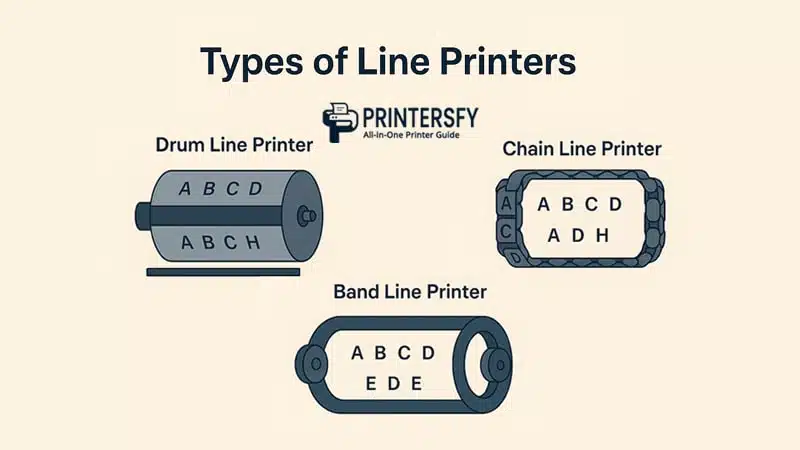
Line printing systems come in several mechanical forms—each optimized for particular tradeoffs between speed, flexibility, and noise. The three primary models are drum, chain (or band), and line-matrix (pin/comb) designs. While all share the ability to print full rows at once, their internal architectures determine suitability for different operational needs.
Selecting the right model depends on required throughput, character-set flexibility, and the physical environment in which the unit will operate.
Drum Line Printer
A drum model uses a rotating cylinder engraved with repeated character sets. As the drum spins, each symbol passes the print line; hammers strike through an inked ribbon when the correct character aligns with a column. Drum units offer strong mechanical stability and excellent alignment, making them reliable for consistent, long-duration runs.
The tradeoff is limited character flexibility—changing fonts or character sets usually requires physical modification or replacement of the drum.
Chain Line Printer
Chain printers employ a circulating metal chain or band that carries character sets horizontally across the print line. Because chains are detachable, operators can swap them to change fonts or languages, offering greater versatility than drum models. Chain systems typically deliver very high lines-per-minute rates, which is why they are preferred for peak-throughput mainframe tasks.
However, chain mechanisms are among the loudest and experience more wear from rapid horizontal motion, so they demand attention to maintenance schedules.
Band Line Printer
A band printer is similar to a chain system but uses a thinner, flexible metal band embossed with character repeats. The lighter band reduces vibration and supports smoother, often faster operation with lower noise levels compared to heavy chains. Band units strike a middle ground: faster and more flexible than drums, but quieter and easier to maintain than chain systems.
They are a practical option when you need a balance of speed, maintainability, and reduced operational noise.
Comparison: Drum vs Chain vs Band
| Printer Type | Mechanism | Speed | Character Flexibility | Noise | Durability | Best Use |
|---|---|---|---|---|---|---|
| Drum | Rotating engraved cylinder | High, consistent | Low | Moderate | Very high | Stable, long runs with fixed character sets |
| Chain | Circulating chain/band | Very high | High (swappable chains) | High | Medium | Peak-throughput mainframe jobs |
| Band | Flexible metal band | High | Medium | Lower than chain | Medium–High | Balanced speed and quieter operation |
Advantages of Line Printers
A line printer remains highly effective in industrial and large-scale processing environments due to its mechanical efficiency and ability to manage continuous workloads. While modern machines offer superior graphic quality, few can sustain the volume and consistency required for nonstop operational printing.
Understanding the main line printer advantages highlights why many facilities still depend on this technology for bulk documentation, batch reporting, and system-generated logs. Its architecture is engineered specifically for high-speed volume printing, making it ideal for tasks where output rate and reliability matter more than resolution.
Built for extended duty cycles, these printers generate full lines in a single mechanical action. This design supports speeds that many impact or laser printers cannot maintain over long runs. Combined with sturdy components capable of operating for decades, line printers continue to serve as key infrastructure in legacy and mainframe environments.
Below are the primary strengths that keep these machines relevant in modern industrial workflows.
Speed and Throughput
One of the most defining advantages of a line printer is its exceptionally fast throughput. By printing all characters in a row simultaneously, it reaches thousands of lines per minute—far exceeding typical dot-matrix and mid-range laser models.
This capability is crucial for high-speed volume printing in settings such as transaction processing, batch job execution, and large-scale operational logging, where rapid output directly supports workflow efficiency.
Reliability in Harsh Environments
These printers are engineered to perform consistently in challenging conditions, including dust, vibration, and fluctuating temperatures. Unlike delicate office printers, they rely on rugged mechanical assemblies that hold alignment well under pressure.
Because of this, factories, warehouses, and data centers often maintain line printer units even after adopting newer technologies, ensuring dependable output where environmental factors could disrupt lighter equipment.
Lower Operating Costs for Bulk Printing
Over long-term use, line printers generally offer lower operating expenses than many modern alternatives. Their ribbons are durable, maintenance procedures are straightforward, and major components rarely need replacement thanks to heavy-duty construction.
For extended print runs—especially those using continuous forms—the cost per page is substantially lower. This economic advantage is a significant reason businesses value line printer advantages in high-volume environments.
Disadvantages and Limitations
Despite their strengths, a line printer does come with limitations that affect its suitability for modern office-based or visual-heavy printing tasks. Most disadvantages of line printers arise from their impact-driven mechanics and focus on speed rather than detail.
As organizations shift toward digital documentation and higher-resolution output, certain aspects of line printer performance—particularly sound, flexibility, and print quality—may become restrictive.
These line printer limitations often include operational noise, more frequent maintenance, and a narrow range of character options. Because the print process depends on hammer strikes, noise levels are noticeably higher than with laser or inkjet devices.
Additionally, although mechanically durable, these printers still require scheduled lubrication, alignment checks, and ribbon replacement to maintain clean output.
Noise Levels and Operational Disruption
One of the most common drawbacks is the line printer noise level. The hammer bank and moving character assemblies produce a loud impact sound, often necessitating dedicated rooms or enclosures to prevent disruption.
While some noise-dampening housings exist, they only reduce—not eliminate—the inherent noise created by impact-based printing.
Limited Print Quality and Character Flexibility
These printers are built strictly for text. They do not support advanced graphics or high-resolution output and cannot create detailed visual elements such as logos or complex layouts.
Font changes are also limited, particularly in drum-based units where characters are physically etched. This can be restrictive for organizations that require versatile formatting or brand-focused print materials.
Maintenance Requirements
Although durable, line printers must be maintained regularly to ensure optimal performance. Important maintenance requirements include ribbon replacement, hammer alignment checks, component lubrication, and cleaning to remove accumulated dust.
If neglected, these factors can lead to faded output, alignment drift, or feed issues. Compared with the low-maintenance design of modern printers, this upkeep may be considered demanding.
Line Printer Examples (Real-World Models & Case Uses)

Real-world line printer models continue to serve industries that depend on uninterrupted, high-volume text output. Although many workplaces now rely on laser or inkjet machines, industrial environments still prefer heavy-duty impact printers because they integrate easily with legacy systems and support continuous-form printing.
One of the most recognized historical models is the IBM 1403, which set early standards for industrial printing. Modern alternatives such as the Printronix P8000 Series deliver similar durability with improved electronics, longer-lasting consumables, and better energy efficiency.
These line printer examples are widely used in logistics centers for manifests and picking lists, government institutions for archival documents and regulatory outputs, and financial sectors for transaction summaries and end-of-day reports.
Their combination of endurance, low per-page costs, and compatibility with established software gives them a lasting role in operations where consistency and throughput outweigh aesthetic print needs.
Line Printer vs Other Impact Printer Types
A line printer differs from other impact printers mainly in throughput and intended purpose. While all impact devices use mechanical force to transfer ink to paper, the architectures vary—resulting in clear trade-offs between speed, print quality, noise, and maintenance.
Understanding these differences helps determine which technology fits a given workload: raw-volume tasks favor line-based systems, whereas flexible layouts or letter-quality text may be better suited to other impact approaches.
Speed Comparison
Speed is the area where line-based systems outperform rivals. Because they print entire rows at once, they routinely deliver hundreds to thousands of lines per minute—far more than character-by-character devices.
- Dot matrix: Prints characters via multiple pins; useful for basic graphics but substantially slower for large reports.
- Daisy wheel: Impacts one character at a time and offers letter-quality text, but operates at very low throughput.
- Character printers: Older electromechanical units that output single symbols and are unsuitable for heavy batch jobs.
Cost & Maintenance Comparison
For sustained, high-volume printing the per-page cost of a line-based system is usually lower. Durable ribbons and rugged mechanics mean predictable, infrequent major repairs—though routine servicing (lubrication, alignment checks) is required.
- Dot matrix: Lower initial cost but higher maintenance frequency for continuous runs.
- Daisy wheel: High upkeep and lower speed increase costs per document.
- Character: Obsolescent—parts and service are costly and hard to source today.
Use-Case Comparison
Different impact printers suit different operational needs. Line-based units excel where nonstop text throughput is the priority; others fit niche demands for flexibility or print quality.
- Line systems → data centers, mainframe batch jobs, continuous multi-page forms, warehouse manifests.
- Dot matrix → invoices, multipart forms, environments needing occasional simple graphics.
- Daisy wheel → formal letters and documents requiring crisp, typewriter-like characters.
- Character printers → largely historical; limited modern use.
Summary Table: Impact Printer Comparison
| Printer Type | Mechanism | Speed | Print Quality | Noise | Maintenance | Best Use |
|---|---|---|---|---|---|---|
| Line printer | Drum/chain/band with hammer bank | Very high (hundreds–thousands LPM) | Text-focused, low graphics | High | Low–Medium | High-volume batch printing, data centers |
| Dot matrix | Pin head (24/9-pin) | Medium | Medium (basic graphics) | Medium | Medium | Invoices, multipart forms |
| Daisy wheel | Character wheel | Low | High (letter-quality) | Low–Medium | High | Formal documents, letter-quality text |
| Character printer | Single-character electromechanical | Very low | Low–Medium | Medium | High (obsolete) | Legacy terminal output (historical) |
Why Line Printers Are Still Used Today (Industry Insights)
Many organizations continue to operate line printers because these systems deliver reliable, high-throughput printing with minimal integration effort into existing mainframe or batch-processing workflows. Their durability and predictable operating profile reduce migration risk and keep operational costs stable.
Key reasons include long service life, straightforward servicing schedules, and tight compatibility with legacy data formats. In environments where uptime is critical—logistics centers, utilities, government agencies, and large financial operations—this combination often outweighs the benefits of newer, more flexible printers.
Ultimately, the choice to retain these units is pragmatic: when speed, continuity, and compatibility matter most, the proven mechanics of line-based printing remain an efficient, low-risk solution.
Conclusion
The line printer remains an enduring technology in industrial printing thanks to its speed, durability, and ability to handle continuous, text-heavy workloads with minimal error. While modern printers excel in graphics and resolution, they rarely match the reliability required by high-volume printing systems, especially those connected to long-standing mainframe infrastructures.
Even as digital processes expand, many organizations continue relying on these machines because they offer low operating costs, predictable performance, and seamless compatibility with legacy environments. Their robust construction and consistent throughput ensure they remain practical for industries that generate large and repetitive data outputs.
Ultimately, the continued use of line-based printing reflects a simple truth: in specific mission-critical workflows, stability and efficiency matter more than visual sophistication. For applications where uninterrupted, bulk text output is essential, the line printer still stands as one of the most dependable solutions available.
FAQs About Line Printer
What is a line printer used for?
It is primarily used for large-scale text printing in environments such as data centers, manufacturing plants, government offices, and legacy mainframe systems.
How does a line printer work?
It prints an entire row at once using a rotating drum, chain, or band mechanism paired with a hammer bank, enabling fast and synchronized impact printing.
What is the difference between a line printer and a dot matrix printer?
A line printer outputs full lines in a single action, while a dot matrix prints characters individually using a pin head, making it slower for bulk tasks.
Are line printers still used today?
Yes. Many industries continue to use them because they integrate easily with older systems and support continuous high-volume output.
What are the advantages of a line printer?
They offer high speed, low long-term operating costs, strong durability, and reliable performance in demanding industrial workflows.