Think back to the last time you printed a report at the office or an assignment at school. Chances are, the machine you relied on was a laser printer. These one of printers types have become so common that we rarely stop to ask how they work—or why they remain the backbone of business printing even in a digital-first world.
Unlike inkjet printers that spray tiny drops of liquid ink onto paper, a laser printer uses precision technology developed in the late 1970s. The idea was simple but groundbreaking: instead of liquid, use powdered toner fused with heat and pressure to produce fast, sharp, and professional-quality documents. That innovation changed the printing industry, making high-volume printing affordable and reliable.
Today, laser printers are everywhere—from compact models designed for home offices to powerful machines that handle thousands of pages a day in large corporations. They are trusted not only for speed but also for consistency, which explains why they continue to dominate environments where quality and efficiency matter.
In this guide, we’ll break down what a laser printer is, the components that make it work, and the science behind the printing process. We’ll also look at the different types of laser printers, weigh their pros and cons, and compare them with other printing technologies so you can see exactly where they fit in the modern world of printing.
What Is a Laser Printer?
A laser printer is a type of non-impact printer that produces high-quality text and graphics by passing a laser beam across a photosensitive drum. Instead of physically striking the paper like impact printers, it uses static electricity and heat to transfer powdered toner onto the page. This method is what gives laser printers their signature speed, precision, and durability.
The concept was first introduced by Gary Starkweather at Xerox in the 1970s. His idea was to combine the mechanics of a photocopier with digital computer data—replacing the light source with a laser beam that could “draw” the image or text to be printed. That innovation laid the foundation for modern laser printing, which quickly spread from large corporate environments to home users once costs dropped in the 1980s and 1990s.
Today, when people talk about a laser printer, they’re usually referring to machines designed for office use, where fast output and professional document quality are essential. While inkjet printers dominate the photo-printing and low-volume home market, laser printers remain the standard choice for offices, schools, and businesses because of their ability to handle large print jobs at lower long-term costs.
Components of a Laser Printer
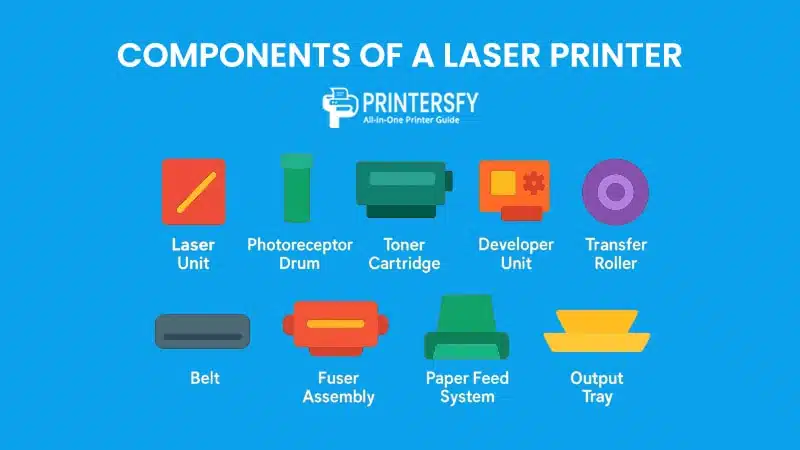
When you open up a laser printer, what looks like a simple box on the outside is actually a carefully engineered system inside. Every part has a job to do, and if one fails, the entire printing process can slow down or stop completely. Knowing the key components not only helps in understanding how the machine works but also makes it easier to spot problems and keep the printer running smoothly.
Below are the main components you’ll find in most modern laser printers and the roles they play in producing sharp, reliable prints.
Laser Unit
At the center of the process is the laser unit. This printer parts directs a fine laser beam across the surface of the drum, creating the invisible pattern that will later become text or images. Because the beam is so precise, the printer can handle small fonts and detailed graphics without losing clarity.
What makes the laser unit so important is its consistency. Whether you’re printing one page or a thousand, the laser can repeat the process with the same accuracy every time. That’s why laser printers are trusted in offices where professional-quality documents are needed on demand.
Photoreceptor Drum
The photoreceptor drum, often called the imaging drum, is the surface where the laser draws the electrostatic image. The drum is coated with special material that reacts to light, which allows it to hold the pattern temporarily before toner is applied.
Over time, the drum wears out, and that’s when you start seeing faded prints, streaks, or ghost images on the page. Replacing or maintaining the drum is one of the most common tasks in keeping a laser printer in good condition.
Toner Cartridge
Instead of liquid ink, laser printers rely on toner—fine powder made of plastic particles mixed with pigments. The toner cartridge stores and delivers this powder during the printing process. When heated in the fuser, the particles melt and bond permanently to the paper fibers.
Toner cartridges usually last longer than ink cartridges, which helps explain why businesses prefer them for high-volume printing. However, because they can be expensive to replace, the cost of toner remains one of the biggest factors in overall printing expenses.
Developer Unit
The developer unit acts as the bridge between the toner cartridge and the drum. Its job is to make sure toner is evenly distributed and only sticks to the charged areas created by the laser. If the developer unit is dirty or worn, you’ll often see uneven shading or background marks on the paper.
Some advanced models also use the developer to regulate toner density, so print quality stays sharp even as printer cartridges near the end of their life.
Transfer Roller or Belt
Once the toner image is formed on the drum, the transfer roller (or belt, depending on the design) moves that image onto the sheet of paper. This step requires precise timing, as any misalignment can lead to blurry or incomplete prints.
Because the roller comes into direct contact with paper, dust or debris can build up over time. Regular cleaning can extend its life and prevent common issues like smudging.
Fuser Assembly
The fuser is what makes the print permanent. It uses a pair of heated rollers—one for pressure, one for heat—to melt the toner particles into the paper. This is why documents from a laser printer feel slightly warm when they first come out.
If the fuser isn’t working properly, toner may rub off the page or the paper may come out wrinkled. In offices with heavy print volumes, the fuser is one of the most frequently replaced parts.
Paper Feed System and Output Tray
The paper feed system is responsible for pulling each sheet from the input tray and moving it through the print path. It has to be precise—otherwise, you’ll end up with jams or misaligned text.
Finally, the output tray collects the printed pages. While it may seem like a small detail, poor paper handling at this stage can cause stacking problems or curled pages, especially during long print runs.
Baik Clarissa 👍, saya tambahkan tabel ringkasan di akhir bagian ini. Tabel ini sangat bagus untuk featured snippet karena menyajikan informasi cepat, jelas, dan mudah dipahami.
Main Parts Inside a Laser Printer
| Component | Function | Common Issues |
|---|---|---|
| Laser Unit | Projects the laser beam to create an electrostatic image on the drum. | Misalignment, loss of precision. |
| Photoreceptor Drum | Holds the latent image before toner is applied. | Faded prints, streaks, ghosting. |
| Toner Cartridge | Stores powdered toner and delivers it during printing. | High replacement cost, empty toner. |
| Developer Unit | Transfers toner from cartridge to drum, regulates density. | Uneven shading, background marks. |
| Transfer Roller/Belt | Moves toner image from drum to paper with precision timing. | Smudging, incomplete transfers. |
| Fuser Assembly | Applies heat and pressure to bond toner to paper permanently. | Toner rubbing off, wrinkled paper. |
| Paper Feed System | Pulls sheets from tray and guides them through the print path. | Paper jams, misfeeds. |
| Output Tray | Collects finished pages after printing. | Curling, stacking problems. |
How a Laser Printer Works
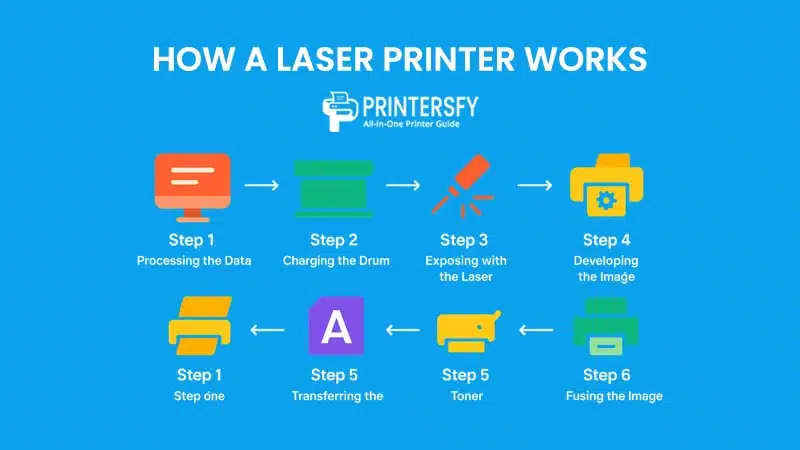
A laser printer follows a highly coordinated process to transform digital data into a printed page. Unlike inkjet printers, which spray ink directly onto paper, laser printers rely on static electricity, heat, and toner powder. The entire sequence happens in seconds, which explains why laser printers are much faster than other consumer printing technologies.
Understanding this process also helps users recognize where problems might occur—whether it’s toner not sticking properly, paper jams, or faded output. The process generally involves six main steps.
Step 1: Processing the Data
When you hit “Print,” the computer sends data to the printer’s processor. This processor converts the document into a raster image (a grid of tiny dots) that the printer can reproduce. Modern printers use Raster Image Processors (RIPs) to handle this task quickly and accurately.
Without this stage, the printer would not know where to place text or graphics. For large or complex files, processing can take longer, but once completed, the rest of the workflow moves very quickly.
Step 2: Charging the Drum
Next, the photoreceptor drum is given a uniform electrical charge by a corona wire or charging roller. This prepares the drum’s surface so it can react when the laser beam scans across it.
If the charging unit is dirty or failing, you’ll often see streaks or blank areas on the page because the drum cannot hold a consistent charge.
Step 3: Exposing with the Laser
The laser beam “draws” the image of the page onto the drum by selectively discharging certain areas. Where the laser hits, the electrical charge is reduced, forming an invisible pattern that matches the document.
This step is what gives a laser printer its name and its accuracy. Because the laser can pinpoint extremely fine details, it ensures clean lines and sharp characters.
Step 4: Developing the Image
Once the drum has been exposed, the developer unit coats it with toner powder. The charged areas attract toner particles, while uncharged areas remain clean. This creates a visible toner image on the drum that mirrors the final document.
Problems at this stage usually appear as uneven print density, such as pages with dark spots or light streaks.
Step 5: Transferring the Toner
The toner image is then transferred from the drum to a sheet of paper by the transfer roller or belt. A charge is applied to the paper to pull toner particles away from the drum and onto the correct areas of the sheet.
If this process fails, the image may not align properly, or parts of the page may appear missing.
Step 6: Fusing the Image
Finally, the paper passes through the fuser assembly, where heated rollers melt the toner into the fibers of the paper. Pressure ensures the toner bonds permanently, creating a durable and smudge-resistant print.
A faulty fuser will cause toner to smear or rub off easily, which is one of the most common service issues in older printers.
How the Laser Printing Cycle Works
| Step | Description | Common Issues |
|---|---|---|
| Processing | Converts document data into a printable raster image. | Delays with large files. |
| Charging | Applies uniform electrical charge to the drum. | Streaks, blank areas. |
| Exposing | Laser discharges specific areas to form an electrostatic image. | Poor image sharpness. |
| Developing | Toner adheres to charged areas of the drum. | Uneven density, light/dark streaks. |
| Transferring | Toner image is moved from drum to paper. | Misalignment, missing areas. |
| Fusing | Heat and pressure bond toner permanently to paper fibers. | Smudging, toner rubbing off. |
Types of Laser Printers

Laser printers come in a variety of forms, each designed for different user needs. Understanding these categories helps buyers select the right model based on print quality, speed, cost, and intended use. Instead of lumping all devices together, it’s better to group them by color output, functionality, intended use, and special variations.
By Color Output
Monochrome Laser Printers
Monochrome models print only in black and white. They are valued for their low running costs, high page yields, and excellent text clarity. Offices that mainly produce documents—such as invoices, contracts, or legal papers—tend to prefer monochrome laser printers.
Because they don’t use expensive color toners, they are generally more affordable to maintain. However, they lack versatility for projects requiring graphics, charts, or marketing materials.
Color Laser Printers
Color laser printers can handle both text and full-color graphics. They use four toner cartridges (cyan, magenta, yellow, and black), making them suitable for businesses that need vibrant materials like brochures, presentations, and reports.
The trade-off is higher upfront costs and ongoing expenses, since replacing multiple toner cartridges can be costly. Still, for organizations balancing text and visuals, color laser printers offer a strong middle ground between inkjets and industrial presses.
By Functionality
Single-Function Laser Printers
These printers focus solely on printing tasks. They tend to be smaller, faster, and more affordable than multifunction units. Their simplicity makes them ideal for users who need reliable document output without extra features.
Single-function models also tend to last longer because they have fewer moving parts. On the downside, users may still need to purchase separate devices for scanning or copying, which can take up additional office space.
Multifunction Laser Printers (All-in-One)
Multifunction laser printers combine printing, scanning, copying, and often faxing into one device. They are popular in both small offices and large corporations because they reduce the need for multiple machines.
Their convenience is unmatched, but it comes with higher complexity. Repairs and maintenance can be more expensive since one faulty component may disable multiple functions.
By Intended Use
Personal Laser Printers
Designed for home users or individuals, personal laser printers are compact, affordable, and easy to set up. They typically have lower monthly duty cycles, meaning they’re not built for heavy workloads.
They are excellent for students or professionals working from home who want sharp documents without the mess of inkjet cartridges. However, they may lack features like wireless printing or advanced paper handling.
Shared/Business Laser Printers
These are larger, faster, and built for higher print volumes. Business models often include features like duplex printing, large paper trays, and robust security settings.
While the initial investment is higher, shared printers provide cost savings over time for offices that need to handle thousands of pages per month.
Other Types & Considerations
LED Printers
LED printers use a light-emitting diode array instead of a laser to create the image on the drum. This technology has fewer moving parts, making it potentially more reliable and energy-efficient.
Although they are less common, LED printers can be a good alternative to traditional laser printers, especially in environments where reliability is a top priority.
Compact Laser Printers
Compact models are designed for tight spaces, offering basic functionality in a smaller footprint. They are ideal for students, freelancers, or home users with limited desk space.
Their trade-off is lower paper capacity and slower speeds compared to full-size models, but they balance affordability with convenience.
Industrial Laser Printers
Built for large-scale printing, industrial laser printers can handle massive volumes at high speeds. They are often used by publishing houses, print shops, and enterprises that need fast, continuous output.
These machines are expensive and require professional maintenance, but they deliver unmatched durability and productivity.
Types of Laser Printers Explained
| Category | Type | Key Strengths | Best For |
|---|---|---|---|
| By Color Output | Monochrome Laser Printers | Low cost, sharp text, high volume efficiency | Offices with text-heavy documents |
| Color Laser Printers | Handles text + graphics, vibrant colors | Marketing, presentations, mixed tasks | |
| By Functionality | Single-Function | Simple, durable, affordable | Users who only need printing |
| Multifunction (All-in-One) | Print, scan, copy, fax in one device | Small to large businesses | |
| By Intended Use | Personal Laser Printers | Compact, affordable, easy setup | Students, home users |
| Shared/Business Printers | High volume, advanced features | Offices, teams, organizations | |
| Other Types | LED Printers | Fewer moving parts, reliable | Offices needing durability |
| Compact Printers | Space-saving, basic tasks | Small spaces, freelancers | |
| Industrial Printers | High-speed, massive output | Print shops, enterprises |
Advantages of Laser Printers

Laser printers have been a dominant choice in offices and institutions for decades, and their popularity is not without reason. Compared to inkjet or other printing technologies, they consistently deliver a blend of speed, efficiency, and long-term cost-effectiveness. Below are the main advantages that make them stand out.
Fast Printing Speeds
One of the strongest advantages of laser printers is their speed. Unlike inkjets, which spray liquid ink line by line, laser printers use a laser beam and rotating drum to transfer toner powder in a single, swift motion. This results in pages being printed in seconds rather than minutes.
For businesses that handle large volumes of paperwork—such as law firms, universities, or government offices—speed translates into higher productivity. A single laser printer can easily replace multiple inkjets when it comes to handling bulk workloads efficiently.
High Volume Efficiency
Laser printers are designed with duty cycles that can handle thousands of pages per month. Unlike ink cartridges, which may run out after a few hundred prints, toner cartridges last significantly longer and require less frequent replacement.
This makes laser printers cost-efficient for organizations that rely on daily document printing. Fewer interruptions for cartridge changes also reduce downtime, which helps keep workflows consistent and predictable.
Sharp Text Quality
When it comes to text documents, laser printers outperform most competitors. The precision of the laser beam ensures crisp, clean characters with sharp edges, even at small font sizes. This is especially important for legal documents, contracts, and academic materials where readability and professionalism matter.
Graphics and images may not be as vibrant as those from inkjets, but for black-and-white text printing, laser printers remain unmatched.
Lower Cost per Page
Although the initial purchase price of a laser printer is usually higher than that of an inkjet, the long-term cost per page is much lower. Toner cartridges print thousands of pages, making the per-page cost significantly cheaper than ink-based systems.
Over time, this makes laser printers a better investment for businesses or individuals who print frequently. Many companies calculate total cost of ownership (TCO) before buying printers, and laser models often come out ahead.
Durability and Reliability
Laser printers are built to last. They have fewer clogging issues compared to inkjets, since toner is powder-based and does not dry out. Their mechanical design is optimized for heavy use, meaning they can keep working reliably for years with proper maintenance.
For environments where uptime is critical—such as hospitals, financial institutions, or logistics companies—reliability is a deciding factor. A dependable printer minimizes disruption and ensures smooth document workflows.
Why People Choose Laser Printers
| Advantage | Key Benefit | Best Use Case |
|---|---|---|
| Fast Printing Speeds | Prints pages in seconds, ideal for bulk jobs | Offices with high workloads |
| High Volume Efficiency | Toner lasts longer, supports thousands of pages per month | Organizations with daily document printing |
| Sharp Text Quality | Crisp, clean characters for professional documents | Legal, academic, and corporate environments |
| Lower Cost per Page | Cheaper long-term printing despite higher initial cost | Businesses calculating TCO |
| Durability & Reliability | Long lifespan, fewer clogging issues, built for heavy use | Hospitals, enterprises, institutions |
Disadvantages of Laser Printers

While laser printers are often praised for speed and efficiency, they also come with certain limitations. These disadvantages don’t always outweigh the benefits, but they are important for buyers to understand before making a purchase decision.
Higher Initial Cost
One of the first barriers people face when considering a laser printer is the upfront price. Compared to inkjet printers, the purchase cost of a laser model is noticeably higher. Even basic monochrome units can be more expensive than feature-rich inkjets.
For small businesses or home users with limited budgets, this cost can be discouraging. Although the long-term savings on toner can offset the initial expense, the starting investment still makes laser printers less accessible for casual users.
Expensive Toner Replacements
While toner cartridges last much longer than ink, replacing them can be costly. A single toner unit may cost nearly as much as a low-end inkjet printer. For households or small offices printing only occasionally, the savings from longevity may not justify the high price of consumables.
In addition, some brands design proprietary toner systems, locking users into buying official cartridges that further increase the running cost.
Limited Color Quality for Images
Laser printers are excellent for text, but when it comes to photos or graphics, they often fall short. The toner-based process cannot reproduce the fine gradients and vibrant hues that inkjets achieve.
As a result, users who need high-quality photo printing—such as photographers or graphic designers—tend to avoid laser printers, instead relying on inkjet or specialty printers for better results.
Larger Size and Weight
Laser printers are typically bulkier than inkjets. Even compact models are larger than most home-use printers, and multifunction units can be quite heavy. This makes them less suitable for users with limited space, such as students in dorms or small home offices.
In addition, portability is rarely an option. Unlike smaller inkjet printers that can be moved easily, laser printers are usually meant to stay in one place.
Warm-Up Time and Energy Use
Although laser printers are fast once running, many models require a warm-up time before printing. This is due to the fuser unit, which must reach high temperatures to bond toner to paper. For quick, one-off prints, this can feel inconvenient compared to inkjets that start almost immediately.
Energy consumption is another factor. The heating process and mechanical complexity often make laser printers consume more electricity than inkjets, especially in high-volume environments.
Limitations of Laser Printers
| Disadvantage | Key Limitation | Typical Impact |
|---|---|---|
| Higher Initial Cost | More expensive than inkjets at purchase | Barrier for budget-conscious users |
| Expensive Toner | Toner replacements cost nearly as much as low-end printers | Higher running costs for light users |
| Limited Color Quality | Less vibrant images compared to inkjets | Poor choice for photography or design |
| Larger Size & Weight | Bulkier and heavier, harder to move | Not ideal for small spaces |
| Warm-Up Time & Energy Use | Requires heating time and consumes more electricity | Slower startup and higher energy bills |
Laser Printers vs Other Printing Technologies
Choosing the right printer often comes down to comparing laser models with alternative printing technologies. Each method has unique strengths and weaknesses, depending on whether the priority is speed, cost, image quality, or special functionality. Below are the most common comparisons.
Laser vs Inkjet Printers
Laser printers and inkjet printers are often compared because they dominate the home and office printing markets. Inkjet printers are compact, relatively cheap to buy, and capable of producing high-quality photos with vibrant colors. Their ability to handle glossy paper and different print media makes them a popular choice among photographers and casual users.
On the other hand, laser printers are designed for speed and efficiency. They handle large volumes of text-heavy documents at a lower cost per page. While their upfront cost is higher, businesses and schools benefit from the long-term savings. If your needs revolve around reports, invoices, or academic papers, a laser printer outperforms inkjet in both productivity and durability.
Laser vs Dot Matrix (Impact Printers)
Dot matrix printers may seem outdated, but they are still used in industries that require multipart forms, such as banking, logistics, and retail. These impact printers use a ribbon and pins to strike the paper, making them suitable for printing on carbon-copy sheets where laser printers cannot.
However, when it comes to print quality, speed, and noise, dot matrix devices lag far behind. Laser printers offer sharp, professional results without the mechanical clatter. Unless you specifically need carbon-copy capabilities, a laser printer is the superior option for modern work environments.
Laser vs Solid Ink Printers
Solid ink printers, which melt wax-like ink sticks to produce vivid and eco-friendly prints, are valued for their rich colors and lower waste. They are especially appreciated in marketing departments where presentation materials need to stand out.
Yet, solid ink printers are expensive to maintain and require a warm-up period before printing. Laser printers, in comparison, are widely available, faster, and more cost-effective for routine office documents. While solid ink has its niche, it cannot match the practicality and scalability of laser technology in mainstream use.
Laser vs Liquid Ink Printers
Liquid ink printers—essentially standard inkjets—are inexpensive at the point of purchase, which makes them appealing to students and home users. They deliver excellent photo prints and perform well for occasional jobs.
But the story changes when print volumes increase. Ink cartridges are notoriously expensive, and frequent replacements drive up the total cost of ownership. Laser printers shine here, offering thousands of pages per toner cartridge, making them the clear choice for offices and frequent users who prioritize cost control and time efficiency.
Laser vs 3D Printers
At first glance, laser and 3D printers may not seem comparable, since they serve very different purposes. A laser printer is designed for producing documents, while a 3D printer builds objects layer by layer using materials like plastic or resin.
That said, both Printers technologies highlight how diverse printing can be. 3D printers are indispensable for industries such as engineering, prototyping, and product design. However, they cannot replace the role of a laser printer in producing crisp, professional paperwork. The comparison illustrates the specialization of modern printing technologies.
Laser vs Specialty Printers
Specialty printers—including photo printers, label printers, and receipt printers—are tailored to very specific tasks. Their advantage lies in accuracy and precision within their niche. For instance, a photo printer might deliver better image quality than even the best color laser printer, while a thermal receipt printer is unmatched for retail speed.
Still, these devices are limited in scope. A laser printer offers versatility, handling a broad range of office documents at scale. While specialty printers are excellent as secondary tools, they cannot replace the comprehensive role of a laser printer in professional settings.
Laser Printers Compared to Other Printers
| Technology | Printing Method | Strengths | Weaknesses | Best For |
|---|---|---|---|---|
| Laser | Toner + Laser/Drum | Fast, sharp text, low CPP | High upfront cost | Offices, schools |
| Inkjet (Liquid Ink) | Nozzles spraying ink | Photo quality, compact | Expensive ink, slower | Home/photo users |
| Dot Matrix (Impact) | Pins strike ribbon | Durable, carbon copies | Noisy, low quality | Banking, logistics |
| Solid Ink | Wax-based ink sticks | Vivid colors, eco-friendly | Warm-up time, cost | Marketing prints |
| 3D Printer | Layer-by-layer extrusion | Physical object creation | Expensive, slow | Prototyping, industry |
| Specialty Printers | Varies (thermal, label, photo) | Niche accuracy | Limited scope | Labels, photos, receipts |
Conclusion
Laser printers have become an indispensable tool for businesses, schools, and even households that need fast, reliable, and professional-quality documents. Their efficiency lies in the combination of speed, low cost per page, and durability—qualities that make them stand out compared to other printing technologies.
From monochrome units designed for basic document printing to multifunction color models that serve as all-in-one office hubs, laser printers cover a wide range of needs. While the upfront investment may be higher than inkjet alternatives, the long-term savings and consistent output make them a smart choice for high-volume users.
By understanding how laser printers work, their components, types, and how they compare with other printing technologies, users can make better purchasing decisions and maintain their devices effectively. Whether for personal use or enterprise-scale operations, the laser printer remains a cornerstone of modern printing.
FAQs About Laser Printers
Which is the best laser printer for a small office?
The best laser printer for a small office typically balances speed, networking features, and low running costs. Models like HP LaserJet Pro and Brother HL-L series are popular for their reliability and ability to handle moderate to high print volumes.
Which laser printer is the best for home use?
For home use, a compact and affordable model such as the Brother HL-L2350DW or HP LaserJet MFP series is ideal. They take up less space, provide wireless connectivity, and offer low-cost printing for occasional but important tasks.
How long do laser printers last?
On average, a laser printer lasts between 5 to 10 years, depending on usage and maintenance. Regular cleaning, proper handling, and timely replacement of consumables like toner cartridges and drums can extend their lifespan significantly.
Can a laser printer print color?
Yes, color laser printers are available and can produce professional-quality graphics and documents. While they may not match the photo quality of specialized inkjet printers, they are excellent for presentations, reports, and marketing materials.
Do you need to refill laser printers?
Laser printers don’t use liquid ink; instead, they rely on toner cartridges filled with powdered toner. These cartridges need to be replaced or refilled when they run out. Fortunately, they last much longer than inkjet cartridges, often yielding thousands of pages per refill.