Every organization—whether a startup or a global enterprise—relies on digital systems to operate, communicate, and store critical information. But these systems are constantly exposed to risks. That’s why cyber security tools have become fundamental in defending against modern threats like phishing, ransomware, data breaches, and zero-day exploits. As cyber attacks grow more complex and persistent, having the right tools is no longer optional—it’s essential.
More than just virus scanners or firewalls, cyber security tools enable organizations to detect vulnerabilities in real time, enforce data protection policies, and respond swiftly to incidents before they escalate into full-scale breaches.
In this article, we’ll break down the core types of cyber security tools professionals rely on every day. You’ll learn how these tools work, where they fit in your security ecosystem, and how to choose the right ones for your needs.
Understanding the Role of Cyber Security Tools
Cybersecurity tools are essential components of a well-rounded defense strategy in the digital age. They’re designed to protect systems, networks, and data from unauthorized access, attacks, and damage. Without the right tools, even the most well-trained IT teams would struggle to keep pace with evolving threats.
Why Cyber Security Is No Longer Optional
As businesses grow increasingly dependent on cloud services, remote work infrastructure, and interconnected devices, the attack surface expands. Every new device, user, or third-party integration becomes a potential entry point. A single unpatched vulnerability can lead to catastrophic losses—including data theft, financial damage, and legal consequences.
Modern cyber security technologies tools provide the visibility and control needed to minimize those risks. They empower teams to detect unusual behavior, block malicious code, and enforce access policies without slowing down daily operations. In short, these tools help turn a reactive security posture into a proactive defense system.
The Purpose of Using Specialized Tools
Each cyber security tool is designed for a specific function—whether it’s scanning for vulnerabilities, analyzing traffic patterns, managing access control, or detecting insider threats. Instead of relying on a single solution, professionals often use a combination of tools to build layered protection.
This layered approach is critical. A firewall may block incoming attacks, but it won’t detect a malicious file already inside your network. Similarly, antivirus software can stop malware, but it can’t monitor suspicious user behavior or flag data exfiltration attempts.
By integrating various cyber security tools, organizations can:
- Respond to threats faster and with greater precision
- Reduce the chance of blind spots in their infrastructure
- Meet compliance standards like GDPR, HIPAA, or ISO 27001
- Improve the effectiveness of security operations centers (SOC)
These tools are not just software—they’re strategic assets in the ongoing battle to keep sensitive information safe.
Categories of Cyber Security Tools

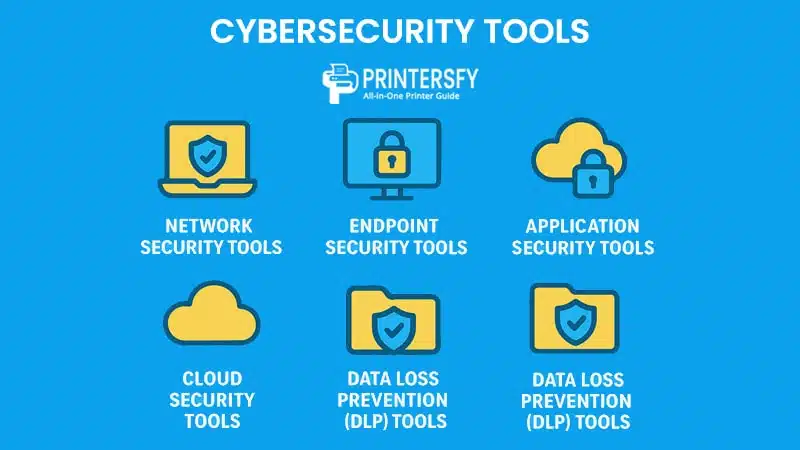
Cyber security tools are not one-size-fits-all. Each category serves a different purpose and protects against specific types of threats. To build an effective security posture, organizations must understand how each category works and where it fits within their infrastructure.
Network Security Tools
These tools monitor and protect the integrity of networks by identifying suspicious activity, preventing unauthorized access, and blocking malicious traffic.
- Examples: Firewalls, Intrusion Detection Systems (IDS), Intrusion Prevention Systems (IPS), VPNs, Network Access Control (NAC)
Endpoint Security Tools
With the rise of remote work, endpoints like laptops, mobile devices, and desktops have become prime targets. Endpoint security tools protect these devices against malware, ransomware, and unauthorized data access.
- Examples: Antivirus, Endpoint Detection and Response (EDR), Mobile Device Management (MDM)
Application Security Tools
These tools identify security flaws in software during development and after deployment. They help ensure that applications can’t be used as backdoors for attacks.
- Examples: Web Application Firewalls (WAF), Static Application Security Testing (SAST), Dynamic Application Security Testing (DAST)
Cloud Security Tools
With more businesses shifting to cloud platforms, these tools help monitor configurations, enforce policies, and protect cloud-native environments from threats.
- Examples: Cloud Access Security Brokers (CASBs), Cloud Workload Protection Platforms (CWPPs), Cloud Security Posture Management (CSPM)
Data Loss Prevention (DLP) Tools
DLP tools prevent sensitive data from being accidentally or maliciously shared outside the organization. They’re especially useful in regulated industries.
- Examples: Symantec DLP, Digital Guardian, Forcepoint DLP
Security Information and Event Management (SIEM) Tools
SIEM tools aggregate logs and alerts from different systems, helping teams detect patterns, conduct forensic analysis, and comply with regulatory requirements.
- Examples: Splunk, IBM QRadar, LogRhythm
Comparison Table of Cyber Security Tool Categories
| Category | Primary Function | Common Tools Used | Best For |
|---|---|---|---|
| Network Security | Monitor, detect, and block unauthorized access | Firewalls, IDS/IPS, VPNs | Enterprise networks |
| Endpoint Security | Protect user devices from malware & attacks | Antivirus, EDR, MDM | Remote teams, BYOD environments |
| Application Security | Secure software from development to deployment | WAF, SAST, DAST | DevSecOps teams |
| Cloud Security | Secure cloud configurations and workloads | CASB, CSPM, CWPP | SaaS, IaaS, cloud-native teams |
| Data Loss Prevention | Prevent sensitive data leakage | Symantec DLP, Forcepoint | Healthcare, finance, legal |
| SIEM | Centralize logs & detect threats | Splunk, QRadar, LogRhythm | Large IT environments, SOCs |
Using the right combination of these cyber security tools helps businesses reduce risk exposure and ensure holistic protection across all digital assets.
Top Features to Look for in Cyber Security Tools

Choosing the right cyber security tools isn’t just about brand recognition—it’s about identifying the features that align with your organization’s risk profile, infrastructure, and long-term strategy. The best tools share several key characteristics that help professionals not only defend, but also adapt and respond to modern cyber threats.
Real-Time Threat Detection
Real-time detection is one of the most vital features of any security tool. Instead of identifying threats after the fact, real-time systems continuously scan traffic, behavior, or code to detect and block anomalies before damage occurs.
- Examples: SIEM platforms with live dashboards, EDR systems with continuous monitoring, behavior-based anti-malware tools
- Benefit: Faster response times and reduced incident impact
Automation and Response Capabilities
As cyber threats multiply in speed and complexity, automation becomes essential. Tools with built-in automated response features can isolate affected systems, kill malicious processes, or trigger alerts—without waiting for human intervention.
- Examples: SOAR (Security Orchestration, Automation, and Response) platforms, automated firewall rule adjustments, ransomware containment workflows
- Benefit: Reduces response time from hours to seconds
Scalability and Integration Support
Whether you’re protecting 50 users or 5,000 endpoints, your cyber security tools must scale with your environment. Tools that offer strong integration capabilities with existing infrastructure—such as cloud platforms, authentication systems, or ticketing tools—allow for unified protection and centralized control.
- Examples: Tools with APIs, SIEMs with native connectors, security solutions compatible with Microsoft Azure or AWS
- Benefit: Enables seamless ecosystem-level defense
Feature Comparison Table: What to Look for in Cyber Security Tools
| Feature | Description | Why It Matters | Example Tools |
|---|---|---|---|
| Real-Time Threat Detection | Identifies threats instantly across systems | Immediate defense against active attacks | CrowdStrike, SentinelOne, Splunk |
| Automation & Response | Automatically handles threat mitigation actions | Reduces workload and response time | IBM Resilient, Palo Alto Cortex XSOAR |
| Scalability | Supports growing environments and remote workforces | Future-proofs your security investment | Microsoft Defender, Cisco SecureX |
| Integration Capabilities | Connects with existing platforms and tools | Ensures visibility and centralized response | Rapid7 Insight, LogRhythm |
| User Behavior Analytics | Monitors anomalies in user actions | Detects insider threats and account misuse | Exabeam, Varonis |
The most effective cyber security tools combine multiple features into a single solution or integrate smoothly with others in your stack. That’s why experienced professionals evaluate tools not just by their core purpose, but by how they function across teams, workflows, and platforms.
Most Widely Used Cyber Security Tools by Professionals

Cyber security professionals don’t rely on just one or two tools—they often use a stack of specialized solutions to address specific layers of security. Below are some of the most widely adopted and trusted cyber security tools across the industry, each offering a unique role in protecting digital assets.
Wireshark – Network Traffic Analysis
Wireshark is a packet analyzer that lets professionals capture and inspect data traveling across a network in real time.
- Use Case: Diagnosing network performance issues, identifying suspicious traffic, forensic analysis
- Why It Matters: Offers deep visibility into network behavior, helping detect threats hidden in plain sight
Metasploit – Penetration Testing
Metasploit is a framework used to simulate real-world attacks on systems and networks, helping teams identify exploitable vulnerabilities.
- Use Case: Ethical hacking, red teaming, security assessments
- Why It Matters: Enables proactive defense by revealing weak spots before attackers do
Nessus – Vulnerability Scanning
Nessus is a vulnerability scanner that checks systems for known weaknesses, misconfigurations, or outdated software.
- Use Case: Compliance audits, patch management, risk reduction
- Why It Matters: Helps prioritize remediation efforts and reduce the attack surface
Snort – Intrusion Detection System
Snort is a lightweight, open-source IDS that analyzes network traffic in real time to detect malicious patterns.
- Use Case: Network defense, traffic monitoring, rule-based alerting
- Why It Matters: Fast, flexible, and highly customizable
OSSEC – Host-Based Intrusion Detection
OSSEC monitors logs, file integrity, rootkits, and other system-level activity to detect unauthorized changes on endpoints and servers.
- Use Case: Server protection, file monitoring, insider threat detection
- Why It Matters: Adds a critical layer of host-based protection
Splunk – SIEM and Log Management
Splunk ingests massive volumes of machine data and turns it into actionable insights through dashboards, alerts, and analytics.
- Use Case: Log correlation, incident detection, compliance reporting
- Why It Matters: Core tool for centralized monitoring and forensic analysis
Burp Suite – Web Application Security
Burp Suite is a popular platform for testing the security of web applications. It allows both automated and manual testing.
- Use Case: Penetration testing, bug bounty research, app vulnerability scanning
- Why It Matters: Trusted by developers and ethical hackers to secure modern web applications
Nmap – Network Discovery and Mapping
Nmap scans networks to identify active devices, open ports, and running services. It’s often the first step in any security audit.
- Use Case: Network inventory, security assessments, port scanning
- Why It Matters: Helps build an accurate map of your network to identify blind spots
Comparison Table: Most Used Cyber Security Tools and Their Functions
| Tool | Category | Primary Function | Used By |
|---|---|---|---|
| Wireshark | Network Analysis | Packet capture and inspection | Network engineers, analysts |
| Metasploit | Penetration Testing | Simulate attacks to test vulnerabilities | Ethical hackers, red teams |
| Nessus | Vulnerability Scanning | Scan for system weaknesses | Security auditors, IT admins |
| Snort | IDS | Real-time traffic monitoring | SOC teams, network defenders |
| OSSEC | HIDS | Host-based log and file analysis | Server admins, DevOps teams |
| Splunk | SIEM | Log aggregation and event correlation | Large enterprises, SOC |
| Burp Suite | Web App Security | Test web applications for vulnerabilities | DevSecOps, QA teams |
| Nmap | Network Mapping | Identify open ports and services | System admins, pen testers |
These tools form the backbone of most cyber security operations. Professionals often use them in tandem to achieve multi-layered defense and maintain visibility across the entire IT ecosystem.
How These Tools Work Together in a Cyber Security Strategy

Cyber security tools are not just effective in isolation—they’re exponentially more powerful when integrated into a unified defense strategy. Professionals design these systems with layered security in mind, ensuring each tool complements others to detect, prevent, and respond to threats from all angles.
Layered Defense Model
A layered defense strategy—also known as “defense in depth”—involves using multiple cyber security tools to secure different areas of an organization’s IT environment. Each layer serves a unique purpose:
- Network Layer: Firewalls, IDS/IPS, and VPNs prevent unauthorized external access
- Endpoint Layer: Antivirus and EDR solutions detect and isolate threats on user devices
- Application Layer: WAFs and vulnerability scanners secure web apps and software
- Data Layer: DLP tools and encryption protect sensitive files and customer data
- Monitoring Layer: SIEM platforms correlate activity across systems to detect anomalies
This redundancy ensures that if one defense fails, others are in place to mitigate the impact.
Real-World Implementation Examples
Let’s say an organization experiences a phishing attempt:
- Email Filtering Tool blocks the phishing message from reaching the user’s inbox.
- Endpoint Detection Tool flags an abnormal script when the user opens a suspicious attachment.
- SIEM Tool detects the sequence of suspicious activity and sends alerts to the SOC team.
- SOAR Tool triggers an automated response: isolates the device and disables affected accounts.
- Forensic Tools analyze logs and determine how the phishing email bypassed initial filters.
This example illustrates how cyber security tools work in concert—not as individual fixes, but as part of an orchestrated system.
Diagram Table: How Cyber Security Tools Integrate in a Security Stack
| Security Layer | Purpose | Example Tools | Outcome |
|---|---|---|---|
| Perimeter Security | Block unauthorized access | Firewalls, IDS, VPN | Prevents intrusions |
| Endpoint Protection | Secure user devices | EDR, Antivirus, MDM | Stops malware, isolates threats |
| Application Security | Harden apps against exploits | WAF, SAST, DAST | Prevents injection attacks |
| Data Security | Protect sensitive information | DLP, Encryption, DRM | Avoids data leakage |
| Monitoring & Response | Detect and respond to incidents | SIEM, SOAR, Forensics Tools | Ensures fast threat containment |
By designing a strategy where cyber security tools support and inform one another, organizations gain a more resilient and responsive defense system. This not only strengthens protection—it also reduces the burden on security teams by automating many parts of the workflow.
Factors to Consider Before Choosing a Cyber Security Tool

With so many cyber security tools on the market, making the right choice can be overwhelming. A tool that’s perfect for a global enterprise may be overkill for a mid-sized business. That’s why professionals evaluate several key factors before integrating a new tool into their security infrastructure.
Type of Organization and Threat Profile
Every organization has a unique risk landscape. A financial institution must comply with strict data protection regulations, while a SaaS company may prioritize securing its application layer. Selecting tools based on the nature of your business, industry, and threat exposure ensures you invest in protection where it matters most.
- Example: A healthcare provider may prioritize tools with HIPAA compliance and patient data encryption, while an eCommerce platform might focus on fraud detection and application firewalls.
Budget and Resource Constraints
Some cyber security tools come with premium features and high licensing costs. While they offer advanced protection, they may require in-house expertise or dedicated teams to manage effectively. Organizations with limited resources often benefit from open-source tools or cloud-based solutions that offer easier deployment and automation.
- Tip: Always weigh total cost of ownership (TCO), including licensing, training, support, and maintenance.
Compliance Requirements
Businesses in regulated sectors must ensure that their cyber security tools help them meet compliance standards such as:
- GDPR (General Data Protection Regulation – EU)
- HIPAA (Health Insurance Portability and Accountability Act – US)
- PCI-DSS (Payment Card Industry Data Security Standard)
- ISO/IEC 27001 (Global information security framework)
Many cyber security tools now offer built-in compliance dashboards, reporting modules, and audit trails to simplify audits and avoid penalties.
Ease of Integration and Use
A powerful cyber security tool is useless if it doesn’t play well with the rest of your stack. Evaluate tools based on how easily they integrate with:
- Identity providers (like Okta or Active Directory)
- Cloud platforms (AWS, Azure, GCP)
- Ticketing and incident response systems (like ServiceNow or Jira)
Usability is also key. Dashboards should be intuitive, alerting should be meaningful, and setup should not require weeks of configuration.
Evaluation Table: Key Considerations When Choosing Cyber Security Tools
| Consideration | Why It Matters | Questions to Ask |
|---|---|---|
| Threat Profile | Ensures tool fits your specific security needs | What are the most likely threats we face? |
| Budget & Resources | Avoids overspending or overengineering | Can we manage this tool effectively? |
| Compliance Needs | Helps meet legal & industry obligations | Does this tool support our compliance goals? |
| Integration | Ensures smooth deployment within your environment | Will this tool integrate with our platforms? |
| Usability | Empowers teams to act quickly and effectively | Is the UI intuitive? Are alerts actionable? |
Choosing the right cyber security tools is a strategic decision that should align with business goals, regulatory requirements, and operational capacity—not just the latest market trend.
Challenges in Managing Multiple Cyber Security Tools

While implementing a range of cyber security tools strengthens overall protection, it also introduces operational complexity. Many organizations face challenges as their security stacks grow over time—especially when tools come from different vendors or serve overlapping functions.
Tool Fatigue and Overlapping Functions
It’s common for organizations to accumulate multiple tools that do similar things. For example, two different endpoint security tools might both offer threat detection, yet generate duplicate alerts or conflict with each other.
- Problem: Redundant functionality wastes budget and creates noise
- Solution: Conduct regular tool audits to identify overlaps and streamline the stack
Integration Complexities
Not all cyber security tools are designed to work together seamlessly. Incompatible APIs, differing alert formats, or lack of centralized dashboards can leave teams juggling between interfaces and missing critical insights.
- Problem: Fragmented visibility and inefficient workflows
- Solution: Prioritize tools with open integrations or use orchestration platforms like SOAR to unify operations
Alert Overload and False Positives
An advanced SIEM might generate thousands of alerts daily. Without effective correlation or filtering, security teams can quickly become overwhelmed—leading to alert fatigue or missed critical threats.
- Problem: Important threats get buried in irrelevant noise
- Solution: Fine-tune alert thresholds, use AI-powered correlation, and deploy behavioral analytics
Maintenance and Training Burden
Each cyber security tool requires ongoing updates, configuration, and user training. As the stack expands, the operational burden grows—especially for teams with limited resources or staffing.
- Problem: Security teams become reactive rather than proactive
- Solution: Use centralized management platforms and invest in training that keeps pace with your tools
Table: Common Pain Points in Managing Cyber Security Tools
| Challenge | Description | Suggested Approach |
|---|---|---|
| Tool Overlap | Redundant features across multiple tools | Consolidate tools with overlapping features |
| Integration Issues | Tools don’t communicate or sync data | Use SOAR or select API-friendly platforms |
| Alert Fatigue | Too many alerts without prioritization | Tune alert settings and use SIEM correlation |
| Maintenance Complexity | Tools require constant updates and patches | Automate patching and use unified platforms |
| User Training Demands | Teams need training for every new tool added | Standardize training across tool families |
As organizations scale, managing cyber security tools becomes as critical as choosing them. A streamlined, integrated, and well-maintained toolset leads to faster detection, more accurate response, and stronger overall protection.
The Future of Cyber Security Tools
As cyber threats evolve in sophistication, so must the tools designed to defend against them. The future of cyber security tools lies in intelligence-driven, automated, and context-aware solutions that do more than just detect threats—they anticipate and prevent them.
AI and Machine Learning Integration
Modern cyber security tools are increasingly leveraging artificial intelligence (AI) and machine learning (ML) to improve threat detection accuracy and automate decision-making.
- Use Case: Behavioral analysis, anomaly detection, malware classification
- Example Tools: CrowdStrike Falcon, Darktrace, Cylance
- Impact: Reduces false positives and enables faster incident response
Zero Trust Architecture Support
The traditional “castle-and-moat” model of network security is being replaced by the Zero Trust framework, where no user or device is trusted by default—even if they’re inside the network perimeter.
- Feature Integration: Identity-based access, continuous authentication, micro-segmentation
- Supported By: Zscaler, Okta, Palo Alto Prisma Access
- Impact: Limits lateral movement of threats and improves granular control
Predictive Threat Modeling
Next-gen cyber security tools use predictive analytics to identify potential threats based on historical data, emerging threat intelligence, and attacker behavior patterns.
- Use Case: Proactive defense, risk scoring, attack surface forecasting
- Impact: Shifts security from reactive to predictive, improving overall resilience
Cloud-Native and API-First Tools
With businesses shifting workloads to the cloud, cyber security tools are being re-architected to be API-first, cloud-native, and container-aware.
- Tools: Prisma Cloud, Wiz, Aqua Security
- Benefit: Better protection for dynamic environments like Kubernetes and multi-cloud infrastructures
Table: Emerging Trends in Cyber Security Tools
| Future Trend | Key Benefit | Example Solutions | Strategic Value |
|---|---|---|---|
| AI & Machine Learning | Smarter, adaptive threat detection | Darktrace, Vectra AI, SentinelOne | Automation, reduced false alerts |
| Zero Trust Architecture | Least-privilege access enforcement | Okta, Zscaler, Cisco Duo | Reduces insider risk, secures remote work |
| Predictive Threat Modeling | Anticipates attacks before they happen | IBM QRadar Advisor, Microsoft Defender 365 | Proactive threat hunting |
| Cloud-Native Security | Scales with cloud workloads | Prisma Cloud, Wiz, Lacework | Cloud resilience and visibility |
| API-First Platforms | Easier integration and orchestration | Rapid7, Tenable, Snyk | Flexible and centralized operations |
The future of cyber security tools will be defined by agility, intelligence, and adaptability. Professionals must stay informed and evolve alongside these technologies to stay one step ahead of increasingly advanced adversaries.
Conclusion
Cyber security tools are the foundation of every strong digital defense system. From small businesses to multinational corporations, the ability to detect, prevent, and respond to cyber threats depends heavily on the right combination of tools working in harmony.
We’ve explored how these tools are categorized—from network and endpoint protection to cloud security and SIEM—and how professionals choose the right ones based on their unique threat landscape. We’ve also looked at how these tools integrate into a layered strategy, what challenges come with managing them, and how emerging technologies like AI, Zero Trust, and predictive analytics are shaping their future.
Choosing and managing cyber security tools isn’t just a technical task—it’s a strategic investment in your organization’s safety, reputation, and operational continuity. The right tools, combined with trained personnel and clear processes, can make the difference between a minor security event and a devastating breach.
FAQ About Cyber Security Tools
What are the most essential cyber security tools every organization should have?
At a minimum, every organization should deploy firewalls, antivirus or EDR software, a vulnerability scanner like Nessus, and a SIEM tool for centralized monitoring. For cloud environments, adding CASBs and cloud workload protection tools is also recommended.
Can small businesses afford effective cyber security tools?
Yes. Many open-source and affordable tools offer enterprise-grade protection. For example, OSSEC (HIDS), Snort (IDS), and even cloud-native security from providers like Microsoft Defender for Business can offer strong baseline protection without a large budget.
Are open-source cyber security tools reliable?
Absolutely. Open-source tools like Wireshark, Metasploit, and Nmap are widely trusted by professionals. However, they often require more manual configuration and experienced users compared to commercial solutions.
How often should cyber security tools be updated?
Cyber security tools should be updated as frequently as possible—ideally through automatic updates. Signature-based tools like antivirus software may require daily updates, while others may follow weekly or monthly patch cycles.
What’s the difference between a firewall and a SIEM tool?
A firewall blocks or permits traffic based on predefined rules, acting as a gatekeeper between networks. A SIEM tool, on the other hand, collects and analyzes data from multiple sources to detect suspicious activity and generate security alerts.