
You don’t have to be a tech expert to use a Personal Area Network (PAN)—in fact, you’ve probably used one today without even thinking about it. Whether you transferred a file via Bluetooth, paired your wireless earbuds, or synced your smartwatch to your phone, you hawere relying on a PAN to make it happen.
A PAN is a short-range network designed to connect devices around a single user. It’s the invisible thread that links your personal gadgets together, enabling seamless communication, sharing, and control. From the fitness tracker on your wrist to the printer in your home office, PANs support a wide range of devices and applications that simplify our digital lives.
But how exactly does a PAN work? What types are available? And how does it differ from other network models like LAN or WAN? This guide breaks down everything you need to know about Personal Area Networks—from the technology behind them to the practical ways they improve your everyday experience.
Understanding the Basics of Personal Area Network (PAN)

What Is a PAN?
A Personal Area Network (PAN) is a computer network used for data transmission among devices located close to one person, typically within a range of 10 meters. The goal of a PAN is to connect personal electronic devices—like smartphones, laptops, smartwatches, tablets, wireless keyboards, and printers—so they can share data, resources, and services.
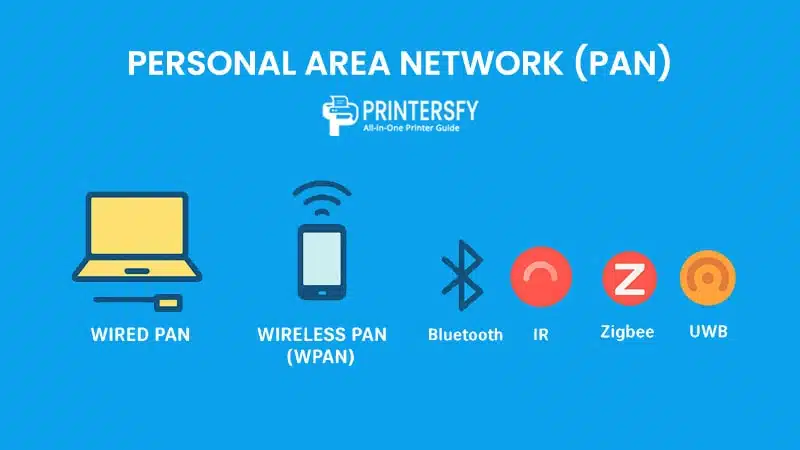
There are two main categories of PAN:
- Wired PAN: Often implemented using USB or FireWire cables to connect devices directly.
- Wireless PAN (WPAN): Utilizes wireless technologies such as Bluetooth, infrared (IR), Zigbee, or Ultra-Wideband (UWB).
PANs are optimized for short-range, low-power communication, making them ideal for daily personal use where minimal infrastructure is required. Unlike LANs or WANs, a PAN is often centered around a single user and their personal environment.
Why PAN Matters in Today’s Connected Environment
In a world increasingly dependent on smart devices and mobile technology, PANs are fundamental to our digital interactions. They enable real-time data syncing across multiple devices without relying on external internet connections or larger network infrastructures.
Here’s why Personal Area Networks are more relevant than ever:
- Mobility: PANs support highly mobile setups. You can connect and disconnect devices on the go without needing static setups.
- Convenience: Sharing files between a smartphone and laptop via Bluetooth or connecting a smartwatch to a phone are seamless experiences thanks to PAN.
- Integration with Wearables and IoT: Devices like fitness bands, smart glasses, and wireless medical sensors rely on Personal Area Network technology to function effectively.
- Battery Efficiency: Most PAN-enabled devices are optimized for energy-efficient communication, which is critical for battery-powered gadgets.
As more devices become personal and portable, PANs are the unseen glue that helps them work together smoothly.
History and Evolution of PAN Technology
The concept of PANs dates back to the late 1990s and early 2000s when technologies like Bluetooth and infrared communication began to be embedded in consumer electronics. Before that, device-to-device communication was limited to wired connections or more complex networking setups that required significant configuration.
Here’s a brief timeline of PAN evolution:
| Year | Milestone | Description |
|---|---|---|
| 1994 | Bluetooth invented | Ericsson develops Bluetooth as a short-range wireless technology. |
| 1999 | Bluetooth 1.0 released | The first PAN-compatible wireless standard becomes available to manufacturers. |
| 2002 | IEEE 802.15 formed | Standardization of WPAN under IEEE, leading to widespread adoption. |
| 2005 | Infrared declines | IR loses favor due to line-of-sight limitations and Bluetooth’s rise. |
| 2010+ | IoT Integration | PANs evolve to include more devices, including wearables and home automation sensors. |
| Present | Multi-device PAN | Users regularly operate multiple personal devices simultaneously, connected via PANs. |
Today, PANs are not just about device connectivity—they’re integral to the ecosystem of personal computing, wearables, Internet of Things (IoT), and beyond.
Types of Personal Area Networks

Personal Area Networks can be classified into two broad categories: Wired PAN and Wireless PAN (WPAN). Each type has its own use cases, technologies, and advantages, depending on the level of flexibility, mobility, and data transmission needs.
Wired PAN
A Wired PAN involves physical connections between personal devices, often using USB, FireWire, or proprietary cables. While this type of Personal Area Network may seem outdated in an era dominated by wireless communication, it still holds relevance in specific scenarios where stable data transfer, security, or power delivery is crucial.
Common Use Cases for Wired PAN:
- Connecting a smartphone to a laptop for file transfers or tethering
- Using a USB cable to sync music between a PC and an MP3 player
- Charging and managing wearable devices via USB
- Connecting peripherals like printers or external drives
Advantages:
- Stable and high-speed data transmission
- Reduced risk of interference
- More secure from wireless snooping
Limitations:
- Limited mobility due to physical tethering
- Inconvenient for users on the move
- Cable clutter and port availability can be a concern
Despite the decline in popularity, wired PANs are still used in enterprise, industrial, and healthcare settings where reliability and precision are non-negotiable.
Wireless PAN (WPAN)
Wireless Personal Area Networks (WPAN) are far more common in today’s digital ecosystem. They use radio signals or infrared to transmit data over short distances without the need for cables. The most well-known technologies in WPAN include Bluetooth, Infrared (IR), Zigbee, and Ultra-Wideband (UWB).
Bluetooth
Bluetooth is the most widely adopted WPAN technology. It supports device discovery, pairing, and low-power data transfer across a short range (typically up to 10 meters, though newer versions like Bluetooth 5.0+ can reach up to 100 meters in optimal conditions).
Key Applications:
- Wireless headphones and speakers
- Smartwatches and fitness bands
- Keyboards, mice, and game controllers
- File transfers between smartphones and laptops
Pros:
- Ubiquitous device support
- Low energy consumption (especially with Bluetooth LE)
- Supports secure communication via encryption and authentication
Cons:
- Limited bandwidth (not ideal for high-volume transfers)
- Potential for interference in crowded environments
Infrared (IR)
Once the go-to solution for short-range communication between devices, infrared uses light-based signals and requires line-of-sight alignment between devices. IR is now considered a legacy technology but is still used in specific applications like remote controls or older medical equipment.
Strengths:
- Simple and cost-effective
- Immune to radio signal interference
Weaknesses:
- Requires direct alignment and no obstructions
- Limited speed and range
- Largely replaced by Bluetooth in consumer electronics
Zigbee
Zigbee is a wireless protocol designed for low-power, low-data-rate communication, especially in mesh networks. While not as popular as Bluetooth for general consumer use, it’s commonly used in smart home systems, sensor networks, and industrial automation.
Common Use Cases:
- Smart lighting systems
- Temperature and motion sensors
- Home security systems
Key Advantages:
- Energy efficient (ideal for battery-powered devices)
- Mesh networking allows for broader range and device-to-device communication
Ultra-Wideband (UWB)
UWB is an emerging technology that offers high data rates over short distances, along with precise location tracking. It’s gaining traction in smartphone ecosystems, particularly in premium devices for features like digital car keys and ultra-accurate indoor navigation.
Use Cases:
- Wireless data streaming
- Asset tracking
- Secure device unlocking
Benefits:
- High accuracy in device location
- Low power consumption
- High-speed data transfers
Wireless PANs offer the mobility and flexibility that modern users expect from their devices. Each protocol brings its own strengths, making WPANs suitable for a wide range of personal and commercial applications.
Core Components and Devices in a Personal Area Network (PAN)
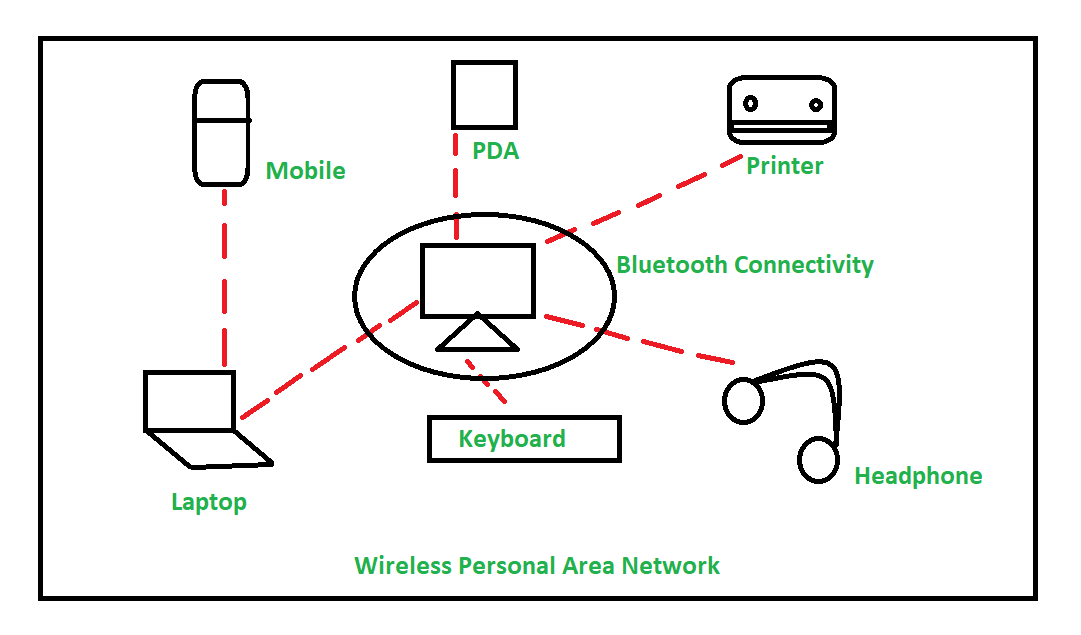
A Personal Area Network doesn’t require complex infrastructure. Instead, it’s built around common personal devices that you likely use every day. These components interact seamlessly, often automatically, to provide a cohesive and integrated user experience—especially within a wireless PAN.
Let’s break down the primary components and device types commonly found in PANs.
Smartphones and Tablets
Your smartphone is often the central hub of your Personal Area Network. It can connect to a wide variety of peripherals and sensors via Bluetooth, infrared, or even USB, depending on the application.
Examples of smartphone Personal Area Network functionality:
- Syncing fitness data from a wearable
- Tethering internet access to a laptop (via Bluetooth or USB)
- Transferring files to another device wirelessly
- Controlling smart home devices using a mobile app
Smartphones and tablets are equipped with multiple communication protocols (Bluetooth, Wi-Fi Direct, NFC, etc.), making them ideal for managing PANs.
Laptops and Wearables
Laptops are versatile nodes in a PAN. They often serve as endpoints for file sharing, media playback, or data syncing. In business settings, they might be paired with wireless projectors or printers within a Personal Area Network setup.
Wearables, such as smartwatches and fitness trackers, constantly communicate with smartphones to update user data, receive notifications, and share real-time metrics.
Examples:
- Apple Watch pairing with an iPhone
- Fitbit or Garmin fitness data syncing to health apps
- Using a smartwatch to control music playback on a phone or laptop
Peripheral Devices
PANs commonly include wireless or USB-connected peripherals, which improve user productivity or enhance convenience.
Examples include:
- Wireless keyboards and mice
- Bluetooth speakers and headsets
- Printers and scanners
- Game controllers
These devices typically rely on short-range protocols and are optimized for low-latency communication.
Sensors and IoT Gadgets
As Internet of Things (IoT) technology grows, so does the number of PAN-enabled devices. Smart sensors can track motion, temperature, proximity, and even biometric data, and relay that information to a nearby smartphone or laptop.
Common IoT devices in PANs:
- Temperature or humidity sensors
- Heart rate monitors
- Proximity and motion detectors
- Smart door locks and tags
Many of these devices use Bluetooth Low Energy (BLE) or Zigbee, which are ideal for battery efficiency and constant connectivity.
In short, a PAN is not limited to personal computing devices alone. It extends to wearables, smart objects, and health-monitoring tools—all working together in a compact, personalized network environment. As technology advances, the scope of Personal Area Network continues to expand, touching more aspects of personal life and even professional tasks.
How Personal Area Network (PAN) Work
A Personal Area Network may seem simple on the surface—just a few devices connecting wirelessly or via cable—but behind the scenes, a PAN depends on several key elements: network topologies, communication protocols, and hardware limitations like range and power usage.
Understanding how these factors work together helps explain why PANs are efficient, practical, and ideal for close-range, user-centered connectivity.
Topologies Used in PAN
In networking, topology refers to how devices are arranged and connected within a network. PANs generally use the following configurations:
Star Topology
This is the most common Personal Area Network structure, where all peripheral devices connect to a central hub—typically a smartphone or laptop.
- Example: A smartwatch, wireless headset, and fitness tracker all connect to a single smartphone.
- Advantage: Easy to manage; central hub controls access.
- Disadvantage: If the hub fails, all device connections are lost.
Peer-to-Peer Topology
In this arrangement, devices can communicate directly without a central controller.
- Example: File transfer between two smartphones via Bluetooth.
- Advantage: Fast, direct communication.
- Disadvantage: Limited scalability and control.
Mesh Topology (Rare in PANs)
Some advanced PANs—especially those involving Zigbee or smart sensors—use a mesh layout, allowing each device to relay data for others.
- Use Case: Smart home systems where sensors and controllers communicate without relying on one central device.
- Advantage: Redundancy and extended coverage.
- Disadvantage: More complex to configure and power-hungry.
Short-Range Communication Protocols
PANs depend on a variety of communication protocols to send and receive data. These protocols are chosen based on the range, power consumption, data speed, and device compatibility.
| Protocol | Range | Speed (Mbps) | Power Usage | Notes |
|---|---|---|---|---|
| Bluetooth | ~10–100 meters | 1–50+ | Low | Most popular WPAN protocol |
| Infrared | ~1–5 meters | 0.1–4 | Low | Requires line of sight |
| Zigbee | ~10–100 meters | ~0.25 | Very low | Used in IoT & automation |
| UWB | ~10 meters | 110–480+ | Low | High-precision location |
| USB | Cable-length | 480–5000+ | Power source | Used for data and charging |
Each protocol has trade-offs between data rate, power efficiency, and use case suitability. For instance, Bluetooth is ideal for consumer peripherals, while Zigbee excels in low-power sensor networks.
Power and Range Limitations
Since PANs are designed for short-range, low-power communication, both battery consumption and range limitations are critical considerations:
- Battery Dependency: Most PAN devices are portable and battery-powered. Protocols like Bluetooth LE and Zigbee are optimized to conserve energy by minimizing signal strength and maintaining efficient idle states.
- Range Constraints: PANs are usually limited to a 10-meter radius (standard Bluetooth). While newer standards allow for extended range, signal strength still drops with distance and physical obstructions like walls or metal surfaces.
- Interference Issues: WPANs operate in the 2.4 GHz spectrum, which is shared with Wi-Fi and microwave ovens. Interference can result in reduced signal quality, lag, or disconnections, especially in crowded environments.
Because of these constraints, PANs are not meant to replace larger networks (like LANs or WANs) but to complement them for personal, localized connectivity.
In essence, the technical foundation of a Personal Area Network is intentionally designed to balance mobility, efficiency, and simplicity—making it perfect for connecting your personal ecosystem of digital tools.
Real-World Examples and Applications of Personal Area Network (PAN)
Personal Area Networks are no longer limited to niche tech use cases—they’re deeply integrated into everyday activities across personal, professional, and industrial settings. Whether it’s controlling your music, monitoring your health, or automating your environment, PANs play a crucial role in making devices smarter and communication smoother.
Here are some practical and impactful applications of PAN technology in real-world scenarios.
Home Automation
In smart homes, PANs are used to connect and control personal devices with minimal user input. Many smart devices in your living space—especially those close to your body or handheld—rely on Personal Area Network protocols to work seamlessly with smartphones or control hubs.
Examples:
- Connecting your smartphone to a smart TV or Bluetooth speaker
- Using a smartwatch to adjust home lighting or thermostat settings
- Controlling window blinds or a home security camera via Bluetooth
While broader home automation often involves Wi-Fi or Zigbee mesh networks, PANs are key for device-to-device or user-device interaction at close range.
Health Monitoring Systems
The healthcare sector has embraced PAN technology, particularly in the form of body area networks (BANs)—a subcategory of Personal Area Network focused on wearable medical sensors and devices.
Applications include:
- Heart rate monitors syncing with mobile health apps
- Continuous glucose monitors sending real-time data to smartphones
- Fall detection devices alerting caregivers via Bluetooth
- Smartwatches monitoring sleep patterns and physical activity
These systems provide continuous, non-invasive monitoring, empowering individuals to manage their health proactively and giving healthcare providers access to real-time patient data.
File Sharing Between Devices
One of the earliest and most recognizable uses of PANs is in file transfer between nearby personal devices. Bluetooth remains a popular method for sharing photos, documents, and media files, especially when internet access is limited.
Use Cases:
- Sending files from a smartphone to a laptop without a cable
- Sharing photos between mobile devices
- Syncing music playlists between a PC and wireless speaker
The convenience of quick, cable-free sharing over Personal Area Network helps users stay productive even without network infrastructure.
Personal Entertainment
PANs enable seamless multimedia experiences by connecting entertainment devices wirelessly:
- Streaming music from a phone to a Bluetooth speaker
- Watching videos using wireless headphones connected to a tablet
- Gaming with wireless controllers paired to a console or mobile device
As wireless audio and video quality improves, PANs continue to enhance mobile entertainment through speed, simplicity, and minimal latency.
PAN in Industrial and Enterprise Use
While PANs are primarily designed for personal use, they’re increasingly adopted in enterprise and industrial environments for localized communication and monitoring.
Examples:
- Technicians using Bluetooth-enabled tools or scanners synced with tablets
- Field workers using smart glasses or wearables for data input
- Inventory tracking via UWB or Bluetooth Low Energy beacons
In industrial contexts, PANs can operate independently or integrate with larger networks (LAN/WAN) for syncing data after the fact.
These real-world applications show just how versatile and valuable Personal Area Networks have become. Whether it’s connecting health monitors or syncing smart devices, PANs are foundational to modern digital living.
PAN vs Other Network Types
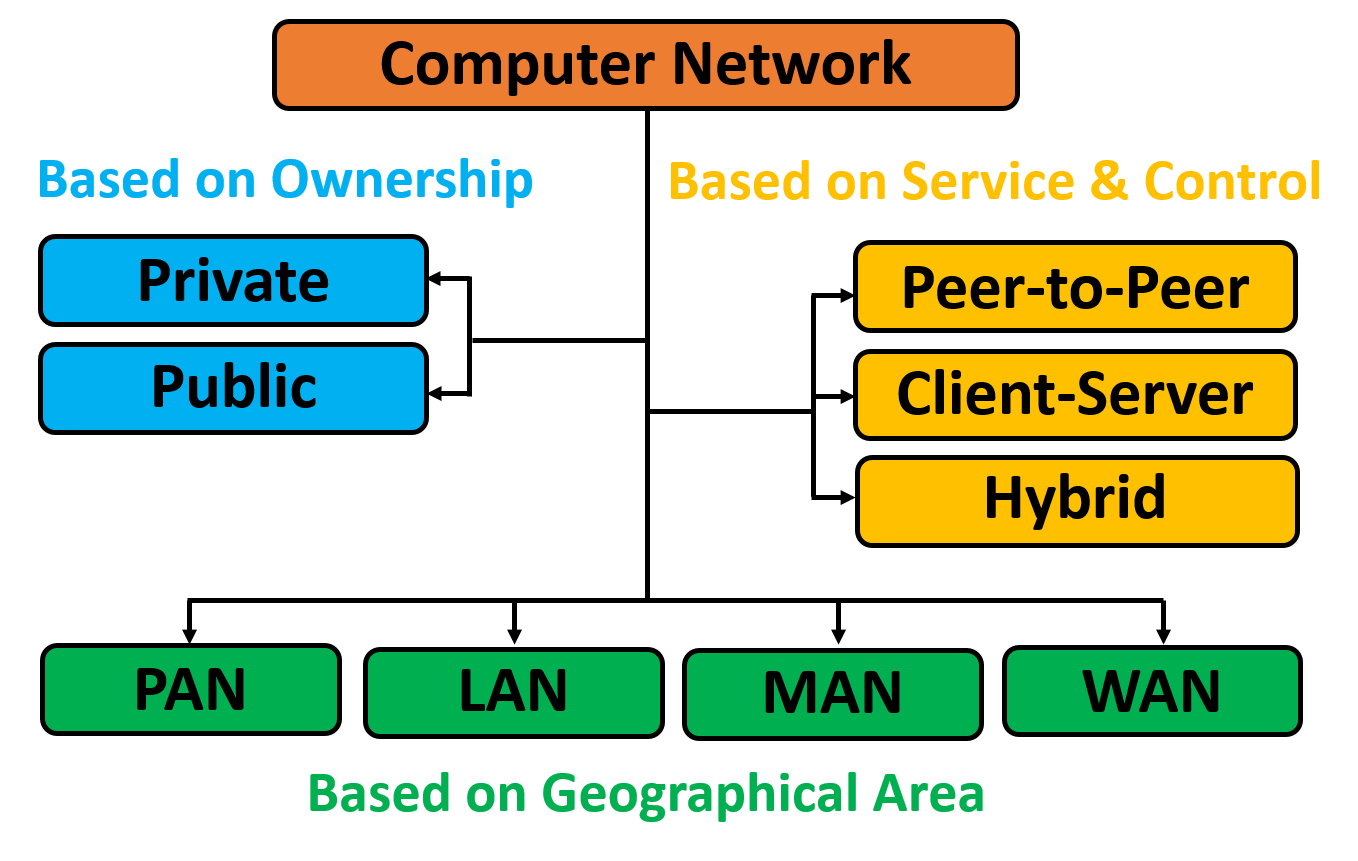
While a Personal Area Network (PAN) is the smallest and most localized form of networking, it’s important to understand how it compares to other widely used Computer Network Types:
Each of these networks serves a different scope, scale, and purpose in the broader ecosystem of connectivity.
PAN vs LAN
| Feature | PAN | LAN |
|---|---|---|
| Coverage Area | ~10 meters (short-range) | Up to several hundred meters (building-wide) |
| Purpose | Personal device connectivity | Connecting multiple computers/devices in a location |
| Example | Bluetooth headphones, smartwatch, smartphone | Office network with desktops and printers |
| Infrastructure | Minimal (no router required for Bluetooth/IR) | Requires router/switch, Ethernet/Wi-Fi |
| Data Transfer Speed | Low to moderate | Moderate to high |
Key Difference: While both PAN and LAN are private networks, PAN is centered around a single person’s devices, whereas LAN connects multiple users or devices within a defined space like a home, office, or school.
PAN vs MAN
| Feature | PAN | MAN |
|---|---|---|
| Coverage Area | ~10 meters | Spans a city or large campus |
| Purpose | Personal use | Connects multiple LANs in a metro area |
| Example | Smartwatch to phone | University campus internet infrastructure |
| Infrastructure | None to minimal | High-level networking hardware (fiber, routers, etc.) |
| Ownership | Individual | Often government, ISPs, or institutions |
Key Difference: A MAN serves multiple buildings or institutions across a city, while a Personal Area Network serves one person. They operate on completely different scales and infrastructure requirements.
PAN vs WAN
| Feature | PAN | WAN |
|---|---|---|
| Coverage Area | ~10 meters | Global (inter-country and intercontinental) |
| Purpose | Short-range, personal connectivity | Long-distance, high-volume data exchange |
| Example | Wireless earbuds connected to a phone | The internet, corporate enterprise networks |
| Ownership | Individual | ISPs, large corporations, governments |
| Complexity | Very low | Extremely high (includes satellite, fiber, etc.) |
Key Difference: A WAN connects computers and networks across vast geographical areas and relies on major infrastructure providers. In contrast, a PAN operates at the smallest possible scale, facilitating communication between personal gadgets.
Summary Table: PAN vs LAN vs MAN vs WAN
| Feature | PAN | LAN | MAN | WAN |
|---|---|---|---|---|
| Coverage Area | ~10 meters | 100–1000 meters | Several kilometers | 1000+ kilometers |
| Ownership | Personal | Organization/Individual | ISP/Government | ISP/Government |
| Setup Cost | Very low | Moderate | High | Very high |
| Speed | Low to moderate | Moderate to high | High | High |
| Complexity | Very simple | Simple to moderate | Moderate to complex | Very complex |
| Example | Bluetooth headset | Office network | City-wide Wi-Fi | The Internet |
Understanding these distinctions helps clarify where Personal Area Network fits in the broader networking landscape—it’s a user-centric, low-power network that thrives in close proximity scenarios. It doesn’t replace larger networks but complements them by covering the last few meters between you and your devices.
Advantages and Disadvantages of Personal Area Network (PAN)
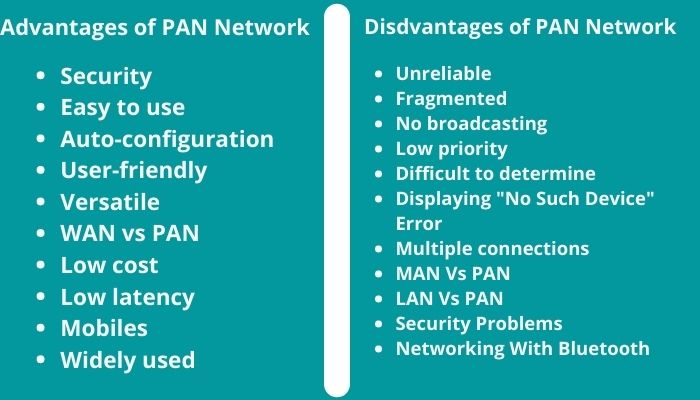
Like any network type, a Personal Area Network (PAN) comes with its own set of strengths and limitations. While it offers convenience and flexibility for everyday use, it’s not without technical constraints—especially when compared to larger and more robust networks like LAN or WAN.
Let’s break down the key advantages and disadvantages of Personal Area Network technology.
Advantages of PAN for Personal Use
1. Mobility and Flexibility
PANs allow devices to connect on the go, without relying on fixed infrastructure. You can easily sync your phone with your smartwatch, earbuds, or fitness tracker from virtually anywhere.
- Use Case: Listening to music through wireless earbuds while walking or exercising.
2. Low Cost and Simple Setup
Most PANs require no additional infrastructure. Devices with built-in Bluetooth or USB capabilities can start communicating almost immediately with little to no configuration.
- No router, switch, or modem needed
- Simple pairing process via Bluetooth or IR
3. Energy Efficiency
Protocols like Bluetooth Low Energy (BLE) and Zigbee are optimized for low-power operation, making them ideal for battery-powered devices that need to operate continuously.
- Example: Fitness bands that last days or even weeks on a single charge
4. Short-Range Privacy and Security
The limited range of PANs (typically 10 meters or less) can act as a natural security barrier, reducing the risk of external interference or unauthorized access—especially in home or office settings.
5. Device Interoperability
Modern PAN-compatible devices can connect across platforms and ecosystems. For example, a single smartwatch might connect to both Android and iOS devices, depending on configuration.
Disadvantages and Limitations of PAN
1. Limited Range and Coverage
The biggest drawback of PANs is their short communication range. Devices need to be close to one another, which limits usability in larger spaces.
- Example: Bluetooth audio may cut out if your phone and earbuds are more than 10 meters apart or separated by walls.
2. Low Data Transfer Speeds
PANs are not designed for heavy data transfer. File sharing via Bluetooth, for instance, is noticeably slower compared to Wi-Fi Direct or USB 3.0 connections.
- Not suitable for streaming HD video or transferring large files
3. Device Dependency
Most PANs rely on a central hub device, such as a smartphone or laptop. If this main device fails or is turned off, the network collapses.
- Risk: Lost connection to peripherals (headphones, wearables, etc.)
4. Interference and Signal Collision
Since Bluetooth and other Personal Area Network protocols operate in the 2.4 GHz ISM band, they are prone to interference from Wi-Fi networks, microwaves, and other wireless devices operating in the same frequency.
- Impact: Poor audio quality, connection drops, or lag
5. Security Vulnerabilities
While PANs offer physical proximity-based privacy, they’re still vulnerable to eavesdropping, device spoofing, or man-in-the-middle (MitM) attacks if not properly secured.
- Older Bluetooth versions, in particular, have known vulnerabilities if encryption is not enabled
Is PAN Right for Every Situation?
No—but it doesn’t have to be.
PANs are perfect for personal, mobile, and low-data applications, but they’re not intended to replace robust enterprise-level networks or support large-scale communication. Their value lies in simplicity and proximity, and for that niche, they perform exceptionally well.
Security Challenges in Personal Area Network (PAN)
Despite their short range and simplicity, Personal Area Networks (PANs) are not immune to security threats. In fact, the very characteristics that make PANs convenient—wireless communication, auto-discovery, and minimal user input—can also make them vulnerable to exploitation.
Whether you’re using Bluetooth, infrared, or Zigbee, securing your PAN is critical to protecting personal data, device integrity, and privacy.
Common PAN Vulnerabilities
1. Eavesdropping
In unencrypted Personal Area Network connections, attackers within range may intercept data transmitted between devices.
- Example: A hacker listening in on Bluetooth communication between a wireless keyboard and a laptop could capture keystrokes or login credentials.
2. Bluejacking and Bluesnarfing
These are Bluetooth-specific threats:
- Bluejacking: Sending unsolicited messages to Bluetooth-enabled devices. Often harmless but intrusive.
- Bluesnarfing: Unauthorized access to a device’s data (contacts, messages, files) via Bluetooth without the user’s knowledge.
3. Man-in-the-Middle (MitM) Attacks
In MitM attacks, a malicious device inserts itself between two communicating Personal Area Network devices, relaying and possibly altering the communication without detection.
- Risk: Data manipulation or interception of sensitive information like passwords or health metrics.
4. Device Spoofing
An attacker impersonates a trusted device to gain unauthorized access or disrupt communication.
- Example: A fake headset connecting to your smartphone to intercept audio or calls.
5. Outdated Protocols and Weak Pairing
Many PAN devices use legacy Bluetooth versions or insecure pairing mechanisms (e.g., 0000 or 1234 as default PINs), making them easy targets.
Encryption and Authentication Techniques
To mitigate these risks, PANs should use modern encryption and authentication standards:
- Bluetooth Secure Simple Pairing (SSP): Uses Elliptic Curve Diffie-Hellman (ECDH) for key exchange
- AES Encryption: Used in Bluetooth 4.2+ and Zigbee for secure data transmission
- Two-Factor Authentication (2FA): Some PAN-connected apps require confirmation on both devices
For wired PANs, physical control over the cable and device acts as a natural layer of security, but even these should have encrypted communication when data sensitivity is high.
Best Practices for PAN Security
Here are practical ways to secure your Personal Area Network:
- Disable Wireless Features When Not in Use
- Turn off Bluetooth, IR, or NFC on your devices when you’re not using them.
- Use Device Whitelisting or Approval-Based Pairing
- Require manual approval before a new device can connect to your network.
- Update Device Firmware Regularly
- Manufacturers often patch Bluetooth/Zigbee vulnerabilities in firmware updates.
- Avoid Using Default Pairing PINs
- Use secure, unique pairing codes or biometric approvals where available.
- Use Visibility Controls
- Set your device to “non-discoverable” mode after pairing to prevent unknown connections.
- Limit Device Range When Possible
- Keep personal devices close together and avoid using Personal Area Network in high-traffic public areas where eavesdropping is easier.
- Monitor for Unknown Connections
- Some devices notify users when a new PAN connection is attempted—pay attention and deny anything unexpected.
Security in PANs often relies more on awareness and user behavior than technical complexity. Because these networks operate in intimate proximity, users must take personal responsibility for managing access and ensuring device safety.
The Future of Personal Area Networks
As personal technology becomes increasingly sophisticated and interconnected, the role of Personal Area Networks (PANs) is set to grow far beyond simple Bluetooth pairing or file sharing. With the rise of wearables, IoT devices, and context-aware applications, PANs are evolving into dynamic, intelligent ecosystems that not only connect—but adapt to—our daily lives.
Integration with the Internet of Things (IoT)
The Internet of Things (IoT) is built on the idea that everyday objects—from thermostats to toothbrushes—can collect and exchange data. PANs are the first layer of connectivity that enables these devices to communicate with a user’s smartphone or hub before syncing to the cloud.
Key IoT use cases for PAN:
- Health sensors transmitting data to a smartphone, which then uploads it to a remote health dashboard
- Smartwatches acting as intermediaries for fitness trackers, blood pressure cuffs, or temperature sensors
- PANs in logistics: tracking tags on personal equipment or deliveries in transit
As IoT devices become more personalized, the need for efficient, secure, and lightweight PANs becomes even more critical.
Trends in WPAN Technology
The evolution of wireless Personal Area Network protocols is accelerating, driven by demand for greater speed, lower latency, and minimal energy consumption.
Emerging developments include:
- Bluetooth 5.4 and Beyond: Offering higher range, more stable connections, and support for multiple simultaneous devices with broadcast capabilities (useful for location-based services).
- UWB (Ultra-Wideband): Enables ultra-precise positioning and secure proximity detection, paving the way for new applications in mobile payments, digital car keys, and indoor navigation.
- Matter Protocol (Zigbee Alliance): Designed to unify smart home device communication. Many Matter devices use Personal Area Network technologies like Thread (based on IEEE 802.15.4) to operate reliably within homes.
AI-Driven Context Awareness
Future PANs may incorporate artificial intelligence and machine learning to create adaptive, context-aware networks that respond to user habits and environmental triggers.
- Examples:
- Your earbuds automatically switch to noise-canceling when you enter a loud environment.
- Health sensors adjust sampling rates based on physical activity detected by other Personal Area Network devices.
- Smartwatches suggest hydration or break reminders based on long periods of physical inactivity.
This type of intelligent PAN would shift from reactive to proactive behavior, making user interaction more seamless and personalized.
Improved Security and Privacy by Design
As attacks on wireless networks become more sophisticated, Personal Area Network protocols will continue to prioritize built-in security and user control:
- More widespread adoption of end-to-end encryption
- Dynamic device authentication using biometrics or behavioral data
- Permission-based granular control over what data can be shared and with whom
These improvements are especially important in healthcare and financial applications, where PANs may handle highly sensitive personal data.
Seamless Integration with Cloud and Edge Computing
In the future, PANs will act as gateways between edge devices and cloud infrastructure, enabling real-time data collection at the user level and fast decision-making via edge processors—before data even reaches the internet.
- Example: A fitness tracker processes basic analytics on-device (edge) and only uploads summaries or alerts to the cloud.
This hybrid architecture reduces latency, saves bandwidth, and ensures better privacy control.
In short, the future of PANs is hyper-personal, highly integrated, and AI-enhanced. As our world becomes more interconnected, PANs will evolve from simple connection layers into intelligent digital companions, capable of adapting to our preferences, protecting our data, and enhancing the way we live and interact with technology.
Conclusion: Why PAN Is More Relevant Than Ever
In a world where digital devices are an extension of ourselves, Personal Area Networks (PANs) have become the invisible backbone of seamless connectivity. From syncing your smartwatch to your phone, to streaming music through wireless earbuds, PANs quietly empower the way we live, work, and communicate—without needing a complex setup or constant internet access.
They offer mobility, convenience, and security at a scale that fits directly into your personal space. Whether through Bluetooth, infrared, Zigbee, or UWB, PANs are enabling a smarter, more responsive ecosystem—one device at a time.
As technology continues to evolve, the boundaries of PANs will blur further with IoT, AI, and edge computing, bringing personalized experiences to the forefront of daily life. The more interconnected our devices become, the more essential PANs will be—not just as a network, but as a personal digital environment that works for you, around you.
FAQs About Personal Area Network (PAN)
What is the main purpose of a Personal Area Network (PAN)?
The primary purpose of a PAN is to connect personal electronic devices—such as smartphones, wearables, and peripherals—within a short range (typically 10 meters) to allow seamless communication and data sharing.
Is Bluetooth considered a type of PAN?
Yes, Bluetooth is the most common wireless technology used in PANs. It allows devices like headphones, smartwatches, and fitness trackers to communicate wirelessly within a short range.
What are the limitations of PAN?
Personal Area Network (PAN) have limited range, slower data transfer speeds compared to LANs or Wi-Fi, and can be vulnerable to security risks like Bluetooth-based attacks if not properly secured.
How is a PAN different from a LAN?
A Personal Area Network (PAN) connects devices around a single person, typically using Bluetooth or USB. A LAN connects multiple users or devices in a localized area like a home or office and often requires routers and switches.
Can PANs be used in business or industrial settings?
Yes, PANs are used in enterprise and industrial settings, especially for wearables, smart tools, or tracking devices. They offer flexibility and mobility for field operations, though usually as a complement to larger network systems.
