

You buy a printer, connect it to your Mac, and expect it to work right away. That’s the whole point of getting the best home printers for mac. No setup drama, no extra steps.
Reality feels different. The printer shows up once, then disappears the next day. AirPrint doesn’t show up when you need it. Sometimes the device is connected to WiFi, but your Mac still can’t find it.
A lot of people end up reinstalling the printer over and over. Some try different drivers, hoping it fixes the issue. Others just give up and reconnect every time they want to print. That’s where most of the frustration comes from.
Apple actually made this simple. According to Apple Inc., AirPrint lets your Mac print without installing drivers as long as everything is on the same network. In practice, only certain printers handle this properly.
This guide focuses on the best home printer for mac that doesn’t break that promise. No disappearing printers. No repeated setup. Just a stable connection that works when you need it.
How to Choose the Best Home Printers for Mac
Picking the best home printer for mac is less about specs and more about behavior. Two printers can look similar on paper, yet one works instantly while the other keeps asking for setup again and again.
Most Mac users don’t deal with drivers the same way Windows users do. You connect a printer, and it should just appear. When that doesn’t happen, it feels broken, even if the printer itself is fine.
Why Mac Compatibility Is Different
macOS is built around simplicity. In many cases, you connect to WiFi, open the print menu, and the printer is already there. No installer, no extra steps.
AirPrint handles most of that process. It allows the Mac to talk directly to the printer over the network. When everything lines up, printing feels immediate.
The issue starts when printers don’t hold that connection well. Some show up once, then vanish. Others stay listed but don’t respond. Sleep mode can also break the connection, forcing you to reconnect.
That’s why choosing the best home printer for mac matters more than just checking compatibility labels. It needs to stay stable, not just work once.
Features That Actually Matter for Mac Users
Specs like DPI or speed don’t fix connection problems. What matters is how the printer behaves day to day.
- AirPrint support: Lets your Mac print without installing anything extra
- Wireless stability: Keeps the printer visible every time you open the print menu
- Driverless setup: Avoids conflicts and unnecessary configuration
- Apple ecosystem support: Works the same way on iPhone and iPad
These are the things that make a printer feel easy to use. The best home printer for mac is the one that responds instantly without forcing you to troubleshoot.
What Most Reviews Get Wrong
A lot of reviews focus on numbers. Print speed, resolution, monthly volume. Those details look important, but they don’t reflect what Mac users deal with.
The real test is simple. Can you open your Mac and print without fixing anything first? Does the printer stay connected over time?
According to Keypoint Intelligence, setup experience and wireless reliability have a bigger impact on satisfaction than technical specs. That lines up with how people actually use printers at home.
A fast printer won’t help if it disappears from the list. High resolution won’t matter if AirPrint fails to show up.
The best home printer for mac is the one that works every time, without extra steps or repeated setup.
7 Best Home Printers for Mac (No Setup Issues)
Most people don’t want to test five different printers just to find one that works with their Mac. You plug it in, connect to WiFi, and expect it to show up. That’s it.
The problem is, many printers don’t stay consistent. They connect once, then disappear. AirPrint shows up today, then vanishes tomorrow. That’s where choosing the best home printer for mac starts to matter.
This list focuses on printers that stay connected, respond quickly, and don’t force you to repeat setup. If your goal is simple printing without interruptions, these are the models that actually hold up.
Printersfy is supported by readers. As an Amazon Associate we earn from qualifying purchases. Learn more.
1. Brother MFC-L3780CDW

Some printers connect once, then disappear the next day. You open your Mac, click print, and it’s no longer there. That pattern shows up a lot, especially on unstable wireless setups.
This model is often picked as a best home printer for mac for users who want to stop dealing with that issue. Once it connects, it tends to stay visible in the printer list without needing to be added again.
In daily use, it feels consistent. You send a document, and it prints without delay. There’s no need to check connection status or restart the printer before every job.
If your current setup keeps dropping the connection, this is one of the safer ways to fix that without changing your workflow.
Key Features
Feature Details Type Color Laser AirPrint Yes Connectivity WiFi, Ethernet, USB Duplex Yes Best Use Documents
Pros
- Stable AirPrint behavior on macOS
- Clean and sharp text output
- Rarely disappears from the network
Cons
- Higher upfront cost
- Not designed for photos
- Larger size for home use
Why It Works Well for Mac
This printer follows how macOS handles printing. It appears through AirPrint without requiring driver installation, as long as it’s on the same network.
Once connected, it stays listed even after your Mac goes into sleep mode. When the system wakes up, the printer is still available instead of showing as offline. That removes one of the most common issues Mac users face.
Print jobs move through without getting stuck in queue. You don’t see repeated “waiting” or failed attempts. The connection stays active long enough to complete tasks without interruption.
That combination of stability and response makes it feel like a reliable best home printer for mac for everyday work.
Who Is This For?
- Home office users
- Frequent document printing
- Mac users who want a stable, always-available printer
2. HP Envy Inspire 7255e
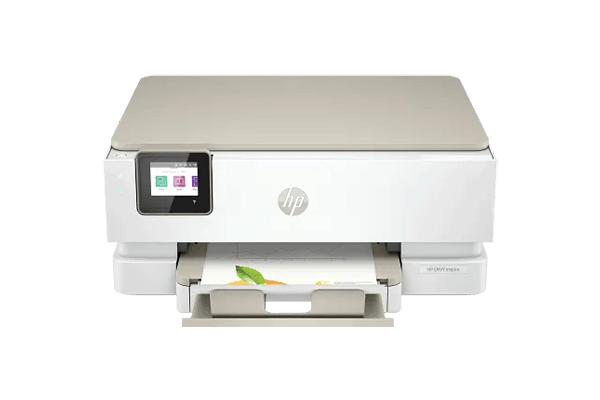
Some users don’t want to deal with setup at all. They just want a printer that works the moment it’s connected, without going through menus or installing software.
This is where this model fits as a best home printer for mac for simple home use. You connect it to WiFi, open your Mac, and it shows up through AirPrint.
There’s no extra configuration needed. You don’t have to search for drivers or adjust settings. For light use, it feels straightforward.
In real use, it behaves in a predictable way. You open a file, click print, and it responds. There’s no extra step in between.
If your goal is to avoid setup issues completely, this is one of the easiest ways to get started.
Key Features
Feature Details Type Inkjet AirPrint Yes Connectivity WiFi, USB Duplex Yes Best Use Home
Pros
- Fast and simple setup on macOS
- AirPrint detects it automatically
- Works well for occasional printing
Cons
- Ink runs out faster than tank systems
- Higher cost over time
- HP+ restrictions may limit usage
Why It Works Well for Mac
The printer connects through AirPrint without manual setup. Once it joins the same network, macOS detects it automatically.
It stays visible in the printer list for basic use. You don’t need to reconnect or adjust settings between print jobs.
It also works across Apple devices in a consistent way. You can print from a Mac, then switch to an iPhone or iPad without changing anything. That keeps the experience simple.
For users who want something easy, this works as a best home printer for mac without adding complexity.
Who Is This For?
- First-time printer users
- Home environments
- Users who print occasionally
3. Canon PIXMA TS7720

Printing images from a Mac often leads to one problem. The colors on screen look right, but the printed version feels off. That difference becomes obvious with photos or design work.
This model fits as a best home printer for mac for users who care about color output. The result stays closer to what you see on your display.
When printing photos, tones look more balanced. You don’t need to adjust brightness or contrast repeatedly. That reduces wasted paper and ink.
AirPrint also handles image files without breaking the flow. Larger files go through without delays or failed jobs.
If your current printer struggles with image quality, this one improves that without adding extra steps.
Key Features
Feature Details Type Inkjet AirPrint Yes Connectivity WiFi Photo Printing Yes Best Use Photo
Pros
- More accurate color output
- Good for photos and light design
- AirPrint handles image files well
Cons
- Ink cost can increase with frequent use
- Not built for high-volume printing
- No automatic document feeder
Why It Works Well for Mac
Mac displays are known for consistent color. This printer keeps output closer to that standard, which reduces mismatch between screen and print.
AirPrint remains stable when sending image files. Jobs don’t fail midway, even with larger photos.
It also holds connection during repeated prints, which matters when working on multiple files. That makes it a practical best home printer for mac for visual tasks.
Who Is This For?
- Home photo printing
- Casual design work
- Users focused on color accuracy
4. Epson EcoTank ET-3850

Some users don’t struggle with connection. Their problem shows up later when ink runs out too fast and printing starts to feel expensive.
This model fits as a best home printer for mac for users who print often and want to avoid constant cartridge replacement. The ink tank system changes how you use the printer over time.
Instead of worrying about ink levels every few days, you can print in larger batches without stopping. That makes it easier to rely on the printer for daily work.
In real use, the experience feels steady once the setup is done. It doesn’t require repeated attention or frequent adjustments.
If your printing routine is regular, this model reduces both interruptions and cost.
Key Features
Feature Details Type Ink Tank AirPrint Yes Connectivity WiFi, USB Duplex Yes Best Use High volume
Pros
- Low cost per page
- Ink lasts much longer
- Suitable for frequent printing
Cons
- Initial setup takes more time
- Can clog if left unused
- Design is basic
Why It Works Well for Mac
After the initial setup, the printer connects through AirPrint without requiring extra configuration. Once it appears on your Mac, it stays available for routine use.
The connection remains stable during repeated print jobs. You don’t need to reconnect or re-add the printer between sessions.
It handles larger document batches without dropping connection, which matters for users printing regularly. That makes it a reliable best home printer for mac for long-term use.
Who Is This For?
- Work-from-home setups
- Frequent document printing
- Users focused on reducing ink cost
5. Brother MFC-J4335DW

Some printers need constant attention. They work for a few days, then start showing small issues that add up over time.
This model fits users who want a best home printer for mac that stays simple and stable without regular maintenance. It focuses on basic functionality and keeps it consistent.
Once connected, it holds its place in the printer list. You don’t need to check settings or reconnect before printing.
In daily use, it feels quiet and predictable. It handles simple tasks without slowing down or dropping connection.
If you want something that works without needing to manage it, this is a safe option.
Key Features
Feature Details Type Inkjet AirPrint Yes Connectivity WiFi Duplex Yes Best Use Everyday
Pros
- Long-lasting ink compared to standard cartridges
- Stable connection for daily use
- Minimal maintenance
Cons
- Average photo quality
- Limited advanced features
- Less popular model
Why It Works Well for Mac
It connects through AirPrint and stays visible without requiring repeated setup. Once added, it rarely disappears from the printer list.
The printer responds consistently to basic print jobs. There are no frequent delays or failed tasks during normal use.
For simple printing needs, this works as a dependable best home printer for mac that doesn’t require constant fixes.
Who Is This For?
- Home users
- Casual printing needs
- Users who prefer low maintenance
6. HP Smart Tank 7301

When printing volume increases, most printers start showing limits. Ink runs out quickly, and frequent refills interrupt the workflow.
This model fits as a best home printer for mac for users who print in higher volumes. The ink tank system reduces how often you need to refill, which keeps printing uninterrupted.
You can send multiple jobs from your Mac without worrying about stopping halfway due to ink issues.
In real use, it handles repeated printing better than standard cartridge models. It may not be the fastest, but it stays consistent under load.
If your workload involves regular printing, this model keeps things steady.
Key Features
Feature Details Type Ink Tank AirPrint Yes Connectivity WiFi Duplex Yes Best Use High volume
Pros
- Lower ink cost over time
- Suitable for frequent printing
- AirPrint support available
Cons
- Setup takes longer
- Build quality is average
- Slower than laser printers
Why It Works Well for Mac
Once connected, it stays available without needing to be reconfigured. AirPrint works consistently even when sending multiple files.
The printer handles repeated jobs without disconnecting. That stability matters when printing in batches.
For users with higher workloads, this becomes a practical best home printer for mac that keeps running without interruption.
Who Is This For?
- Work-from-home users
- Frequent printing
- Higher volume workloads
7. Canon MAXIFY GX4020

Some printers perform well at first but struggle when used heavily. Delays start to appear, and connection issues become more frequent.
This model fits users who need a best home printer for mac for more demanding workloads. It is built to handle regular use without slowing down.
The connection stays stable even when sending multiple jobs in a row. It doesn’t disappear from your Mac during active use.
AirPrint works consistently across different Apple devices. You can switch between Mac, iPhone, and iPad without reconnecting.
If your printing needs go beyond occasional use, this model offers a more stable experience.
Key Features
Feature Details Type Ink Tank AirPrint Yes Connectivity WiFi, Ethernet Duplex Yes Best Use Office
Pros
- Strong build quality
- Stable under heavy workload
- Consistent performance
Cons
- Higher price
- Larger size
- Not ideal for light use
Why It Works Well for Mac
It connects through AirPrint and remains stable even during frequent use. The printer stays visible and responsive without requiring resets.
It handles multiple print jobs without breaking the connection, which is important for heavier workloads.
For users who rely on printing daily, this stands as a best home printer for mac that keeps up without slowing down.
Who Is This For?
- Home office with regular workload
- Small business use
- Users printing in large volumes
Common Mac Printing Problems (And Quick Fixes)
Even after choosing the best home printer for mac, small issues can still show up. Most of them are not hardware problems. They come from network behavior, sleep mode, or how macOS handles connections.
Instead of guessing, it’s better to fix them step by step. These are the most common cases Mac users deal with at home.
Mac Not Detecting Printer
This usually happens after the printer has been idle or the network changes.
- Restart your WiFi router and wait a few minutes
- Turn the printer off, then power it back on
- Remove the printer from macOS and reconnect it
- Make sure both Mac and printer are on the same network
- Avoid switching between multiple WiFi networks
If the printer still doesn’t appear, it’s often a network sync issue, not the device itself.
AirPrint Not Showing
AirPrint should appear automatically, but sometimes it doesn’t show at all.
- Check if AirPrint is enabled on the printer
- Confirm both devices are on the same WiFi network
- Restart your Mac to refresh the connection
- Reset network settings on the printer if needed
- Avoid guest networks or restricted connections
Even with the best home printer for mac, AirPrint can disappear if the network blocks discovery.
Slow Wireless Printing
Slow printing is rarely about speed. It usually comes from unstable wireless signals.
- Move the printer closer to the router
- Reduce interference from other devices
- Avoid placing the printer behind walls or metal objects
- Use a less crowded WiFi channel if possible
- Restart the router to refresh bandwidth
A stable connection matters more than raw speed. That’s why many users look for a best home printer for mac that holds connection without drops.
Quick Comparison Table
Not everyone wants to read long reviews. Some users just want a fast way to compare options before choosing the best home printer for mac. This table gives a clear overview so you can decide without going through every detail.
If you’re trying to pick the best home printer for mac quickly, this section helps you narrow it down based on your actual needs.
Printer Best For AirPrint Ink Type Key Strength Limitation Brother MFC-L3780CDW Home office Yes Toner Stable connection Not for photos HP Envy Inspire 7255e Home use Yes Cartridge Easy setup Ink cost Canon PIXMA TS7720 Photo printing Yes Cartridge Accurate colors Not for volume Epson EcoTank ET-3850 High volume Yes Tank Low cost per print Setup takes time Brother MFC-J4335DW Everyday use Yes Cartridge Low maintenance Average photos HP Smart Tank 7301 Heavy printing Yes Tank Ink efficiency Setup effort Canon MAXIFY GX4020 Home office pro Yes Tank Stable workload Higher price
Quick Picks
- If you want no connection issues, pick Brother MFC-L3780CDW
- For the easiest setup, go with HP Envy Inspire 7255e
- Trying to save on ink? Choose Epson EcoTank ET-3850
- Need better photo quality? Grab Canon PIXMA TS7720
These choices reflect what most users look for when searching for the best home printer for mac without testing multiple devices.
Recommended models:
- 10 Best Budget Printers for Home: Low Ink Cost Picks
- 10 Best Colour Printers for Home: Tested & Affordable
- 10 Best Home Printers for Occasional Use: No Dry Ink Issues
- 10 Best Photo Printers for Home: Real Output & Cost Tested
- 10 Best Printers for Students: Cheap & Reliable Picks
- 10 Best Laser Printers for Home: Low Cost per Page
- 10 Best Home Printers with Cheap Ink: Stop Overpaying
- 7 Best Printers for Crafts: Cardstock & Sticker Ready
- 10 Best Home Printers with Scanner: All-in-One Picks
- 10 Best Wireless Home Printers: Stable & Easy Setup
Final Verdict: Which One Should You Pick?
At this point, the choice depends on how you actually use your printer. Specs matter less than daily behavior.
If your priority is simplicity, HP Envy Inspire 7255e is the easiest option. You don’t deal with setup or configuration. It just works for basic tasks.
If stability matters more, Brother models stand out. They stay connected and don’t disappear from your Mac. That alone makes them feel like a reliable best home printer for mac for long-term use.
If cost is your concern, Epson EcoTank gives you better value over time. You print more without worrying about replacing ink constantly.
For heavier workloads, Canon MAXIFY GX4020 handles more demanding use without slowing down.
The right choice comes down to your routine. The best home printer for mac is the one that fits how often you print and how much effort you want to spend maintaining it.
FAQs Best Home Printers for Mac
What is the best printer for home use with a Mac?
It depends on usage. For simple tasks, HP Envy Inspire works well. For stability, Brother models are often chosen as a best home printer for mac.
Do Epson printers work well with Mac?
Yes, especially EcoTank models. They support AirPrint and stay consistent for regular printing.
How to choose a printer on Mac?
Focus on AirPrint, stable WiFi connection, and minimal setup. These matter more than speed or resolution.
Can I connect my MacBook to any printer?
Most modern printers work, but not all provide stable AirPrint support. That’s where choosing the best home printer for mac becomes important.
What is the difference between a printer and AirPrint?
A printer is the device. AirPrint is the system that lets your Mac print without installing drivers.


