

Many people search for best home printers wireless expecting a smooth setup, only to run into random disconnects, stuck print queues, and failed jobs from a phone. The printer shows online, then suddenly drops off the network after sitting idle. That pattern shows up across brands and price ranges.
A typical setup at home now involves multiple devices connected at once. Phones, laptops, tablets, and even smart TVs share the same network. A wireless printer for home use has to stay visible across all of them without delay. That’s where most problems start to appear.
Wireless printing has moved from optional to essential. You can send a document from a phone, switch to a laptop, then scan from another device within minutes. Many users assume any best wireless printer for home can handle that without issue. Real-world behavior shows something different.
The real problem is not the presence of WiFi. It’s the quality of the connection between the printer and router. Weak signal handling, unstable firmware, and poor app optimization all play a role. A printer can connect, but fail when traffic increases.
Wireless printing is no longer just a convenience. Industry data shows the wireless printer market continues to grow, driven by mobile printing and multi-device usage at home. Demand keeps increasing, while stability becomes the deciding factor.
A printer can look perfect on paper, then start disconnecting after a few idle cycles. What matters shows up during actual use, not in the spec sheet. It comes down to how well a printer handles real conditions. A strong connection under pressure matters more than extra functions that rarely get used.
How We Evaluated Wireless Performance
Specs don’t reveal how a printer behaves when three devices send jobs at the same time. That’s where connection quality starts to show. A printer might support WiFi, but still fail when handling multiple devices or large files. We focused on real usage patterns that show how each model behaves over time.
Instead of relying on brand claims, we looked at how printers respond during daily tasks. Sending files from a phone, switching networks, and running multiple jobs back-to-back reveal the true wireless connection performance. Small delays or drops quickly become noticeable.
We also tracked how stable each printer remains after idle periods. Many devices disconnect quietly, then fail to reconnect when a new job is sent. That pattern separates average models from the best home printers wireless options that maintain consistent availability.
Connection Stability
Connection stability shows how often a printer drops off the network. Some models disconnect after a few minutes of inactivity. Others maintain a steady link even after hours without use.
A stable printer responds immediately when a job is sent. There’s no need to restart the device or reconnect manually. Strong wireless printer stability reduces interruptions and keeps workflows smooth.
Mobile Printing Experience
Printing from a phone often exposes weak software integration. Files get stuck in the queue or take too long to process. This delay becomes frustrating during quick tasks.
The better models handle mobile jobs instantly. Apps detect the printer without repeated pairing attempts. Smooth mobile interaction is a key factor in selecting the best home printers wireless.
Multi-Device Performance
Homes rarely rely on a single device. Multiple users may send jobs at the same time. A printer must manage that load without slowing down or losing connection.
Some printers struggle when traffic increases. Others maintain consistent speed and visibility across all devices. Reliable wireless connection performance under load defines a strong multi-device printer.
Setup Simplicity
Setup plays a major role in first impressions. Complicated pairing steps often lead to connection issues later. A printer that connects quickly tends to remain stable.
Simple installation through guided apps or automatic detection reduces errors. The best home printers wireless models allow users to start printing within minutes, without repeated troubleshooting.
Common Wireless Printing Problems at Home
Even high-rated printers can struggle in real environments. Many issues appear after a few days of use, not during initial setup. These problems often push users to search again for best home printers wireless options.
Most failures relate to connection behavior, not hardware defects. A printer may work perfectly for a short time, then begin showing random errors. These patterns are common across different brands.
Printer Keeps Going Offline
One of the most frequent issues is the printer going offline without warning. It connects successfully, then disappears from the network after staying idle.
This behavior often relates to power-saving modes or weak signal recovery. When a new job is sent, the printer fails to respond. This creates a classic printer offline issue that interrupts daily tasks.
Slow Mobile Printing Response
Mobile printing delays are another common complaint. A file is sent from a phone, but the printer takes too long to react. Sometimes the job remains in queue without progress.
This delay can come from poor app optimization or unstable communication between devices. In some cases, users think the wireless printer not connecting, while the issue is actually response time.
Difficult Setup Process
Setup problems appear early and often lead to long-term issues. Pairing may fail multiple times, or the printer connects to the wrong network band.
Incorrect configuration can cause unstable performance later. A complicated setup increases the chance of connection drops and repeated troubleshooting.
Weak Signal Handling
Distance from the router plays a major role in wireless performance. Some printers struggle to maintain a connection when placed in another room.
Walls, interference, and network congestion can weaken the signal. A strong printer handles these conditions better, reducing the chances of a printer offline issue during normal use.
Quick Comparison of the Best Wireless Home Printers
Comparing models side by side helps identify which ones truly belong in the best home printers wireless category. Key factors include stability, mobile support, and long-term usability.
The table below highlights how each model performs in real conditions. It focuses on practical features rather than marketing claims, The comparison makes it easier to spot which models stay stable under load and which ones start slowing down.
| Model | Wireless Stability | Mobile Printing | Ink System | Scanner | Duplex | Best For |
|---|---|---|---|---|---|---|
| Canon MF665Cdw | Very Stable | AirPrint, Mopria | Toner | Yes | Yes | Overall |
| Epson ET-4850 | Stable | Epson App | Ink Tank | Yes | Yes | Cheap ink |
| HP OfficeJet Pro 9125e | Stable | HP Smart | Cartridge | Yes | Yes | Home office |
| Canon G3270 | Moderate | Canon App | Ink Tank | Yes | No | Budget |
| Epson ET-8500 | Stable | Epson App | Ink Tank | Yes | Yes | Photo |
| Brother MFC-L2820DW | Very Stable | Mopria | Toner | Yes | Yes | Laser |
| HP Smart Tank 7001 | Stable | HP Smart | Ink Tank | Yes | Yes | High volume |
| Brother HL-L2460DW | Very Stable | Mopria | Toner | No | Yes | Simple |
| Epson ET-2850 | Stable | Epson App | Ink Tank | Yes | Yes | Entry |
| HP Envy 6555e | Moderate | HP Smart | Cartridge | Yes | Yes | Occasional |
This wireless home printer comparison shows a clear pattern. Models with strong stability tend to use better firmware and optimized apps. They reconnect faster and handle multiple devices without dropping jobs.
Usage pattern changes everything. A printer that works fine for occasional printing may struggle in a busy household. Some users need high volume printing, while others focus on occasional tasks. Matching the printer to actual usage leads to better long-term performance.
10 Best Home Printers Wireless
Not every model in the best home printers wireless category performs the same once it’s connected to a real home network. Some stay online for days without interruption. Others drop connection right after going idle.
This section focuses on how each printer behaves during actual use. Multi-device traffic, mobile printing, and long idle periods reveal which models hold a stable connection. The goal is simple: printers that respond when you need them, not after troubleshooting.
Printersfy is supported by readers. As an Amazon Associate we earn from qualifying purchases. Learn more.
1. Canon Color imageCLASS MF665Cdw

This model stands out in the best home printers wireless category for one reason: it stays connected. Even after hours of inactivity, it responds immediately when a new job is sent. No need to restart or reconnect.
In homes with multiple devices, it handles traffic without slowing down. A phone, laptop, and tablet can send jobs at the same time, and the printer processes them without delay. That level of consistency makes it reliable for both home and light office use.
Mobile printing feels direct. Files sent through AirPrint or Mopria appear almost instantly in the queue. There’s no long waiting time or random failure. This is where it performs like a best home wireless printer scanner all in one that actually works under pressure.
For users dealing with frequent disconnect issues, this model removes that frustration. It holds a steady link to the network and recovers quickly if the signal fluctuates.
Key Features
| Feature | Specification |
|---|---|
| Wireless Stability | Very Stable |
| Mobile Printing | AirPrint, Mopria |
| Ink System | Toner |
| Duplex | Yes |
| Monthly Volume | High |
Pros
- Connection stays stable even after idle
- Fast response for mobile printing
- Handles multiple devices without delay
Cons
- Higher price compared to entry models
- Larger size requires more space
Best For
Users who want strong connection stability with minimal interruption.
SEE PRICE Amazon2. Epson EcoTank ET-4850

This printer fits well into the best home printers wireless list for users focused on long-term cost. It maintains a steady connection during daily use, especially for routine printing tasks.
Connection behavior stays consistent throughout the day. It doesn’t randomly drop offline when idle, which makes it reliable for households with regular printing needs. Students and families benefit from this stability.
Mobile printing through the Epson app works without repeated pairing. Jobs sent from a phone process smoothly, even when multiple devices are connected. This makes it a strong option as a best wireless printer for home use with cheap ink.
The refillable ink system reduces running costs significantly. Combined with stable wireless performance, it becomes a practical choice for high-volume environments where reliability matters more than speed spikes.
Key Features
| Feature | Specification |
|---|---|
| Wireless Stability | Stable |
| Mobile Printing | Epson App |
| Ink System | Ink Tank |
| Duplex | Yes |
| Monthly Volume | High |
Pros
- Low ink cost over time
- Easy refill system
- Stable connection for daily use
Cons
- Higher upfront cost
- Slightly slower than laser models
Best For
Users printing frequently who want lower long-term cost
SEE PRICE Amazon3. HP OfficeJet Pro 9125e
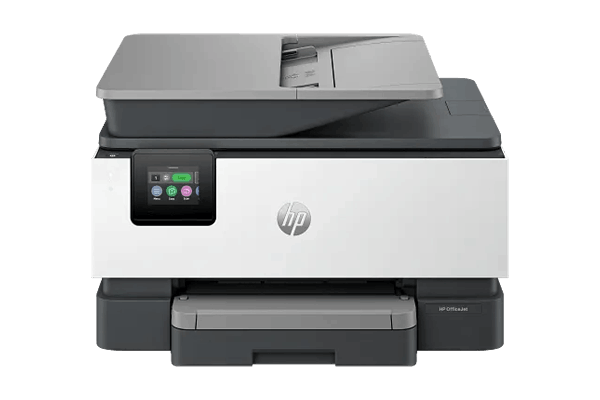
Designed for productivity, this model earns its place among the best home printers wireless for home office setups. It connects quickly and remains accessible across multiple devices without repeated setup.
The HP Smart app provides a smooth workflow for scanning and printing. Documents sent from a phone or laptop move into the queue without delay. This reduces interruptions during work sessions.
Connection remains stable under moderate load. Multiple users can send print jobs without causing disconnects or slowdowns. It performs well during back-to-back tasks such as printing, scanning, and copying.
This model works well as a best home wireless printer scanner copier for remote work environments. It handles document-heavy tasks without requiring constant reconnection or troubleshooting.
Key Features
| Feature | Specification |
|---|---|
| Wireless Stability | Stable |
| Mobile Printing | HP Smart |
| Ink System | Cartridge |
| Duplex | Yes |
| Monthly Volume | High |
Pros
- Fast print and scan performance
- Reliable app integration
- Handles office tasks efficiently
Cons
- Ink cost is higher over time
Best For
Home office users who need consistent performance across devices.
SEE PRICE Amazon4. Canon PIXMA G3270

This model enters the best home printers wireless list as a budget option that still delivers stable day-to-day performance. It doesn’t aim for high speed, but it keeps a consistent connection during light usage.
For single-user or low-traffic homes, the printer responds well. It stays online during short idle periods and reconnects without much delay. Issues start to appear when several devices send jobs at the same time.
Mobile printing works through the Canon app with minimal setup. Files go through without repeated pairing, though response time can slow slightly under load. It still fits users searching for a best wireless printer for home use with cheap ink.
The ink tank system helps reduce running costs, making it suitable for students or casual printing needs. It balances affordability with acceptable wireless behavior.
Key Features
| Feature | Specification |
|---|---|
| Wireless Stability | Moderate |
| Mobile Printing | Canon App |
| Ink System | Ink Tank |
| Duplex | No |
| Monthly Volume | Medium |
Pros
- Affordable initial cost
- Low ink usage over time
- Simple daily operation
Cons
- No automatic duplex
- Slower response under multi-device load
Best For
Budget users with light daily printing needs.
SEE PRICE Amazon5. Epson EcoTank ET-8500

This model targets users who care about color output while still expecting stable wireless performance. It holds its position in the best home printers wireless category by keeping a consistent connection during both photo and document printing.
The printer handles mobile jobs smoothly. Sending high-resolution images from a phone does not create long delays. It processes files with steady speed, even when handling larger print sizes.
Wireless behavior remains reliable during normal usage. It stays connected after idle and responds quickly when a new job is sent. This consistency supports users looking for best home printers wireless color performance without dealing with dropouts.
For creative work such as photo printing or design tasks, it maintains accuracy and stability. The combination of quality output and dependable connection makes it suitable for more demanding home setups.
Key Features
| Feature | Specification |
|---|---|
| Wireless Stability | Stable |
| Mobile Printing | Epson App |
| Ink System | Ink Tank |
| Duplex | Yes |
| Monthly Volume | Medium |
Pros
- High color accuracy
- Consistent wireless response
- Handles photo printing well
Cons
- Higher price range
Best For
Users focused on photo printing and color quality.
SEE PRICE Amazon6. Brother MFC-L2820DW

This printer focuses on document efficiency and strong connection reliability. It earns a place in the best home printers wireless group by maintaining a steady link even under continuous use.
Connection stability stands out. The printer remains visible across devices without dropping offline after idle periods. Jobs sent from different devices process without conflict or delay.
Mobile printing through Mopria works cleanly, especially for document-heavy tasks. Files move into the queue quickly, and the printer starts without hesitation. This behavior supports users searching for a best home wireless printer scanner for consistent output.
For work environments with frequent printing, it handles volume without slowing down. The laser system adds speed, while the wireless connection stays dependable throughout long sessions.
Key Features
| Feature | Specification |
|---|---|
| Wireless Stability | Very Stable |
| Mobile Printing | Mopria |
| Ink System | Toner |
| Duplex | Yes |
| Monthly Volume | High |
Pros
- Strong connection stability
- Fast document printing
- Reliable under heavy use
Cons
- No color printing
Best For
Users focused on document printing with stable performance.
SEE PRICE Amazon7. HP Smart Tank 7001

Built for high-volume printing, this model fits into the best home printers wireless category with a focus on efficiency and steady connectivity. It handles repeated tasks without frequent interruptions.
Wireless performance stays consistent during extended use. It doesn’t drop connection easily, even when multiple jobs are queued. This makes it suitable for small business or busy home environments.
The HP Smart app simplifies mobile printing. Files sent from different devices appear quickly, reducing waiting time. For users needing a best wireless printer for home use with cheap ink, this model offers both cost efficiency and stable operation.
Large ink capacity reduces the need for frequent refills. Combined with reliable wireless behavior, it supports users who print in high volume without constant maintenance.
Key Features
| Feature | Specification |
|---|---|
| Wireless Stability | Stable |
| Mobile Printing | HP Smart |
| Ink System | Ink Tank |
| Duplex | Yes |
| Monthly Volume | High |
Pros
- Low cost per page
- Handles large print volumes
- Stable connection during heavy use
Cons
- Larger physical size
Best For
Users with high-volume printing needs and frequent daily use.
SEE PRICE Amazon8. Brother HL-L2460DW

This model focuses on simplicity, yet it still earns a place in the best home printers wireless list. It connects quickly and stays available without constant checks or resets.
Connection behavior remains steady during light usage. It doesn’t disappear from the network after sitting idle, which is a common issue in this category. Jobs sent from a laptop or phone start without delay.
It handles basic printing without extra features getting in the way. That makes it suitable for users who want a printer that just works. For many homes, this kind of reliability is what defines the best home printers wireless experience.
The absence of a scanner keeps the design simple. Fewer functions often lead to fewer connection conflicts, which helps maintain stable performance over time.
Key Features
| Feature | Specification |
|---|---|
| Wireless Stability | Very Stable |
| Mobile Printing | Mopria |
| Ink System | Toner |
| Duplex | Yes |
| Monthly Volume | Medium |
Pros
- Fast document printing
- Strong and stable connection
- Simple operation
Cons
- No scanner included
Best For
Users who need basic printing with minimal setup.
SEE PRICE Amazon9. Epson EcoTank ET-2850

This entry-level option fits users who want stable wireless printing without a complex setup. It remains part of the best home printers wireless category due to its consistent performance in smaller households.
The printer stays connected during normal use. It handles daily tasks without dropping offline after idle periods. For homes with limited devices, the connection remains smooth and predictable.
Mobile printing through the Epson app works reliably. Files sent from a phone process without repeated attempts. This makes it suitable as a best home wireless printer scanner all in one for basic needs.
Its compact design fits smaller spaces while still offering scanning and duplex features. It doesn’t aim for high speed, but it delivers steady performance for everyday printing.
Key Features
| Feature | Specification |
|---|---|
| Wireless Stability | Stable |
| Mobile Printing | Epson App |
| Ink System | Ink Tank |
| Duplex | Yes |
| Monthly Volume | Medium |
Pros
- Low running cost
- Compact design
- Stable for daily use
Cons
- Slower print speed
Best For
Small households with moderate printing needs.
SEE PRICE Amazon10. HP Envy 6555e

This model targets occasional use while keeping wireless setup simple. It belongs in the best home printers wireless list for users who print occasionally but still want a reliable connection.
Setup is straightforward. The printer connects through the app without complicated steps, making it easy for first-time users. Once connected, it remains accessible for basic tasks.
Wireless performance is stable under light usage. It may show slight delays when multiple devices send jobs, but it handles normal home printing without major issues. It also works well as a best home wireless printer scanner for mac, especially for users in that ecosystem.
The compact design fits limited spaces, making it suitable for desks or small rooms. It focuses on convenience rather than high-volume output.
Key Features
| Feature | Specification |
|---|---|
| Wireless Stability | Moderate |
| Mobile Printing | HP Smart |
| Ink System | Cartridge |
| Duplex | Yes |
| Monthly Volume | Low |
Pros
- Easy setup process
- Compact and space-saving
- Simple mobile printing
Cons
- Higher ink cost over time
Best For
Users with occasional printing needs and limited space.
SEE PRICE AmazonInk Cost Breakdown for Wireless Home Printing
A printer can stay connected all day, but still become expensive after a few weeks of use. Ink runs out faster than expected, and replacement cost starts to stack. This is where many users begin to rethink their decision after picking from the best home printers wireless list.
Cost does not show up immediately. The first few prints feel normal, then usage increases and ink consumption becomes noticeable. Over time, the difference between cartridge and tank systems becomes impossible to ignore.
When comparing the best home printers wireless, long-term cost often matters more than the purchase price. A cheaper printer can turn into a costly setup once daily printing begins.
Cartridge vs Ink Tank
Cartridge printers are easy to start with. Install, connect, and print. The issue appears when pages start adding up. Ink levels drop quickly, especially for documents with heavy text or images.
Frequent replacement becomes part of the routine. This pattern makes it hard to maintain a printer low cost per page, especially for users who print regularly.
Ink tank systems approach this differently. Large reservoirs hold more ink, reducing the need for constant replacement. Refilling takes longer, but happens less often.
For users aiming to reduce cost, this setup aligns better with a cheapest ink printer approach. The difference becomes clear after a few refill cycles.
Refillable ink tank systems continue to grow in popularity due to significantly lower cost per page compared to traditional cartridges. That shift reflects how users adapt once they experience ongoing expenses.
Long-Term Cost
A printer used once a week behaves very differently from one used daily. Volume changes everything. Occasional printing may not expose the cost difference right away.
As usage increases, cartridge systems start showing limitations. More replacements, higher spending, and shorter intervals between changes. This pattern breaks any expectation of a printer low cost per page.
Ink tank printers handle volume better. They stretch usage over longer periods, keeping cost predictable. This is why they appear more often in the best home printers wireless category for high-volume users.
Matching printer type with usage avoids unnecessary expense. A mismatch leads to constant refilling or replacement, which quickly becomes frustrating.
Wireless Setup Tips That Actually Matter
A strong printer can still fail if the setup is off. Many connection issues start from simple placement or network conditions, not the printer itself. Even models from the best home printers wireless group can struggle in a poor setup environment.
Small adjustments often make a bigger difference than expected. Signal strength, network load, and device behavior all affect how the printer performs.
Router Placement
Distance weakens signal faster than most users expect. A printer placed in another room may show full connection at first, then lose stability over time.
Walls, furniture, and interference reduce signal strength. Keeping the printer closer to the router improves consistency and reduces dropouts in a wireless network printer setup.
Network Stability
A busy network changes how devices communicate. Streaming, downloads, and background updates can slow down printer response.
When bandwidth fluctuates, print jobs may delay or fail. A stable network environment improves the outcome of any wireless printer setup, especially during peak usage.
Multi-Device Usage
Multiple devices sending jobs at once can expose weak performance. Some printers handle this without issue, while others begin to lag or disconnect.
The best home printers wireless models manage traffic without losing visibility. They stay accessible even when several devices are active.
Official Apps
Using the correct app reduces communication problems. Official apps are designed for each printer model and handle pairing more efficiently.
Third-party tools may work at first, then fail during repeated use. A proper wireless network printer setup works best when supported by the manufacturer’s app.
How to Choose the Right Wireless Printer for Your Home
Every household uses a printer differently. Some print daily, others only when needed. The right choice depends on how the printer fits into that routine, not just the feature list.
The best home printers wireless options perform well when matched with the right usage pattern. A mismatch leads to slow performance, higher cost, or repeated connection issues.
For Students
Students need a setup that works without constant maintenance. Assignments, notes, and occasional documents require reliability more than speed.
A wireless printer for students should stay connected and keep costs low. Ink tank models often provide better value over time.
For Home Office
A home office setup runs differently. Printing, scanning, and copying happen throughout the day. Delays interrupt workflow and reduce productivity.
A wireless printer for home office should respond quickly and support duplex printing. Stable connection ensures documents move without interruption.
For Occasional Use
Some users print only a few times each month. In these cases, simplicity matters more than performance.
Compact models with easy setup work best. The best home printers wireless for this use focus on quick access without complex configuration.
For High Volume
Heavy usage demands consistency and efficiency. Large print jobs require both stable connection and low cost per page.
Ink tank printers handle this workload better. Within the best home printers wireless group, they provide longer intervals between refills and steady output.
Our recommendations:
- 10 Best Budget Printers for Home: Low Ink Cost Picks
- 10 Best Colour Printers for Home: Tested & Affordable
- 10 Best Home Printers for Occasional Use: No Dry Ink Issues
- 10 Best Photo Printers for Home: Real Output & Cost Tested
- 10 Best Printers for Students: Cheap & Reliable Picks
- 10 Best Laser Printers for Home: Low Cost per Page
- 10 Best Home Printers with Cheap Ink: Stop Overpaying
- 7 Best Printers for Crafts: Cardstock & Sticker Ready
- 7 Best Printers for Mac: No Setup Issues
- 10 Best Home Printers with Scanner: All-in-One Picks
Final Thoughts
A wireless label alone does not guarantee a smooth experience. Some printers stay connected all day, while others drop offline after short idle periods. That difference becomes clear once regular use begins.
The best home printers wireless stand out through consistency. They respond quickly, stay visible across devices, and handle daily tasks without interruption.
Features can look impressive, but connection behavior matters more. A printer that fails during use creates more frustration than one with fewer functions but stable performance.
A best wireless printer for home use should match how the household actually prints. Volume, device count, and network conditions all influence the final experience.
Reliable connection and practical cost lead to better long-term results. Among the best home printers wireless, stability always carries more weight than extra features.
FAQs About Best Home Printer Wireless
Why does my wireless printer keep going offline?
Many printers enter idle mode and fail to reconnect properly. Weak signal or network fluctuation can trigger a printer offline issue during normal use.
Do wireless printers need WiFi?
Most models rely on WiFi to communicate with devices. Some support direct connection, but a network setup improves consistency and accessibility.
Which printer has cheapest ink?
Ink tank printers usually offer the lowest running cost. They are often preferred as a cheapest ink printer for frequent use.
Can I print from phone?
Yes, modern printers support mobile printing. You can easily print from phone using built-in features or official apps.
Ink tank vs cartridge?
Ink tank systems reduce long-term cost, while cartridges are easier to replace but require more frequent changes.
