
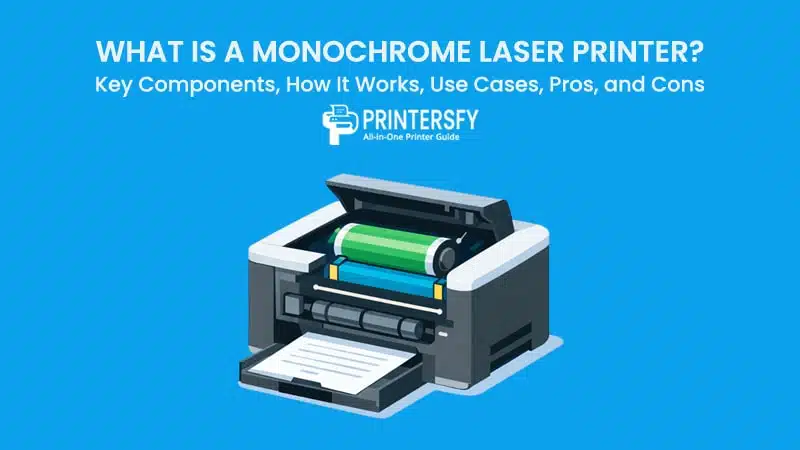
Behind stacks of office documents, school reports, and administrative records printed every day, there is one device that works almost unnoticed: the monochrome laser printer. It does not offer striking colors or artistic visual output, yet it serves as the backbone of text-based printing in many professional environments. When clarity, speed, and consistency matter more than aesthetics, this is the type of printer most often relied upon.
Unlike other printing technologies that emphasize visual flexibility, black-and-white laser printers are designed with a single primary goal: producing sharp, easy-to-read text in large volumes with stable efficiency. From small administrative offices to large-scale organizations, this device is chosen not because of trends, but because of the proven reliability of its technology over decades of use.
However, understanding this device goes beyond knowing that it “prints in black and white.” Its operation involves a precise electrophotographic process, tightly integrated mechanical and electronic components, and performance characteristics that distinguish it from inkjet printers and color laser printers. This is why it is important to view this technology as a complete system, rather than simply a basic printing tool.
This article discusses the monochrome laser printer in detail, covering its fundamental definition, key components, and working mechanism, as well as various usage scenarios, advantages, and limitations. With an educational and neutral approach, the discussion aims to help readers understand why this seemingly simple technology remains relevant in an increasingly digital world.
What Is a Monochrome Laser Printer?
A monochrome laser printer is a printing device designed specifically to produce black-and-white output using laser-based technology. Unlike printers that rely on liquid ink, this type of printer uses powdered toner and a precise electrostatic process to transfer text and images onto paper. Its primary role is not decorative printing, but the reliable production of clear, readable documents in environments where consistency and speed matter.
At its core, a monochrome laser printer focuses on text-based output. Contracts, invoices, internal reports, academic materials, and administrative records are typical examples of what this printer is built to handle. The absence of color is not a limitation in this context, but a deliberate design choice that allows the device to optimize performance for a specific purpose. By eliminating the complexity of color management, the printer can operate faster, more predictably, and with fewer variables affecting output quality.
Another defining characteristic of a monochrome laser printer is how it positions itself among other printing technologies. While inkjet printers are often associated with versatility and photo printing, laser printers—especially monochrome models—are associated with stability and efficiency. The laser printing mechanism enables uniform text density, sharp edges, and minimal variation between pages, even during long print runs. This makes the technology especially suitable for offices and institutions where printing is routine rather than occasional.
In practical terms, a monochrome laser printer is not chosen for novelty or visual appeal. It is chosen because it performs a narrow task exceptionally well. Its design reflects a long-standing demand for printers that can handle high document volumes without frequent intervention, unexpected quality drops, or excessive maintenance. This focus on reliability explains why the technology remains widely used, even as digital workflows continue to expand.
Definition and Core Purpose
From a technical standpoint, a monochrome laser printer can be defined as a black and white laser printer that uses a laser beam, electrostatic charges, and heat to produce permanent text and simple graphics on paper. Instead of spraying ink droplets, it forms an image by selectively attracting toner particles to a rotating drum, which then transfers that image onto the page.
The core purpose of this printer is efficiency in text reproduction. It is engineered to deliver consistent results across hundreds or thousands of pages, maintaining the same level of sharpness and alignment throughout a print job. This consistency is one of the reasons monochrome laser printers are commonly found in business offices, educational institutions, and administrative departments.
According to 1800 Office Solutions, monochrome laser printers use a laser beam to create an electrostatic image on a drum, which attracts toner particles that are then fused onto paper using heat and pressure. This process results in sharp, clean prints while keeping operating costs lower than many color-based printing systems. By relying on toner rather than liquid ink, the printer avoids issues such as smudging, uneven saturation, or drying delays.
Beyond the mechanics, the purpose of a monochrome laser printer is also economic. Printing in black and white reduces consumable complexity, simplifies maintenance, and lowers the cost per page over time. This makes the device particularly suitable for organizations that prioritize throughput and legibility over aesthetic output. In this sense, the printer is less a general-purpose tool and more a specialized instrument designed around predictable document workflows.
Historical and Technical Context
The development of monochrome laser printers is closely tied to the evolution of laser printer technology itself. Early laser printers emerged as office-oriented machines, intended to replace slower impact printers and provide a more professional appearance for printed documents. Color printing was neither practical nor necessary for most business tasks at the time, which naturally positioned monochrome output as the standard.
As office printing needs grew, so did the demand for speed and reliability. Laser technology offered a solution by enabling faster page production and higher print resolution compared to earlier methods. Over time, improvements in electronic control systems, drum materials, and toner composition refined the process, making monochrome laser printers more compact, energy-efficient, and accessible to smaller offices.
Technically, the principles behind laser printing have remained largely consistent. The key innovations have focused on efficiency, durability, and integration with digital systems. Modern monochrome laser printers benefit from more precise laser scanning, improved thermal control in fuser units, and better toner formulations that adhere more evenly to paper. These refinements have allowed the technology to remain relevant even as alternative printing solutions have emerged.
In office printing environments, this historical continuity matters. It means that monochrome laser printers are built on decades of proven design rather than experimental concepts. Their continued use reflects trust in a mature technology that has adapted incrementally without losing its original strengths.
Key Components of a Monochrome Laser Printer
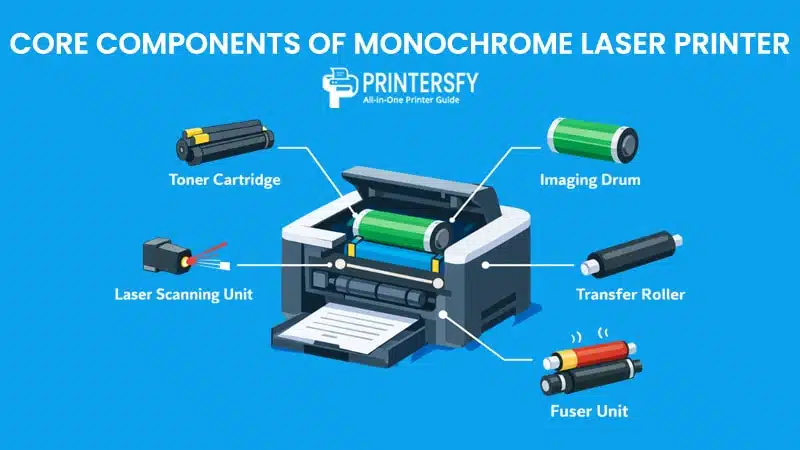
The way a monochrome laser printer performs is shaped by how its internal hardware works together. Each component of printer has a specific task, and the printing result depends on how smoothly those tasks connect from start to finish. This interaction is what sets laser printers apart from ink-based machines and explains why they can produce stable, uniform output even when handling large print volumes.
Main Hardware Components
Toner Cartridge
The toner cartridge stores the powdered toner used during printing. Unlike ink, toner is composed of fine plastic particles mixed with pigments and binding agents. When exposed to heat, these particles melt slightly and bond to the paper surface. The quality of the toner cartridge directly affects text sharpness, edge definition, and overall print density.
Because toner does not dry out like liquid ink, the cartridge can maintain consistent performance over long periods of inactivity. This characteristic contributes to the reliability associated with monochrome laser printers, particularly in environments where printing patterns fluctuate.
Imaging Drum
The imaging drum, sometimes referred to as the photoconductor drum, is responsible for forming the printable image. It receives an electrostatic charge and is selectively discharged by the laser to create a latent image. Toner particles are then attracted to these charged areas.
The condition of the imaging drum has a significant impact on print consistency. Wear or contamination can lead to faded areas, repeated marks, or uneven output. In many printer designs, the drum is either integrated with the toner cartridge or installed as a separate replaceable unit.
Laser Scanning Unit
The laser scanning unit directs the laser beam across the surface of the imaging drum. Controlled by digital signals, it determines exactly where toner should be applied. Precision at this stage is essential for producing clean text and accurate character shapes.
Any misalignment or instability in the laser scanning unit can affect resolution and clarity. This component is one of the reasons laser printers excel at text reproduction, as it allows extremely fine control over image placement.
Fuser Unit
The fuser unit applies heat and pressure to bond the toner permanently to the paper. It typically consists of heated rollers that melt the toner particles just enough to fuse them into the paper fibers.
The effectiveness of the fuser unit influences print durability. Proper fusing ensures that text does not smear, flake, or fade easily. Over time, the fuser is subject to wear due to repeated heating cycles, making it a key maintenance consideration in high-volume printing environments.
Transfer Roller
The transfer roller moves toner from the imaging drum onto the paper. It applies an opposite electrical charge that pulls the toner image onto the sheet before it enters the fuser unit.
Consistency at this stage is crucial. An uneven transfer can result in light prints or missing sections. When functioning correctly, the transfer roller ensures that the toner image remains intact during the transition from drum to paper.
How Components Work Together
The printing process in a monochrome laser printer is best understood as a sequence of coordinated actions rather than isolated steps. This sequence is commonly described as the electrophotographic printing process. Each component prepares the conditions for the next, creating a continuous flow from digital data to physical output.
First, the imaging drum is uniformly charged. The laser scanning unit then alters this charge pattern based on the digital document, creating an invisible image. Toner particles adhere to this image, forming the visible text. The transfer roller moves the toner onto paper, and finally, the fuser unit permanently bonds it in place.
What makes this process effective is timing and alignment. Each component operates within precise tolerances, ensuring that the toner image remains stable from start to finish. This coordination explains why monochrome laser printers can maintain consistent quality even during extended print jobs.
Core Components and Their Functions
| Component | Function | Impact on Print Quality |
|---|---|---|
| Toner Cartridge | Stores and supplies toner powder | Text sharpness and density |
| Imaging Drum | Creates the electrostatic image | Print consistency and accuracy |
| Laser Scanning Unit | Directs the laser to form the image | Character precision and edge clarity |
| Transfer Roller | Transfers toner from drum to paper | Uniform toner placement |
| Fuser Unit | Bonds toner permanently to paper | Durability and smudge resistance |
How Does a Monochrome Laser Printer Work?

A monochrome laser printer produces each page through a controlled sequence of electrical, mechanical, and thermal actions. Unlike ink-based systems that spray liquid onto paper, laser printing relies on static charges, fine toner powder, and heat to create durable text output. The process happens quickly, but every stage plays a specific role in ensuring that letters remain sharp, evenly spaced, and consistent from the first page to the last.
At the center of this process is coordination. Data from a computer is translated into precise electrical instructions, which guide how the internal components behave. The printer does not simply “draw” text on paper. Instead, it builds an invisible image first, then turns that image into a physical print through a series of carefully timed steps. This structured approach explains why laser printers are often chosen for environments that demand predictable results over long print runs.
Understanding how the laser printing process works also helps explain its strengths and limitations. Speed, text clarity, and durability are not accidental outcomes. They are direct results of how the technology handles toner, paper movement, and heat. By breaking the process down step by step, the mechanics behind everyday printing become easier to grasp.
Step-by-Step Laser Printing Process
The laser printing process follows a repeatable cycle that occurs every time a page is printed. While the steps happen rapidly, each one prepares the conditions for the next.
Charging
The process begins with the imaging drum receiving a uniform electrical charge. This charge creates a neutral starting surface that can later be selectively altered. The drum’s coating is sensitive to light and electricity, allowing it to hold and release charges in precise patterns.
This initial charging stage is essential. Without an even charge across the drum, the image formed later would lack consistency. Small variations at this point could lead to faded areas or uneven text density, especially noticeable in large blocks of text.
Exposing
Once the drum is charged, the laser beam printing stage begins. A laser scans across the drum’s surface, guided by digital data from the document being printed. Wherever the laser touches, it alters the electrical charge, creating an invisible pattern that matches the text or graphics on the page.
This is where precision matters most. The laser does not draw visible ink; it creates a charge-based blueprint. The accuracy of this step determines the sharp edges of characters and the clean separation between letters. Fine control of the laser beam allows laser printers to handle small fonts and dense text without blurring.
Developing
After the image is exposed on the drum, toner particles are introduced. These particles carry an opposite electrical charge, causing them to stick only to the areas altered by the laser. The result is a visible toner image that mirrors the digital document.
The developing stage turns an invisible electrostatic pattern into something tangible. The quality of the toner and the consistency of its charge affect how solid the text appears. Well-balanced toner distribution leads to even strokes and clear lines, while inconsistencies can cause grainy or faded output.
Transferring
The toner image on the drum must now move onto paper. As a sheet passes through the printer, the transfer roller applies an opposing charge that pulls the toner from the drum onto the paper surface. At this point, the toner rests loosely on the page and can still be disturbed.
Timing and alignment are critical during transferring. The paper must pass the drum at exactly the right moment to keep text properly positioned. Any slippage or uneven pressure could result in misaligned prints or light areas.
Fusing
The final step is fusing. The paper moves through heated rollers that apply both heat and pressure. This causes the toner particles to melt slightly and bond permanently with the paper fibers.
Fusing determines print durability. Properly fused toner resists smudging, flaking, and fading under normal handling. Once this stage is complete, the page exits the printer as a finished document, ready for immediate use.
Performance and Print Quality Factors
The effectiveness of laser printing is influenced by several performance-related factors that go beyond the basic process. Print speed, text sharpness, and paper type all interact with the technology to shape real-world results.
Print speed is largely determined by how efficiently the printer can repeat the laser printing process. Because the drum can be prepared quickly and the laser operates with high precision, laser printers are well suited for producing many pages in a short time. This makes them reliable for environments where waiting for documents is not an option.
Text sharpness depends on both laser accuracy and toner behavior. Fine control of the laser beam allows clean character edges, while stable toner formulation ensures even coverage. Together, these elements produce text that remains legible even at small font sizes.
Paper type also plays a role. Smooth, consistent paper allows toner to bond evenly during fusing, resulting in crisp output. Heavier or textured paper can still be used, but it may require adjusted settings to maintain optimal results. These interactions explain why laser printers perform best when paired with paper designed for toner-based printing.
Common Use Cases of Monochrome Laser Printers

The practical value of a monochrome laser printer becomes clear when looking at how it is used in different environments. Its strengths align closely with settings where text-based documents dominate and reliability matters more than visual variety.
Office and Business Environments
In offices, printing is often a routine task rather than a creative one. Contracts, invoices, internal memos, financial statements, and reports all require clarity and consistency. A monochrome laser printer fits naturally into this workflow because it handles repetitive tasks without frequent interruptions.
Businesses benefit from fast output and predictable costs. High-volume printing can be managed without worrying about color calibration or ink drying issues. Over time, this stability reduces downtime and simplifies maintenance planning, making laser printers a dependable choice for daily operations.
Educational and Institutional Use
Schools, universities, and training centers rely heavily on printed materials. Handouts, exams, administrative notices, and study guides are typically text-heavy and produced in large quantities. In these settings, clarity is essential, and color is often unnecessary.
Laser printers meet these needs by delivering consistent text quality across many pages. They can handle scheduled printing periods, such as exam preparation or semester transitions, without significant drops in performance. Their durability also suits shared environments where multiple users rely on the same device.
Home Office and Professional Users
In home offices and professional workspaces, printing needs are more varied but still focused on documents rather than visuals. Freelancers, consultants, and remote workers often print contracts, drafts, and reference materials.
A monochrome laser printer provides reliability without excessive complexity. It can remain idle for periods and still produce clean output when needed. This makes it appealing for users who want dependable performance without frequent cartridge replacement or print quality adjustments.
Typical Use Cases and Printing Needs
| Use Case | Printing Volume | Why Monochrome Laser |
|---|---|---|
| Office | High | Speed & low cost |
| School | Medium–High | Text clarity |
| Home Office | Medium | Reliability |
Across these scenarios, the monochrome laser printer proves its value by focusing on what matters most: readable text, stable performance, and efficient operation. Its continued use reflects how well the technology aligns with everyday printing demands rather than short-term trends.
Advantages of Monochrome Laser Printers
Monochrome laser printers are built around a clear set of priorities. They are not designed to be versatile visual tools, but dependable machines for producing large amounts of text with consistent results. Their advantages become most visible in environments where printing is frequent, deadlines matter, and output quality must remain stable over time.
Speed and Efficiency
One of the most noticeable advantages of a monochrome laser printer is speed. From the moment a print command is sent, the device is optimized to move paper quickly through the printing cycle. Once the printer has warmed up, each additional page can be produced with minimal delay, making it well suited for batch printing.
This speed is not just about pages per minute on a specification sheet. In real-world use, it means less waiting between documents and fewer interruptions during busy work periods. Offices that handle invoices, reports, or administrative paperwork often rely on this predictable output pace to keep workflows moving. The printer does not slow down significantly as print jobs grow larger, which is a key advantage over many ink-based alternatives.
Efficiency also comes from how the printer handles its resources. Because it prints only in black and white, there is no need to manage multiple cartridges or balance color output. The internal process remains focused on a single task, allowing the hardware to operate with fewer adjustments and less overhead. Over time, this focus translates into smoother operation and fewer unexpected slowdowns.
Cost Efficiency (Cost per Page)
Cost efficiency is one of the strongest reasons organizations choose monochrome laser printers. The concept of low cost per page is central here. Toner cartridges are designed to yield a large number of prints before needing replacement, especially when compared to ink cartridges used in many inkjet printers.
In practical terms, this means the expense of printing each page remains relatively stable, even as volume increases. Businesses that print hundreds or thousands of pages per month can estimate printing costs more accurately and avoid sudden spikes in consumable spending. This predictability is particularly valuable for budgeting and long-term planning.
Another factor contributing to cost efficiency is reduced waste. Toner does not dry out when the printer sits unused, which minimizes the loss often associated with ink-based systems. Pages that are printed tend to come out correctly the first time, reducing the need for reprints due to smudging or uneven coverage. When viewed over months or years, these small savings accumulate into a meaningful advantage.
Reliability for High-Volume Printing
Reliability is where monochrome laser printers truly distinguish themselves. They are commonly selected for high-volume printing because they are designed to handle repeated use without frequent maintenance. Components such as the imaging drum and fuser unit are built to endure extended printing cycles, rather than occasional, sporadic jobs.
In high-volume printing environments, consistency matters as much as speed. Documents need to look the same regardless of when they are printed or how many pages came before them. Laser printers maintain uniform text density and alignment across long print runs, reducing the risk of faded sections or misaligned output.
This reliability also affects downtime. Fewer paper jams, stable toner performance, and predictable wear patterns allow organizations to plan maintenance instead of reacting to sudden failures. As a result, monochrome laser printers are often trusted in roles where printing cannot afford to stop, such as administrative offices, financial departments, and educational institutions during peak periods.
Disadvantages of Monochrome Laser Printer
While monochrome laser printers offer clear benefits, they are not without limitations. A balanced evaluation requires acknowledging the scenarios where this type of printer may not be the best choice.
No Color Printing Capability
The most obvious limitation is the absence of color printing. Monochrome laser printers are restricted to black-and-white output, which limits their usefulness for materials that rely on visual elements. Marketing brochures, presentations, and graphics-heavy documents often require color to communicate effectively, and this is something monochrome printers cannot provide.
For users who occasionally need color output, relying solely on a monochrome printer may lead to inconvenience or the need for an additional device. In mixed-use environments, this limitation can complicate workflows, especially when both text documents and visual materials are produced regularly.
Limited Graphic Output
Even within black-and-white printing, monochrome laser printers are not ideal for detailed graphics or photographic images. While they can reproduce simple diagrams or charts adequately, subtle gradients and complex visuals may lose detail. The technology prioritizes sharp text over tonal variation, which affects how images appear on the page.
This limitation does not impact text-heavy documents, but it becomes noticeable when printing materials that depend on visual nuance. Users who frequently work with image-based content may find the output too rigid for their needs.
Initial Hardware Cost Considerations
Another factor to consider is the initial hardware cost. Monochrome laser printers often cost more upfront than basic inkjet models. For individuals or small offices with low printing volumes, this initial expense may feel difficult to justify.
Although long-term operating costs are typically lower, the higher purchase price can be a barrier for users who print infrequently. In such cases, the advantages of low cost per page and high-volume efficiency may not outweigh the initial investment. This is why laser printer disadvantages are often more noticeable at the entry level, where printing needs are limited.
Common Misconceptions About Monochrome Laser Printers
Despite being widely used, monochrome laser printers are often misunderstood. Many assumptions about them come from outdated experiences or comparisons that ignore how printing needs differ from one environment to another. Addressing these misconceptions helps place the technology in its proper context rather than judging it by standards it was never designed to meet.
“Monochrome Printers Are Outdated”
One common belief is that monochrome printers belong to the past, replaced by modern color and multifunction devices. In reality, their continued presence in offices and institutions suggests the opposite. A monochrome laser printer is still chosen because it solves a specific problem reliably: producing clear text at scale.
Calling the technology outdated usually confuses age with relevance. While the core principles of laser printing have existed for decades, the hardware itself has evolved. Modern models are faster, more energy efficient, and better integrated with digital systems than their early counterparts. The fact that the underlying method has remained stable is a sign of maturity, not obsolescence.
In many professional environments, consistency matters more than novelty. As long as text-based documents remain essential, monochrome laser printers will continue to serve a practical role.
“Laser Printers Are Expensive to Maintain”
Another widespread assumption is that laser printers cost more to maintain than ink-based alternatives. This perception often comes from comparing upfront toner prices without considering how many pages those cartridges can produce.
While a toner cartridge may appear expensive at first glance, it typically yields far more pages than an ink cartridge. Over time, this translates into a lower cost per page, especially for users who print regularly. Maintenance intervals are also less frequent, since toner does not dry out and internal components are designed for sustained use.
For organizations that print in volume, maintenance costs tend to be predictable rather than surprising. This stability is one reason monochrome laser printers are trusted in operational settings where downtime is costly.
“Inkjet Is Always Better for Home Use”
Inkjet printers are often recommended for home users because of their lower purchase price and ability to print color. However, this does not automatically make them the better option for every home environment.
Many home offices focus on documents such as contracts, drafts, invoices, and reference materials. In these cases, a monochrome laser printer can offer better reliability and cleaner text output. It can sit unused for weeks and still produce consistent results when needed, something ink-based printers may struggle with due to drying issues.
The idea that inkjet is always better for home use overlooks how varied home printing needs can be. The right choice depends on what is being printed, how often, and with what expectations for quality and maintenance.
Monochrome Laser Printer vs Other Toner-Based Printers
Toner-based printers share the same core printing method, but each type serves a different purpose. The distinction becomes clear when comparing a monochrome laser printer with other toner-based options such as color laser printers and LED printers.
vs Color Laser Printer
A monochrome laser printer is designed exclusively for black-and-white document printing. It uses a single toner cartridge, which simplifies maintenance and keeps operating costs low. This type of printer is commonly used in offices that prioritize speed, text clarity, and consistent output.
A color laser printer, on the other hand, uses multiple toner cartridges to produce color prints. This allows charts, graphics, and visual documents to be printed internally. However, color printing introduces higher consumable costs, more complex maintenance, and longer processing time for each page. For environments that print mostly text, the added complexity of color printing often provides little practical benefit.
vs LED Printer
An LED printer also belongs to the toner-based category but differs in how the image is created. Instead of a moving laser beam, an LED printer uses a fixed array of light-emitting diodes to expose the imaging drum.
From a usage perspective, LED printers and laser printers produce similar output. The difference lies mainly in internal design. LED printers reduce mechanical movement, which may improve durability, while monochrome laser printers rely on proven laser scanning systems that deliver precise text output. Functionally, both serve similar document-focused roles.
Conclusion
A monochrome laser printer is best understood as a focused tool rather than a general-purpose device. It is designed to produce black-and-white documents with speed, consistency, and durability, using a printing process that has been refined rather than replaced over time. Its value lies not in versatility, but in how well it performs a clearly defined task.
By examining how the technology works, where it is commonly used, and what its strengths and limitations are, it becomes clear why this type of printer remains widely deployed. It is not competing with color printers or inkjet models on visual output, but serving environments where text clarity and predictable performance are essential.
As noted by 1800 Office Solutions, monochrome laser printers remain a preferred option for businesses and institutions that prioritize efficiency, low operating costs, and reliable document output. This continued relevance reflects how well the technology aligns with real-world printing demands, even as workplaces and workflows continue to evolve.
FAQs About Monochrome Laser Printers
What is a monochrome laser printer?
A monochrome laser printer is a printer that produces black-and-white output using laser technology and toner powder instead of liquid ink. It is mainly used for text-based documents.
Do monochrome laser printers scan in color?
The printer itself does not print in color. If it is part of a multifunction device, the scanner may support color scanning, but printed output remains black and white.
Which is the best monochrome laser printer?
There is no single best model. The right choice depends on printing volume, speed requirements, and reliability rather than brand alone.
Does a monochrome laser printer need ink?
No. It uses toner powder, not liquid ink.
Which is better: monochrome laser printer or inkjet printer?
Neither is universally better. Laser printers suit frequent text printing, while inkjet printers suit occasional color and image printing.
