

Owning one of the best home printers for occasional use sounds simple, until it sits unused for weeks and suddenly refuses to print properly. The first page comes out faded, lines appear, or nothing prints at all. This is where most users start questioning their choice.
Leave a printer untouched for a while, and problems begin quietly. Ink inside the system thickens, nozzles get blocked, and the printer struggles to deliver a clean output. What feels like a minor issue quickly turns into repeated maintenance and wasted supplies.
Many people fall into the same trap. They buy the cheapest option available, expecting it to handle light usage without issues. A few months later, the ink dries, cleaning cycles drain the cartridge, and printing becomes unreliable. The initial savings disappear faster than expected.
The best home printers for occasional use are not defined by price, but by how they perform after sitting idle. Some models break down under inactivity, while others stay ready even after long gaps between prints.
If your printing habits are irregular, a proper printer for infrequent use makes a huge difference. A true low maintenance printer should not demand constant attention just to stay functional. It should work when needed, without extra steps or hidden costs.
This guide focuses on options that handle real usage patterns. No overpromises. No unnecessary features. Just printers that stay reliable even when they are not used every da
Why Most Printers Fail When Used Occasionally
Some printers handle idle time better than others. The difference comes down to how they store and use their printing materials.
Ink Drying and Clogged Printheads
Inkjet printers struggle when left idle. Inside the printhead, tiny nozzles hold liquid ink. Once printing stops for days or weeks, that ink starts to dry. The result is partial blockages that affect print quality.
When this happens, users often run cleaning cycles. These cycles try to push fresh ink through the clogged nozzles. Sometimes it works, but often it just wastes more ink while the problem remains.
When an inkjet printer sits unused, leftover ink inside the nozzles can gradually dry and block the printhead. To restore print quality, the device often runs automatic cleaning cycles, which consume additional ink even before any actual document is printed.
This is why many users say their printer ink dries out if not used. It is not a rare issue. It is how the technology behaves when idle. Anyone looking for the best home printers for occasional use needs to understand this limitation early.
Hidden Cost of Cleaning Cycles
Cleaning cycles sound helpful, but they come at a cost. Every cycle pulls ink from the cartridge, even if no documents are printed. Over time, a large portion of your ink goes into maintenance instead of actual use.
That is why people replace cartridges more often than expected. The printer looks inactive, yet ink levels keep dropping. This leads many users to believe their printer is inefficient or defective.
A printer that doesn’t clog avoids this cycle entirely. Laser printers, for example, skip this issue since they do not rely on liquid ink. This difference matters more when looking for the best home printers for occasional use.
Why “Cheap Printers” Often Cost More Long-Term
Low upfront cost often hides higher long-term expenses. Cartridge-based inkjets look affordable at first, but frequent replacements quickly add up. Ink tank printers reduce refill costs but still face drying risks.
Laser printers change the equation. They use toner instead of liquid ink, which stays stable over time. That makes them the cheapest printer to maintain for users who print occasionally.
A cheap printer might seem like a smart choice, but long-term usage tells a different story. Many users switch after realizing their first purchase could not handle idle periods. That is why selecting the best home printers for occasional use requires looking beyond price tags.
Inkjet vs Laser for Occasional Use
The type of printer you choose has a direct impact on how it behaves after sitting unused. Some models recover instantly, while others struggle the moment they are turned back on
Why Laser Printers Are More Reliable
Laser printers handle idle time far better. They rely on dry toner, not liquid ink, so there is no risk of drying inside the system. You can leave a laser printer unused for weeks and still get a clean print on the first try.
Laser printers use dry toner instead of liquid ink, which eliminates the risk of drying or clogging over time.
This makes them a strong candidate for the best home printers for occasional use. They require less maintenance and deliver consistent output without extra cleaning cycles.
For anyone comparing inkjet vs laser for occasional use, reliability becomes the deciding factor. Laser models simply handle inactivity better.
When Ink Tank Still Makes Sense
Ink tank printers still have their place. They offer very low cost per print, which appeals to budget-conscious users. If you print regularly enough to keep ink flowing, they can be efficient.
However, they are not completely immune to drying. Long idle periods still create risk, especially in warm environments. Users need to print occasionally to keep the system active.
An ink efficient printer like an ink tank model works best when there is some level of routine usage. Without it, the benefits start to fade. That is why they sit in the middle when evaluating the best home printers for occasional use.
Feature Inkjet Ink Tank Laser Risk of Drying High Medium None Maintenance High Medium Low Cost per Print Medium Low Low Best For Rare use (limited) Budget users Occasional use
Laser printers clearly stand out as a low maintenance printer option. Ink tanks offer savings but require attention. Standard inkjets struggle the most in idle conditions.
The right best home printers for occasional use depend on how often you print and how much maintenance you are willing to handle.
Quick Comparison of the Best Printers for Occasional Use
Not every printer handles occasional use well. Some models require constant activity, while others stay ready no matter how long they sit idle. Laser printers remain the most stable option, delivering consistent results without maintenance.
Ink tank printers offer lower running costs, but they come with trade-offs. They work best with light but regular usage. If left untouched for too long, performance can drop. That is why many users searching for the best printer for infrequent use end up going with laser models.
A low maintenance printer reduces frustration and long-term costs. Instead of focusing on the cheapest option, it makes more sense to look at reliability and cost per print over time. The best home printers for occasional use are the ones that stay ready without constant upkeep.
For users who print in bursts, a low cost per print printer can still make sense, but only if it handles idle time well. The models below balance reliability, cost, and performance for different needs.
Printer Type Key Strength Best For Brother HL-L2460DW Laser Low maintenance Rare printing Brother HL-L2350DW Laser Low cost per print Budget users MFC-L2750DW XL Laser AIO All-in-one Home office MF465dw Laser AIO High speed Heavy documents HL-L3280CDW Color Laser Color stability Graphics ET-2800 Ink Tank Ink efficiency Budget home ET-4850 Ink Tank AIO Office features Small office G3270 Ink Tank Cheap refill Light use GX4020 Ink Tank Low cost/page Batch printing ET-5850 Ink Tank Pro Premium performance Business
Each of these models fits a specific use case. The key is matching your habits with the right type. That is how you land on the best home printers for occasional use without wasting money or dealing with constant maintenance.
10 Best Home Printers for Occasional Use
Some printers stay reliable even after weeks of inactivity, while others start failing the moment you press print. That gap becomes obvious with light usage. The models below focus on stability, low upkeep, and consistent output without constant attention.
Printersfy is supported by readers. As an Amazon Associate we earn from qualifying purchases. Learn more.
1. Brother HL-L2460DW

Leave this printer unused for weeks, and it still delivers a clean page without extra steps. The Brother HL-L2460DW is built for people who do not want to deal with maintenance at all. It uses a laser system, so there is no liquid ink sitting inside waiting to dry.
This makes it one of the best home printers for occasional use for anyone tired of running cleaning cycles or replacing dried cartridges. It behaves like a true low maintenance printer for home, staying ready without routine intervention. You turn it on, send a file, and it prints.
Another advantage is consistency. Whether it has been idle for days or weeks, output quality remains stable. That is what defines a printer that works after weeks unused. No streaks, no missing lines, and no wasted supplies.
Feature Detail Type Monochrome Laser Print Speed ~34 ppm Duplex Yes Wireless Yes
Pros
- Very low maintenance
- Fast and consistent printing
- No ink drying issues
- Reliable wireless connection
Cons
- Monochrome only
- No scanning or copying
- Basic display
Who is this for
- Users who print occasionally and want zero maintenance
- Home users printing documents once in a while
- Anyone tired of ink drying problems
2. Brother HL-L2350DW
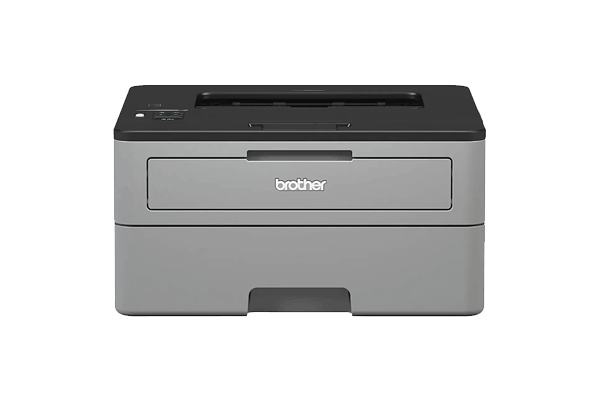
Running costs matter more when a printer is used occasionally. The Brother HL-L2350DW keeps things simple while keeping expenses under control. Its toner lasts long, and replacement cycles are far less frequent compared to cartridge-based inkjets.
This makes it a strong pick among the best home printers for occasional use, especially for users looking for a cheap printer to maintain. Instead of dealing with dried ink or wasted cartridges, you get predictable performance and a steady cost structure.
It also stands out as a low cost per print printer. Even with light usage, the cost per page remains low, which is not something most ink-based printers can maintain over time. The compact design helps it fit easily into small spaces without sacrificing reliability.
Feature Detail Type Monochrome Laser Print Speed ~32 ppm Duplex Yes Wireless Yes
Pros
- Low cost per print
- Compact design
- Reliable performance
- Easy to set up
Cons
- No scanner
- Limited interface
- Basic features
Who is this for
- Budget-conscious users
- Students or home users with light printing needs
- Anyone looking for low running costs
3. Brother MFC-L2750DW XL

Some setups need more than basic printing. Scanning documents, copying pages, and handling multi-page files become part of daily tasks, even with light usage. This is where an all-in-one laser model makes more sense.
The Brother MFC-L2750DW XL brings everything into one machine without adding complexity. It prints, scans, and copies while still keeping maintenance low. That balance makes it one of the best home printers for occasional use, especially for a home office.
The included high-yield toner reduces how often replacements are needed. Even if the printer sits idle, it stays ready without dealing with dried ink or clogged parts. This fits users looking for an all in one printer for occasional use that does not require constant upkeep.
Scanning is fast and reliable, which helps when dealing with multiple pages. It also works well as a printer scanner for occasional use, giving flexibility without extra devices.
Feature Detail Type Laser AIO Print Speed ~36 ppm Duplex Yes ADF Yes
Pros
- All-in-one functionality
- High-yield toner included
- Fast scanning
- Auto document feeder
Cons
- Higher upfront cost
- Bulky size
Who is this for
- Home office users
- Users who need scanning and copying
- Those who want a long-term solution
4. Canon imageCLASS MF465dw

Some printers are built for occasional tasks. Others are designed to handle pressure without slowing down. The Canon imageCLASS MF465dw leans toward performance, making it suitable for heavier workloads.
It prints faster than most home printers and maintains consistent output under load. That reliability makes it a solid pick among the best home printers for occasional use, especially for users who print in bursts.
The build quality also stands out. It feels more durable and handles repeated jobs without hesitation. This is a reliable printer for occasional printing that does not struggle when workload increases.
Speed plays a big role here. As a fast laser printer home option, it reduces waiting time and keeps productivity steady. Even after sitting unused, it performs without extra steps.
Feature Detail Type Laser AIO Print Speed ~40 ppm Duplex Yes Wireless Yes
Pros
- Very fast printing
- Durable build quality
- Strong performance
Cons
- Expensive
- Overkill for light users
Who is this for
- Users needing speed and reliability
- Small business or heavy document users
- Those who want premium performance
5. Brother HL-L3280CDW

Color printing often creates problems for users who print rarely. Traditional ink-based models struggle after sitting idle, especially when color nozzles start to clog. This is where a color laser option changes everything.
The Brother HL-L3280CDW delivers color output without relying on liquid ink. That alone makes it one of the best home printers for occasional use for anyone who needs graphics but wants to avoid maintenance headaches.
Print quality stays consistent even after long gaps between jobs. There is no need to worry about dried ink or missing colors. As a color laser printer for home use, it handles occasional graphics, charts, and presentations without extra effort.
It also stands out as a best home laser printer for occasional use when color is required. While toner costs more upfront, the reliability makes up for it over time.
Features
| Feature | Detail |
|---|---|
| Type | Color Laser |
| Print Speed | ~27 ppm |
| Duplex | Yes |
| Wireless | Yes |
Pros
- Color printing without clogging
- Reliable output
- Good for graphics
Cons
- Expensive toner
- Larger footprint
Who is this for
- Users who need color printing
- Home users printing occasional graphics
- Those avoiding inkjet issues
6. Epson EcoTank ET-2800

Running out of ink too often can be frustrating, especially when printing is infrequent. The Epson EcoTank ET-2800 focuses on reducing that cost with a refillable system.
It uses large ink tanks instead of cartridges, which keeps cost per page extremely low. That makes it part of the best home printers for occasional use for users who prioritize savings over speed.
As an ink efficient printer for home, it handles light printing tasks without frequent refills. It is also useful for those trying to save ink when printing rarely, especially when usage stays consistent at a low level.
There is a trade-off. If left unused for too long, ink can still settle and affect performance. This model works best when used occasionally, not abandoned completely.
Features
| Feature | Detail |
|---|---|
| Type | Ink Tank |
| Print Speed | ~10 ppm |
| Wireless | Yes |
| Scanner | Yes |
Pros
- Extremely low ink cost
- Easy refill system
- Compact design
Cons
- Slower than laser
- Risk of drying if unused too long
Who is this for
- Budget-focused users
- Users printing occasionally but wanting low ink cost
- Families printing light documents
7. Epson EcoTank ET-4850

Working from home often requires more than just printing. Scanning, copying, and handling documents efficiently becomes part of the routine, even with light usage.
The Epson EcoTank ET-4850 adds those features while keeping running costs low. It combines an ink tank system with office-ready functions, making it one of the best home printers for occasional use for small work setups.
As a printer for home office occasional use, it handles documents, forms, and basic workflows without frequent refills. It also stands out as a best ink tank printer for occasional use for users who want flexibility without high running costs.
Like other ink-based models, it benefits from occasional activity. Regular light use keeps the system stable and avoids performance drops over time.
Features
| Feature | Detail |
|---|---|
| Type | Ink Tank AIO |
| ADF | Yes |
| Wireless | Yes |
| Fax | Yes |
Pros
- Full office features
- Low running cost
- Good connectivity
Cons
- Still ink-based
- Needs occasional use to stay optimal
Who is this for
- Home office users
- Small business users
- Users needing multi-function features
8. Canon PIXMA G3270

Not everyone needs advanced features. For light printing, a simple and affordable setup often makes more sense. The Canon PIXMA G3270 focuses on keeping things easy while reducing long-term ink costs.
It uses a refillable system, allowing users to print without worrying about expensive cartridges. That makes it part of the best home printers for occasional use for entry-level needs. The cost stays low, even if printing happens in small batches.
As a refillable ink tank printer home, it works well for basic documents, school tasks, and occasional forms. It also fits users searching for an affordable ink printer that does not require a large upfront investment.
There are limits. Speed is modest, and features stay minimal. Still, for light usage, it does the job without adding unnecessary complexity.
Features
| Feature | Detail |
|---|---|
| Type | Ink Tank |
| Wireless | Yes |
| Scanner | Yes |
| Compact | Yes |
Pros
- Affordable price
- Cheap ink refill
- Simple to use
Cons
- Basic features
- Slower printing speed
Who is this for
- Entry-level users
- Students and families
- Users with very light printing needs
9. Canon MAXIFY GX4020

Printing habits are not always consistent. Some users go weeks without printing, then handle large batches in a single session. The Canon MAXIFY GX4020 is built for that pattern.
It combines a high-capacity ink system with strong output efficiency. This makes it one of the best home printers for occasional use for users who need a low cost per page printer without sacrificing performance.
As a high volume ink tank printer, it handles bulk printing tasks without constant refills. Once loaded, it can produce a large number of pages at a low cost, making it suitable for small business needs.
The upfront price is higher, but the long-term savings become clear over time. It is designed for users who value efficiency during heavy printing sessions.
Features
| Feature | Detail |
|---|---|
| Type | Ink Tank AIO |
| Duplex | Yes |
| ADF | Yes |
| Wireless | Yes |
Pros
- Very low cost per page
- High capacity ink system
- Good for bulk printing
Cons
- Expensive upfront
- Larger size
Who is this for
- Users printing in batches
- Small business owners
- Users needing low long-term cost
10. Epson EcoTank Pro ET-5850

Some users prefer not to compromise. They want strong performance, advanced features, and long-term efficiency in one system. The Epson EcoTank Pro ET-5850 is built with that goal in mind.
It delivers fast output, large ink capacity, and consistent performance across different workloads. This places it among the best home printers for occasional use for professionals who expect reliability even with irregular usage.
As a premium ink tank printer, it handles demanding tasks while keeping cost per page low. It also works well as a business printer for occasional use, especially for users managing documents, reports, or client materials.
The price is higher than most models in this list, but it reflects the level of performance offered. For users who want a long-term solution with minimal limitations, it stands out clearly.
Features
| Feature | Detail |
|---|---|
| Type | Ink Tank Pro |
| Print Speed | High |
| ADF | Yes |
| Duplex | Yes |
Pros
- High performance
- Very low cost per page
- Advanced features
Cons
- Expensive
- Overkill for basic users
Who is this for
- Professionals
- Business users
- Users wanting top-tier performance
How to Choose the Right Printer for Occasional Use
Picking a printer for light usage is not about features alone. It comes down to how the machine behaves when it is not used for days or weeks. The best home printers for occasional use are the ones that stay ready without extra steps.
Start with a simple decision path. If the goal is zero maintenance, laser printers are the safest option. They do not rely on liquid ink, so there is no risk of drying. This makes them a strong match for anyone looking for the best printer for infrequent use.
If budget matters more, ink tank printers offer lower cost per page. They work well for light but somewhat regular use. For basic needs like a printer for home documents, this type can still be a practical choice.
Color adds another layer. Standard inkjets often struggle when idle, especially with color nozzles. A color laser printer handles this better, keeping output stable even after long gaps.
The key is matching your usage pattern with the right type. The best home printers for occasional use are not always the cheapest upfront, but they save more in the long run.
If You Need Choose No maintenance Laser Lowest cost Ink tank Color + stability Color laser
A quick decision like this avoids common mistakes. It also helps narrow down the best home printers for occasional use without overthinking features that may never be used.
How to Maintain a Printer That Is Rarely Used
Even the most reliable printer benefits from basic care. A few simple habits can keep performance stable and prevent common issues over time. The goal is to keep the printer ready without turning maintenance into a chore.
- Print a page every 1–2 weeks: This keeps internal components active and prevents ink from settling. It is one of the easiest ways to keep a printer that works after weeks unused.
- Keep the printer in a stable environment: Avoid placing it in hot or dusty areas. Heat can affect ink behavior, while dust can interfere with internal parts. A clean space helps reduce issues over time.
- Turn it off properly when not in use: Many printers run small internal routines when shutting down. Cutting power directly can interrupt that process and affect performance later.
- Use genuine or high-quality supplies: Low-quality ink or toner can create buildup inside the system. Over time, this increases the risk of problems like streaks or blockages.
- Run maintenance only when needed: Avoid unnecessary cleaning cycles. Excessive cleaning wastes ink and does not always fix the problem. Use it only when print quality actually drops.
These steps help avoid clogged printhead issues and reduce wasted supplies. The best home printers for occasional use still benefit from light care, especially ink-based models.
Conclusion
Printing occasionally should not lead to constant problems. Many issues start with using the wrong type of printer for the job. Ink-based models can struggle with long idle periods, while laser printers stay consistent without extra effort.
The best home printers for occasional use focus on reliability first. Laser models remain the safest option for most users, especially those who print infrequently. They require minimal attention and deliver stable results every time.
Ink tank printers offer a different advantage. They reduce cost per page and work well for light but regular usage. With proper care, they can still perform reliably, though they need more attention compared to laser models.
The right choice depends on how often you print and what you expect from the device. The best home printers for occasional use are the ones that match real usage, not just specifications on paper.
FAQs Best Home Printer for Occasional Use
Is an inkjet or laser printer better for occasional use?
Laser printers handle idle time better and require less maintenance, making them a safer option.
Do inkjet printers dry out if not used frequently?
Yes. Ink inside the printhead can dry over time, which affects print quality and may require cleaning.
What is the best type of printer for infrequent home use?
Laser printers are usually the best home printers for occasional use, especially for simple document printing.
Which is cheaper to run for occasional use, inkjet or laser?
Laser printers often cost less over time due to lower maintenance and fewer replacements.
How do you maintain a printer that is rarely used?
Print occasionally, keep it in a clean environment, and avoid unnecessary maintenance cycles.


